
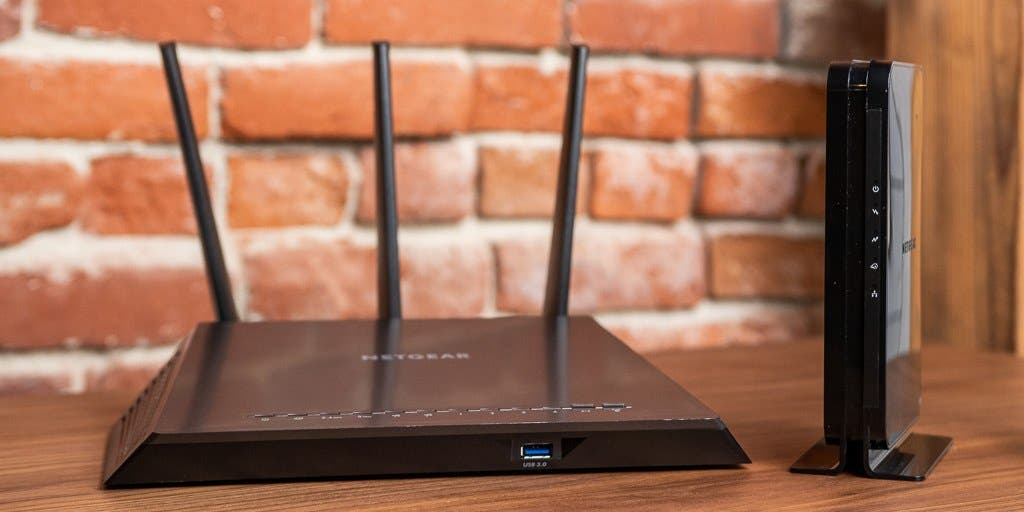
A wifi modem and router is a device that connects your electronic devices wirelessly to the internet. It serves as the gateway to access the internet and enables multiple devices to connect simultaneously.
In today’s world, internet connectivity is a basic necessity. Whether it’s for work, entertainment, or communication, accessing the internet wirelessly is crucial. A wifi modem and router is the key to wireless internet connectivity, allowing users to connect multiple devices to the internet at once.
These devices work together to provide a secure and stable connection for laptops, phones, and smart home devices. In addition, some modern routers come with advanced features like parental controls and guest networks, allowing users to control who has access to their network. So, a wifi modem and router is a vital device that enables wireless internet connectivity for multiple devices.
:max_bytes(150000):strip_icc()/Modem-vs-Router-352720f14b78412ea73f7204cd6e5f4c.jpg)
Credit: www.lifewire.com
Understanding Wifi Modem
Definition Of Wifi Modem
A wifi modem is a device that allows you to connect your devices to the internet using wifi. It is a combination of a modem and a wireless router. The modem allows your internet service provider (isp) to send and receive data while the router redistributes this data to multiple devices in your home or office wirelessly.
Differences Between Modem And Wifi Modem
Modems and wifi modems aren’t the same, and here are the differences:
- A modem is a device that connects your home or office to the internet through a wired connection like a coaxial or ethernet cable. On the other hand, a wifi modem combines the modem and wireless router functions, enabling wireless internet access.
- A modem only provides internet connectivity for a single device with a wired connection, while a wifi modem allows multiple devices to connect through a wireless connection.
- A wifi modem also has features like parental controls, guest networks, and port forwarding, functionalities that mainstream modems lack.
How Wifi Modem Connects To The Internet
A wifi modem connects to the internet via some basic steps:
- A technician installs the cable line from the isp in your home and then secures the modem with cables to the same line.
- Then, the modem sends a request to the network asking for a wan (wide area network) ip address.
- On receiving the request, the isp’s network sends a wan ip address to the modem, which authorizes it to use the internet.
- The modem now forwards the internet connection to the built-in wireless router.
- The wireless router generates a wifi signal that you can connect your devices to, providing them with internet access.
Wifi modems are an important device for individuals and businesses alike looking to connect to the internet wirelessly. This device grants access to multiple devices at any given time, and with the above understanding, you’re equipped to make an informed purchasing decision.
Different Types Of Wifi Modems
Wifi modems or routers are essential networking devices that allow us to connect to the internet wirelessly. A modem enables us to access the internet service provider (isp) network, while a router allows us to share the internet connection amongst devices.
There are several types of wifi modems, including dsl, cable, fiber optic, and satellite. In this section, we’ll delve into each of these types to help you understand their unique features.
Dsl
Dsl stands for digital subscriber line, and as the name suggests, it uses digital signals to transmit data over the phone line. Here are some key points to note about dsl modems:
- Dsl modems are relatively inexpensive and easy to install.
- They’re suitable for small households with a moderate internet usage.
- You need a phone line to connect to a dsl service.
- The speed of dsl internet connectivity depends on the distance you are from the isp. The further you are, the slower the connection gets.
Cable
Cable modems use cable tv infrastructure to deliver high-speed internet connectivity. Here’s what you need to know:
- Cable modems are faster than dsl.
- They’re ideal for large households with heavy internet usage.
- You don’t need a phone line to connect to cable service.
- Cable internet speeds aren’t consistent. During peak usage hours, the internet connection gets congested.
Fiber Optic
Fiber optic modems use fiber-optic cables to transmit data signals, making it the fastest type of internet connectivity available. Here are the key features of fiber optic:
- Fiber optic offers high internet speeds, making it ideal for large households with heavy internet usage.
- It’s more expensive than cable and dsl, but you get what you pay for.
- Fiber optic technology is the most reliable since it’s resistant to electrical interference and doesn’t degrade over long distances.
- It’s not available in all areas since it requires laying costly fiber-optic cables.
Satellite
Satellite modems use satellites orbiting the earth to provide internet connectivity. Here’s what you need to know about satellite modems:
- It’s the most expensive type of wifi modem because of the satellite equipment, installation, and monthly fees.
- It’s ideal for remote areas where other types of connectivity are not available.
- Weather conditions like heavy rain or snow may interfere with satellite connectivity, leading to slower internet speeds or loss of connection.
- Satellite internet connectivity also comes with high latency, making it unsuitable for real-time applications like online gaming or video conferencing.
Understanding the different types of wifi modems is critical in selecting the best type of connectivity that suits your needs. Choose a modem that’s appropriate for the number of devices, internet usage, and budget. Remember, the internet speed and reliability depend on the type of wifi modem you choose.
How Wifi Modem Works
What Is Wifi Modem And Router: How Wifi Modem Works
Nowadays, wifi modem and router play a crucial role in our day to day life. They are the first thing we set up when we move into a new place, yet many of us don’t know how wifi modem works.
We will discuss modulation, demodulation, and signal interference in connection with wifi modem and how they work together to provide seamless internet connectivity.
Modulation
Modulation is the process when the information is added to an electromagnetic wave carrier signal, making it easier to transmit over long distances. Wifi modems use a technique known as orthogonal frequency division multiplexing (ofdm) to transmit data wirelessly to devices.
Ofdm splits the signal into multiple smaller sub-signals, which can travel through the air easily. By using this signal-modulating technique, wifi modems can transmit more data faster and more efficiently.
Modems can also use different modulation techniques such as qam (quadrature amplitude modulation) and psk (phase-shift keying) to encode digital signals into analog waves for smooth transmission and reception of wireless signals.
Demodulation
Demodulation is the process when the encoded information gets extracted from the carrier signal, which is then decoded by the modem. The modem then reconstructs the original data by piecing together those different small sub-signals. It then sends a signal to the router, which in turn sends the signal to the connected devices.
This process occurs so that we can browse the internet and perform different online activities at high speeds.
Signal Interference
Signal interference is the biggest challenge to a wifi modem’s performance. Different obstructions between the modem and device may cause signal interference, which can lead to poor signal strength and slow internet speeds. Let’s discuss some sources of interference:
- Physical barriers like walls or furniture between the devices and the wifi modem
- Other electronic devices using similar frequencies that interfere with the wireless signal such as cordless phones, microwaves, and bluetooth devices
- Radio frequency interference from other routers in the neighboring buildings operating on the same channel
To minimize the impact of interference, wifi routers use frequency agility- by hopping between various frequency ranges and channels and choosing the least crowded, to ensure the fastest and most stable connection.
Wifi modems use modulation and demodulation techniques to transmit signals to connected devices and provide seamless internet connectivity. Signal interference, however, remains a constant challenge, yet the technology behind the wifi modem and routers’ frequency agility helps overcome such challenges.
Understanding Router
Wireless fidelity, more commonly known as wi-fi, has become an important part of everyone’s lives. From zoom meetings to streaming movies, everything is quicker and more accessible with a wi-fi modem and router. In this blog post, we’ll focus on understanding what exactly a router is and how it works.
So let’s dive in!
Definition Of Router
A router is a device that connects multiple devices to the internet or a network. It acts as a bridge between a modem and your devices, allowing information to be sent between them. Simply put, a router directs traffic between the internet and your devices.
Some of the common routers available in the market are netgear, tp-link, linksys, and asus.
How Router Works
Routers work by routing data packets from the incoming internet connection to the local network and vice versa. It does this by assigning unique ip addresses to each device on the network, allowing them to communicate with each other. Here’s a breakdown of how a router works:
- When you connect to wi-fi, your device sends a signal to the router requesting access to the network.
- The router checks the device’s information and assigns it a unique ip address within the network.
- When you send a request to the internet, the router directs it to the modem.
- The modem then sends the request to your internet service provider (isp), which connects you to the internet.
- The isp sends back the requested data, which travels through the modem to the router, and then to your device.
Routers manage traffic between the internet connection and your devices, making it possible for multiple devices to share a single internet connection. By doing so, routers provide a way for your devices to communicate with each other and the internet.
So there you have it, a brief understanding of what routers are and how they work. Hopefully, this information will help you make an informed decision when purchasing a router for your home or office.
Types Of Router
A router is a networking device that helps in connecting various devices to a network. These devices offer different features according to their type as per your home or office requirements. There are mainly three types of routers: wired, wireless, hybrid.
Wired Router
A wired router is a device used to create a local area network (lan) so that the connected devices can communicate with each other and access the internet. Let’s take a look at the key points of a wired router:
- Uses ethernet cables to provide internet access.
- Requires physical connections to connect the devices.
- Ideal for large homes and businesses that require a stable and secure internet connection.
- Offers more reliable connections than wireless routers.
Wireless Router
A wireless router uses a wireless network interface controller and radio signals to provide internet access to wireless-enabled devices such as laptops, smartphones, and tablets. These are some of the key points of a wireless router:
- Uses radio signals to provide connectivity to devices using wi-fi.
- Does not require physical connections.
- Suitable for small homes and offices.
- Offers the convenience of mobility.
Hybrid Router
A hybrid router combines the features of wired and wireless routers into a single device. It offers the stability of the wired network with the convenience of a wireless network. Here are some of the key points of a hybrid router:
- Provides both wired and wireless connectivity options.
- Suitable for medium to large-sized homes and businesses.
- Offers the stability of a wired network with the convenience of a wireless network.
- Provides a seamless and easy connection.
Routers are necessary for modern homes and offices where multiple devices require internet access simultaneously. Wired routers provide more reliable and secure connectivity, while wireless routers offer portability. A hybrid router, on the other hand, provides the best of both worlds.
Depending on your specific needs, choosing the right router can make a huge difference in your networking experience.
How Router Connects To Wifi Modem
What Is Wifi Modem And Router?
In this digital age, wifi technology has primarily replaced the traditional cabled internet system, and thus, it is essential to understand the difference between a wifi modem and a router. A wifi modem is a device that connects your internet service provider (isp) to your household, while a router plays the role of establishing a home internet connection.
In simpler terms, it acts as a link between the isp and all the devices in your home that require an internet connection.
Setting Up The Connection
Setting up a connection between a router and a wifi modem is relatively easy and straightforward. Follow these simple steps:
- The first step is to attach an ethernet cable from the wan port of the router and connect it to the modem’s lan port.
- Power on the modem and wait for it to sync with the isp before turning on the router.
- After waiting for the connection to sync, plug-in the power source for the router and wait for it to boot up.
Functions Of Router In The Home Network
Here are some important functions of routers in the home network:
- A router creates a local area network (lan) that allows devices to communicate with each other and share files and devices like printers.
- Router acts as a firewall, protecting your devices from unauthorized access and external attacks.
- It also assigns a unique ip address to each device in your network to avoid clashes among multiple devices.
- Routers support a variety of wireless security protocols, such as wpa2, wep, and wpa, to ensure secure wireless communication.
Connection Speed And Bandwidth
The router’s speed and bandwidth determine the performance of your home network. Here is what you need to know:
- The bandwidth determines the maximum amount of data that can be transmitted over the internet connection.
- The router speed defines the maximum speed that data can transfer between devices on the local network.
- The router’s position and signal strength determine the quality of the wireless signal on the network, affecting the speed and bandwidth.
Understanding the difference between a wifi modem and router and how they work in tandem will help you make better decisions when selecting an internet plan and devices. With your newfound knowledge, you can now set up your own home network seamlessly and enjoy fast and secure internet connectivity.
Advantages Of Using WiFi Modem And Router
Wifi modems and routers are essential devices in today’s tech-driven world. Wifi modems facilitate internet connectivity, while routers wirelessly connect multiple devices, ranging from smartphones, laptops, gaming consoles, and smart home devices, to name a few. In this blog post, we will focus on the advantages of using wifi modems and routers, which include:
More Extensive Range
Wired modems come with the limitation that connectivity is limited to the range of the connecting cable. Contrarily, wifi modems and routers provide more extensive coverage, making it possible to connect to the internet without the necessity of wired connectivity.
Wifi modems and routers are capable of covering a range of up to 150 feet, depending on the model and the frequency used. It helps consumers connect to the internet from multiple locations in their house without having to drag cables around.
Multiple Devices Connection
One of the key advantages of wifi technology is its ability to connect multiple devices simultaneously. By using a wireless router, several devices can connect to the internet without needing a physical cable. The number of devices connected simultaneously to a router varies from model to model, with some advanced models supporting up to 250 devices.
Apart from cellular connectivity, smart homes and offices rely on wifi connectivity to connect devices like security cameras, smart music systems, temperature sensors, and lighting systems.
Easy Setup
Unlike traditional wired networks, which may require professional expertise, wifi modems and routers are easy to set up for even a non-technical person. Most wifi modems and routers come with long setup manuals, which guide users through the setup process in multiple languages.
In addition, users have access to online resources, such as video tutorials, customer service, and e-books to help with the setup. After plugging the router and assigning a wifi ssid and password, users can access the internet wirelessly.
Wifi modem and router technology ensures that consumers can comfortably use the internet without worrying about wired connectivity. It is simply a game-changer in today’s age where the internet has become a necessity for most people.
Disadvantages Of Using Wifi Modem And Router
Wifi modem and router have become indispensable devices for internet users. They allow multiple users to connect to a network and access the internet wirelessly through multiple devices. However, these devices also come with certain disadvantages that you must know before setting up your home network.
In this section, we will discuss some of the key disadvantages of using wifi modem and router.
Signal Interference
Signal interference is one of the most significant disadvantages of using a wifi modem and router. Signal interference can occur due to various reasons such as physical obstacles between the router and the device, other electronic devices operating on the same frequency, and other networks in the same area.
Some of the common effects of signal interference are slower internet speeds, connectivity issues, and weaker signal strength.
Here are some key points to know about signal interference:
- Physical obstacles like walls, flooring, and mirrors can obstruct signal transmission.
- Other electronics devices such as microwaves, cordless phones, and bluetooth devices can cause signal interference.
- Using channels that overlap with other networks in the area may reduce the signal strength and speed.
- Signal interference can cause connectivity issues and slower speed for the connected devices.
Security Concerns
Security is a significant concern when it comes to wifi modem and router. Since wireless networks operate over radio frequencies, they are vulnerable to attacks and breaches. A poorly configured or unsecured device can allow unauthorized access to the network, leading to security breaches, data theft, and other cybercrimes.
Here are some key points to know about security concerns:
- A poorly configured device can allow easy unauthorized access to the network.
- Without proper security measures, hackers can exploit weaknesses in the network to gain access to sensitive data.
- A secure wireless network should have strong encryption methods, password protection, and regular firmware updates.
- Security breaches can lead to data theft, identity theft, and other cybercrimes.
Technical Issues
Technical issues are another significant disadvantage of using a wifi modem and router. Technical issues can arise due to various reasons such as hardware malfunction, outdated firmware, and software issues. Technical issues can cause connectivity problems, data loss, and other network-related problems.
Here are some key points to know about technical issues:
- Technical issues can occur due to hardware malfunctions like faulty cables, power issues, and damaged routers.
- Outdated firmware can cause connectivity and performance issues.
- Software issues can result in connectivity problems, security breaches, and other network-related problems.
- Technical issues can cause data loss, service disruption, and other network-related problems.
Knowing the disadvantages of wifi modem and router is crucial for maintaining a secure, reliable, and high-performance wireless network. By being aware of these disadvantages, you can take necessary measures to mitigate them. Proper configuration, regular firmware updates, and strong security measures can go a long way in ensuring a smooth and secure wireless network experience.
How To Troubleshoot Wifi Modem And Router Problems
What Is Wifi Modem And Router?
Wifi modem and router are two essential components used to provide wireless networks that offer internet connectivity to various devices. A modem is responsible for translating the signal from the internet service provider into usable internet data. A router, on the other hand, is responsible for sending and receiving that data through the wireless network.
Wifi modem and router are often combined into one device called a wireless gateway. This device is used to establish a wireless network in homes or small businesses.
Here are common wifi modem and router problems you may encounter and possible solutions.
Slow Internet Speed
There are different reasons why you may experience slow internet speed. Some of the common reasons include:
- Too many devices connected: Disconnect some devices that are not being used to improve speed.
- Wireless interference: If your router is receiving radio-frequency interference, you may experience slow speed. Try to move your router to a different location.
- Outdated router/modem: Old or outdated wifi modem and router may cause slow speed. Consider upgrading your router or modem.
Connectivity Issues
Wifi connectivity problems can range from minor dropouts to complete internet connection failures. Here are some common causes of connectivity issues and possible solutions:
- Weak signal strength: Move closer to the router or install a wifi extender.
- Network congestion: Disconnect devices that are not being used, or try to schedule downloads during off-hours.
- Security settings: Double-check the wifi password and make sure it is correct. Alternatively, reset the router to its default settings.
Security Concerns
Wifi security is essential to protect your internet activity and data. Here are some common security concerns with possible solutions:
- Weak password: Make sure your password is strong and unique.
- Outdated firmware: Keep your router’s firmware updated.
- Unsecured access points: Close unused access points or limit their reach.
Understanding how to troubleshoot wifi modem and router problems can save you a lot of time and stress. If the above solutions do not help to resolve the issue, it is advisable to contact the manufacturer’s customer service or your internet service provider for further assistance.
Tips To Improve Wifi Modem And Router Performance
What Is Wifi Modem And Router
Wifi modems and routers are essential networking devices that transmit internet signals to various electronic devices. A wifi router serves as the central hub that connects devices such as laptops, smartphones, tablets and more to the internet via a wireless connection.
The router either connects directly to the internet via a modem or acts as the modem to transmit signals from the internet service provider (isp).
Changing Wifi Channels
Wireless routers usually come with several pre-configured channels that connect to electronic devices using radio frequency. Over time, other wireless devices nearby can interfere with the router, reducing the router’s performance and strength of the wireless signal. Here are some tips to enhance the router’s performance:
- First, download a wireless channel scanner app from your app store. Use it to scan the radio frequency to know the best channel with less interference.
- Log in to the router’s settings page using your browser, navigate to wireless settings, and change the channel to the one with minimum interference.
Updating Firmware
Apart from hardware interference, outdated firmware also affects your router’s performance. Firmware is essentially the router’s software, and updating it regularly enhances the router’s performance, speed, and functionality. Here’s what you should do to update the firmware:
- Log in to the router’s settings page using your browser, navigate to the firmware upgrade section and download the latest firmware version from the manufacturer’s website.
- Update the firmware following the router’s manual instructions.
Relocating Wifi Modem
The wifi modem’s location is another essential aspect that affects its connectivity strength to your devices. It’s best to place the modem at a central location to reduce interference by walls, doors and other objects that may weaken the signal.
Here are some tips to relocate your wifi modem:
- First, determine the most frequent location of your devices, and move the router closer to that spot.
- Place the router away from other electronics like microwaves, cordless phones, and other wireless devices that can interfere with the signal.
Keeping your wifi modem and router up to date and in the best location can significantly enhance your connectivity by ensuring you always have optimal signal strength.
Frequently Asked Questions On What Is Wifi Modem And Router
What Is A Wifi Modem Or Router?
A wifi modem connects to the internet, while a wifi router provides a wireless network.
How Does A Wifi Modem Work?
A wifi modem connects to the internet via a cable, and then creates a wireless network.
What Is The Difference Between A Modem And A Router?
A modem connects you to the internet, while a router connects devices in your home to the internet.
Can I Use A Modem Without A Router?
Yes, if you only have one device you want to connect to the internet.
Why Do I Need A Router With My Modem?
A router enables multiple devices to share the same internet connection.
Can I Connect To The Internet Without A Modem Or Router?
No, you need either a modem or a modem/router combination to connect to the internet.
How Many Devices Can Connect To A Router?
Most routers can support up to 250 devices, but the actual number may vary depending on the router.
What Internet Speed Do I Need For My Router?
The recommended internet speed depends on the number of devices connected and the activities performed.
How Do I Set Up A Wifi Router?
Connect the router to the modem, log in to the router’s web interface, and configure the wireless network and security settings.
Can I Use My Own Modem Or Router?
Yes, you can purchase your own modem or router and connect it to your internet service provider.
Conclusion
After reading this comprehensive guide, it should be clear to you that a wi-fi modem-router is an essential device for any household or office that requires internet connectivity. It allows multiple devices to connect to the internet through a wireless network, saving you the hassle of multiple cables and connections.
In addition, it provides an added layer of security and flexibility with its different features and settings. Whether you’re streaming content, working from home, or just browsing the internet, a reliable wi-fi modem-router is a must-have. To ensure the best performance, it is important to choose a device that meets your needs and supports your internet plan.
With the right wi-fi modem-router, you can enjoy fast and uninterrupted internet connectivity anytime, anywhere.




Leave a Reply
You must be logged in to post a comment.