
Port forwarding concept:
We take one Real IP address from our Internet service provider for internet connection. All computers on the internet necessarily a unique IP address.
Port forwarding is the process that any public IP and a port number forwarding a request to a local IP. see the more details
Why need Real IP?
There are LAN users Work from LAN site to local IP and from outside to public IP. Port forwarding is mainly used on servers to increase security so that nobody can enter the DMZ Zone. From the outside, many people all times scan different ports on the server and try to enter. If the local IP Address of a specific port is forwarded to a public IP address, other ports can be spontaneously scanned off.
Mainly, Port forwarding allows Internet pass bundles transmission control protocol(TCP) and User Datagram Protocol(UDP). According to working execution and user (e.g. A router), the packets are sent to.
The computer ports by default option transmission control protocol and user Datagram protocol or two additional ports will explicate the concept of For port forwarding for CCTV systems.
Where is using Port forwarding?
A lot of owners of forward-looking CCTV systems and servers prefer to have access to Video recording surveillance recorder (s) during the Internet, from anyplace in the Earth.
Whenever the DVR Plugged into the Internet via the router. CCTV assures most advanced digital video recorders have Ethernet The port, allowing users to approach the DVR and cameras are plugged in via a network.
In the case of Digital video recorders, CCTV, the two devices plugged into DVR using a coaxial cable and DVR Web Server gives up the video stream of the cameras to be looked at over a network using sealed varieties of On the customer, such a Web browser on a desktop computer or a laptop computer or an Apps, IPhone or Android cell phone.
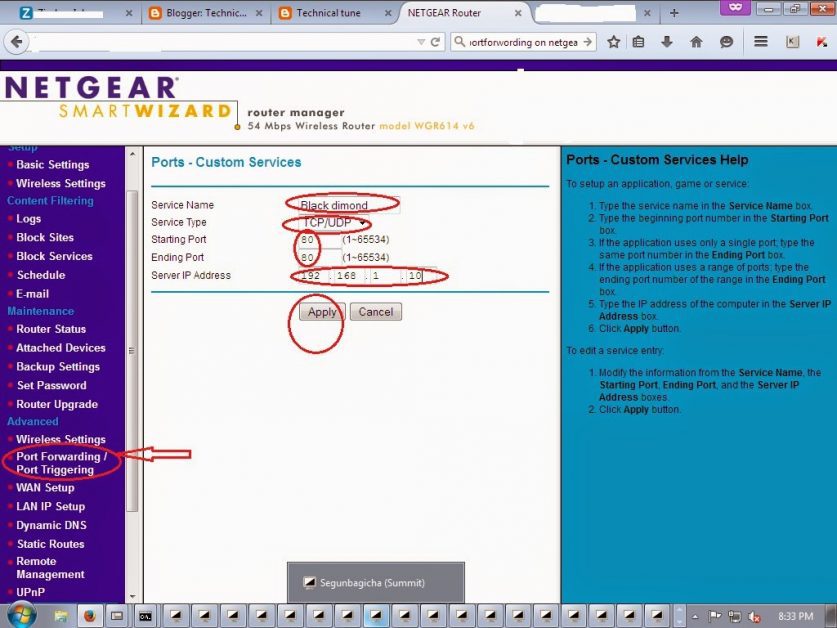
Now I will show graphically and practically
default Gateway browse and enter the Netgear page> click port forwarding > custom services > service Name= Black dimond(if any name you can set) > Service Type = TCP/UDP > Starting Port=80 > Ending port =80 > server IP Address=192.168.1.10 ( must be put this IP Address DVR) > Apply > OK





Leave a Reply
You must be logged in to post a comment.