
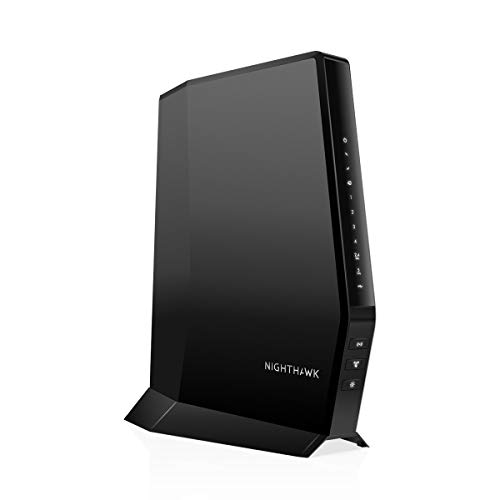
Tired of slow internet? Or maybe you’re just looking to ditch those pesky monthly rental fees from your internet service provider (ISP)? Deciding between a standalone cable modem and a modem-router combo (often dubbed a “WiFi modem”) can feel like a tech headache. But don’t sweat it! Understanding the key differences and choosing the right device is simpler than you think and can significantly upgrade your home network.
In this guide, we’re diving deep into the Cable Modem Vs Wifi Modem debate, breaking down what each does, why you might choose one over the other, and reviewing 10 top-rated devices to help you make the best decision for your setup. Let’s get your internet running smoothly!
Understanding the Core: Cable Modem vs. WiFi Router (and the “WiFi Modem” Myth)
Before we jump into our top picks, let’s clear up some common confusion around internet hardware. When people talk about Cable Modem Vs Wifi Modem, they’re often comparing a standalone modem to a modem-router combo unit.
What is a Cable Modem?
Think of a cable modem as the translator for your internet service. It’s the device that converts the internet signal coming through your coaxial cable line from your ISP (like Xfinity, Spectrum, or Cox) into a digital signal that your computer or a router can understand. A standalone cable modem only handles this translation; it doesn’t create a wireless network on its own. It usually has one or more Ethernet ports for wired connections.
What is a WiFi Router?
A WiFi router is what creates your wireless internet network. It takes the internet signal from your modem and broadcasts it wirelessly to all your devices – your phone, laptop, smart TV, gaming console, and more. A router also manages your home network, assigning IP addresses, handling security, and often includes multiple Ethernet ports for wired connections. Without a router, your modem can typically only provide internet to one wired device at a time.
What is a Modem-Router Combo (The “WiFi Modem”)?
This is where the term “WiFi modem” often comes into play. A modem-router combo unit is exactly what it sounds like: a single device that combines the functions of both a cable modem and a WiFi router. It translates the internet signal and broadcasts a wireless network. These all-in-one units are popular for their convenience, taking up less space and simplifying setup. However, they can sometimes be less flexible for advanced users who prefer to upgrade their modem and router separately.
Cable Modem Vs Wifi Modem: Why Choose One Over the Other?
The choice between a standalone cable modem with a separate router and a modem-router combo often boils down to your specific needs, tech savviness, and future upgrade plans.
Standalone Modem + Separate Router Setup
Pros:
* Flexibility: You can choose the best modem for your ISP and internet speed plan, and then pair it with the best router for your Wi-Fi coverage needs.
* Easier Upgrades: If a new Wi-Fi standard comes out (like Wi-Fi 7) or your internet speed increases, you can upgrade just one component without replacing the whole system.
* Better Performance: Often, dedicated modems and routers offer superior performance compared to combo units designed for general use.
* Advanced Features: Separate routers tend to offer more advanced features like robust parental controls, stronger network security, and advanced Quality of Service (QoS) settings.
Cons:
* Higher Initial Cost: Buying two devices usually costs more upfront.
* More Clutter: Two boxes mean more cables and take up more space.
* More Complex Setup: Setting up two devices can be slightly more involved, though modern devices are generally very user-friendly.
Modem-Router Combo Setup (The “WiFi Modem”)
Pros:
* Simplicity: One device, one power cord, one setup process. It’s truly plug-and-play for many.
* Cost-Effective: Often cheaper than buying a comparable standalone modem and router separately.
* Space-Saving: Reduces clutter with fewer devices and cables.
* Convenience: Ideal for users who want a straightforward internet solution without managing multiple devices.
Cons:
* Less Flexible: If one component becomes outdated, you have to replace the entire unit.
* Performance Bottlenecks: The modem and router components might not be top-tier, potentially limiting overall performance or advanced features.
* Limited Customization: Fewer options for advanced network configurations or specialized features.
Key Factors to Consider Before Buying
Before you make a purchase, keep these essential points in mind to ensure you get the best fit for your home internet.
- ISP Compatibility: This is crucial! Always check your internet service provider’s approved device list before buying. Not all modems or combos work with every ISP.
- Internet Plan Speed (DOCSIS Version): Your modem needs to support your internet plan’s speed.
- DOCSIS 3.0: Good for plans up to around 800 Mbps.
- DOCSIS 3.1: Essential for gigabit (1000 Mbps) and multi-gigabit speeds (2 Gbps+). It’s also backward compatible with DOCSIS 3.0.
- Wi-Fi Standard (for Combos/Routers):
- Wi-Fi 5 (802.11ac): Still widely used, great for up to 1 Gbps speeds.
- Wi-Fi 6 (802.11ax): Faster, more efficient, and better for homes with many connected devices. Essential for multi-gigabit speeds over Wi-Fi.
- Wi-Fi 6E (802.11ax): Extends Wi-Fi 6 to the 6 GHz band for even faster speeds and less interference.
- Coverage & Range: Consider your home size and layout. Larger homes might need a powerful combo unit or a separate modem paired with a mesh Wi-Fi system.
- Number of Devices: If you have many smart home devices, streamers, and gamers, you’ll need a robust combo unit or router that can handle high traffic.
- Ethernet Ports: How many wired devices do you need to connect (PCs, game consoles, smart TVs)? Look for enough Gigabit Ethernet ports. Some even offer 2.5 Gbps or port aggregation.
- Budget & Rental Fees: Owning your modem often pays for itself within a year or two by eliminating monthly rental fees (which can be $10-15+ per month).
Now, let’s dive into our reviews of 10 excellent devices that can help you win the Cable Modem Vs Wifi Modem battle!
Our Top 10 Picks: Cable Modems and Modem-Router Combos Reviewed
1. NETGEAR Nighthawk Modem Router Combo (CAX30) DOCSIS 3.1

The NETGEAR Nighthawk CAX30 is a powerhouse all-in-one solution designed for speed demons and smart homes. If you’re looking to simplify your setup without sacrificing performance, this DOCSIS 3.1 modem and Wi-Fi 6 router combo is built to handle the fastest cable internet plans available, providing robust wireless coverage and plenty of wired connections for all your devices. It’s a fantastic example of a high-end “WiFi modem” that truly delivers.
- Compatible with major cable internet providers (Xfinity, Spectrum, Cox). NOT compatible with Verizon, AT&T, CenturyLink, DSL, DirecTV, DISH, or bundled voice services.
- Best for cable provider plans up to 2Gbps.
- Coverage up to 2,000 sq. ft. and 25 concurrent devices with dual-band WiFi 6 (AX2700) speed (up to 2.7Gbps).
- 4 x 1 Gig Ethernet ports (supports port aggregation) and 1 USB 3.0 port.
- Replaces your cable modem and WiFi router, saving up to $168/yr in equipment rental fees.
- DOCSIS 3.1 and 32×8 channel bonding for future-proof performance.
- NETGEAR Armor provides powerful security features (30-day trial included).
- Easy setup and management with the Nighthawk app.
Pros:
– Excellent performance for multi-gigabit internet plans.
– Wi-Fi 6 provides fast, efficient wireless for many devices.
– Robust security features with NETGEAR Armor.
– Saves significant money on rental fees.
– Nighthawk app offers convenient control.
Cons:
– Premium price point.
– Not compatible with all ISPs or service types.
– A single point of failure for both modem and router functions.
User Impressions: Customers love the CAX30 for its impressive speed and reliable Wi-Fi coverage, especially in homes with many connected devices. The easy setup via the Nighthawk app is frequently praised, though some users find the NETGEAR Armor subscription adds to the long-term cost after the trial.
2. Motorola MG8702 | DOCSIS 3.1 Cable Modem + Wi-Fi Router

The Motorola MG8702 is another strong contender in the “WiFi modem” space, offering a fantastic blend of high-speed internet capability and powerful Wi-Fi performance. This unit is designed to instantly upgrade your home network, making it perfect for demanding users who stream, game, and work from home. Its advanced Wi-Fi features ensure broad coverage and strong connections throughout your living space.
- Instantly upgraded WiFi performance with advanced tech.
- Saves up to $168 per year in rental fees.
- Accesses the fastest cable internet plans with future-proof DOCSIS 3.1.
- Built-in high-speed AC3200 WiFi router with Power Boost, Range Boost, and AnyBeam WiFi Beamforming.
- Intelligent mobile app for easy setup, guest network management, usage monitoring, speed testing, parental controls, and network security alerts.
- Reliability from a worldwide leader in technology with 2-years of free expert support.
Pros:
– Future-proof DOCSIS 3.1 for multi-gig speeds.
– Advanced Wi-Fi features for improved range and reliability.
– Comprehensive mobile app for easy management.
– Strong brand reputation and excellent customer support.
– Significant rental fee savings.
Cons:
– Wi-Fi is AC3200 (Wi-Fi 5), not the latest Wi-Fi 6.
– May be overkill for lower-speed internet plans.
User Impressions: Users appreciate the MG8702’s consistent high speeds and improved Wi-Fi range. The intelligent mobile app is a standout feature, making network management a breeze for many. While some note it’s not Wi-Fi 6, they generally find the AC3200 performance more than adequate for their needs.
3. ARRIS SURFboard SB8200 DOCSIS 3.1 Multi‑Gig Cable Modem

For those who prefer a dedicated modem and want to pair it with their own high-performance Wi-Fi router or mesh system, the ARRIS SURFboard SB8200 is an outstanding choice. This standalone cable modem brings multi-gigabit speeds to your home network, ensuring you’re ready for the fastest internet plans available today and in the future. It’s a workhorse that forms the robust backbone of any advanced home setup.
- Multi‑Gig speed for today & tomorrow: DOCSIS 3.1 performance supports cable internet plans up to 2 Gbps.
- Save on rental fees: Own your modem and avoid monthly equipment charges.
- Compact, modern design with discrete LED indicators.
- Easy setup: Connect cable, power on, and activate with your cable provider.
- Modem only: Requires a separate Wi-Fi router or mesh system for home Wi-Fi coverage.
- Fast Ethernet: Provides two 1 Gigabit Ethernet ports to support connecting to Wi-Fi routers or other wired devices.
- Provider compatibility: CableLabs certified, tested and qualified for use with Cox, Xfinity, and Spectrum.
- Not compatible with fiber, DSL, or satellite services.
Pros:
– Future-proof DOCSIS 3.1 for multi-gig speeds.
– Two Gigabit Ethernet ports for flexibility (e.g., port aggregation).
– Reliable performance from a leading modem brand.
– Compact design.
– Significant rental fee savings.
Cons:
– Requires a separate Wi-Fi router, adding to overall cost and complexity.
– No Wi-Fi capabilities built-in (as expected for a modem only).
User Impressions: Users consistently praise the SB8200 for its rock-solid reliability and its ability to handle high-speed internet plans without a hitch. Many appreciate the flexibility it offers to pair with their preferred Wi-Fi router, noting that it’s a dependable foundation for their home network.
4. NETGEAR Nighthawk Modem Router Combo (CAX30) DOCSIS 3.1 (Further Look)

We’re taking another look at the NETGEAR Nighthawk CAX30, this time emphasizing its cutting-edge Wi-Fi 6 technology and comprehensive security features. While the core product remains the same as our first review, this highlights how an advanced “WiFi modem” like the CAX30 integrates modern wireless standards and robust digital protection, making it an ideal choice for smart homes filled with devices and users prioritizing online safety.
- Compatible with major cable internet providers (Xfinity, Spectrum, Cox). NOT compatible with Verizon, AT&T, CenturyLink, DSL, DirecTV, DISH, or bundled voice services.
- Best for cable provider plans up to 2Gbps.
- Coverage up to 2,000 sq. ft. and 25 concurrent devices with dual-band WiFi 6 (AX2700) speed (up to 2.7Gbps).
- 4 x 1 Gig Ethernet ports (supports port aggregation) and 1 USB 3.0 port.
- Replaces your cable modem and WiFi router, saving up to $168/yr in equipment rental fees.
- DOCSIS 3.1 and 32×8 channel bonding for future-proof performance.
- NETGEAR Armor provides powerful security features (30-day trial included), including enhanced protection against hackers, malware, and identity theft.
- Easy setup and management with the Nighthawk app, offering control over your WiFi from anywhere.
Pros:
– Advanced Wi-Fi 6 provides superior performance for high-density networks.
– Comprehensive cybersecurity with NETGEAR Armor adds peace of mind.
– Excellent coverage and capacity for numerous devices.
– DOCSIS 3.1 ensures compatibility with the fastest internet plans.
Cons:
– The NETGEAR Armor subscription cost can add up after the trial.
– As a combo unit, potential for a single point of failure.
User Impressions: This unit continues to impress users with its seamless integration of high-speed modem and advanced Wi-Fi 6 router. Many highlight its ability to handle multiple simultaneous activities like 4K streaming and online gaming without lag. The Nighthawk app and security features are also noted as valuable additions for managing and protecting their home network.
5. NETGEAR Nighthawk AC1900 (24×8) DOCSIS 3.0 WiFi Cable Modem

For users with internet plans up to 800 Mbps who still want a reliable, high-performing “WiFi modem” without overspending on DOCSIS 3.1, the NETGEAR Nighthawk AC1900 (C7000) is an excellent choice. This DOCSIS 3.0 combo unit delivers strong Wi-Fi 5 performance and ample wired connections, making it a great value proposition for many households. It’s a proven workhorse that still holds its own in many home network setups.
- Compatible with all major cable internet providers: Xfinity by Comcast, COX, and Spectrum. NOT compatible with Verizon, AT&T, CenturyLink, DSL, DirecTV, DISH, or Cable bundled voice services.
- Saves monthly rental fees: Replaces your cable modem and WiFi router, saving up to $150/yr.
- Built for fast speed: Best for cable provider plans up to 800Mbps.
- Fast Wi-Fi Performance: Get up to 1800 sq ft wireless coverage and 30 devices connected with AC1900 speed (up to 1900 Mbps).
- Versatile Connections: 4 Gigabit Ethernet ports and one USB port for storage devices.
- Modem Technology: Engineered with 24×8 channel bonding and DOCSIS 3.0.
- Safe & Secure: WEP and WPA/WPA2 wireless security protocols.
Pros:
– Cost-effective for mid-range internet speeds.
– Reliable Wi-Fi 5 performance and good coverage.
– Ample wired Ethernet ports for various devices.
– Significant savings on rental fees.
– Proven NETGEAR reliability.
Cons:
– DOCSIS 3.0 limits future-proofing for multi-gig plans.
– Wi-Fi 5 (AC1900) is not the latest Wi-Fi standard.
User Impressions: Customers frequently praise the C7000 for its dependable performance and its ability to handle multiple devices without a hitch, making it a solid upgrade from ISP-rented equipment. The savings on rental fees are a major draw, and users find the setup process straightforward.
6. Arris (G18) – Cable Modem Router Combo – Fast DOCSIS

The Arris G18 positions itself as a fast and reliable “WiFi modem” designed for modern internet usage. From a brand trusted by millions of homes, this combo unit leverages DOCSIS 3.1 technology and Wi-Fi 6 to deliver an exceptional internet experience. It’s an excellent choice for families demanding high-speed streaming, responsive gaming, and robust wireless coverage across their entire home.
- Fast, Reliable Connection: Enjoy high-speed streaming, gaming, and browsing with a trusted brand.
- Advanced Modem Tech: Uses DOCSIS 3.1 for faster speeds, better security, and smoother gaming.
- Strong Wi-Fi 6 Coverage: Dual-band Wi-Fi 6 delivers faster, wider wireless performance for your whole home.
- Service Compatibility: Works with major ISPs like Xfinity, Spectrum, and Cox.
- Save on Fees: Own your modem and avoid up to $168/year in rental charges.
Pros:
– Combines DOCSIS 3.1 with Wi-Fi 6 for cutting-edge performance.
– Enhanced security and smooth gaming experience.
– Wide ISP compatibility with major providers.
– Significant cost savings by eliminating rental fees.
Cons:
– Specific Wi-Fi 6 speed rating (AXXXXX) not detailed in initial features.
– May have fewer advanced customization options compared to separate high-end routers.
User Impressions: Users report excellent stability and speed from the Arris G18, especially appreciating the upgrade to Wi-Fi 6 for their numerous connected devices. The ease of setup and reliable performance out of the box are frequently highlighted as major benefits.
7. Netgear Nighthawk Cable Modem WiFi Router Combo (C7000, Revisit)

Returning to the Netgear Nighthawk C7000, we spotlight its consistent value and broad compatibility, making it a smart investment for many households. This “WiFi modem” continues to be a favorite for those seeking to escape rental fees and get a significant upgrade in speed and coverage for mid-range internet plans. It exemplifies a reliable, all-in-one solution that balances performance and affordability.
- Input voltage:120 -240V.
- Compatible with all major cable internet providers: Xfinity by Comcast, COX, and Spectrum. NOT compatible with Verizon, AT&T, CenturyLink, DSL, DirecTV, DISH, or Cable bundled voice services.
- Saves monthly rental fees: Model C7000 replaces your cable modem and WiFi router, saving up to $150/yr.
- Built for fast speed: Best for cable provider plans up to 800 Mbps speed.
- Fast Wi-Fi Performance: Get up to 1800 sq ft wireless coverage and 30 devices connected.
- Versatile Connections: 4 Gigabit Ethernet ports for fast wired connections, plus one USB port for storage devices.
- Modem Technology: Engineered with 24×8 channel bonding and DOCSIS 3.0.
- Safe & Secure: Supports WEP and WPA/WPA2 wireless security protocols.
Pros:
– Proven reliability and performance for plans up to 800 Mbps.
– Excellent coverage for medium-sized homes and many devices.
– Substantial annual savings on rental equipment.
– Ample wired connectivity options.
Cons:
– DOCSIS 3.0 and Wi-Fi 5 (AC) technology is not the latest standard.
– Not suitable for multi-gigabit internet plans.
User Impressions: Many long-term users attest to the C7000’s durability and consistent performance. They often mention its seamless transition from rented equipment and the noticeable improvement in Wi-Fi signal strength and speed throughout their homes. It’s often recommended as a robust mid-range option.
8. ARRIS (G34) – Cable Modem Router Combo – Fast DOCSIS

The ARRIS G34 is a future-ready “WiFi modem” that perfectly bridges the gap between high-speed cable internet and next-generation Wi-Fi. Combining DOCSIS 3.1 with Wi-Fi 6, this combo unit is built to support multi-gigabit internet plans and deliver ultra-fast wireless performance across your entire home, making it an excellent investment for heavy internet users and smart home enthusiasts.
- MultiGig speed for today & tomorrow: DOCSIS 3.1 performance supports cable internet plans up to 2.5 Gbps.
- Save on rental fees: Own your modem and avoid monthly equipment charges.
- Compact, modern design with simple LED indicators.
- Easy setup: Connect cable, power on, and activate with your cable provider.
- Wi-Fi 6 Coverage: Includes dual-band W-Fi 6 (AX3000) delivering up to 3 Gbps wireless performance.
- Fast Ethernet: Provides 4 – 1 Gigabit Ethernet ports for multiple wired devices.
- Provider compatibility: CableLabs certified, tested and qualified for use with Cox, Xfinity, and Spectrum.
- Not compatible with fiber, DSL, or satellite services.
Pros:
– Combines DOCSIS 3.1 and Wi-Fi 6 (AX3000) for top-tier performance.
– Supports multi-gig internet plans up to 2.5 Gbps.
– Excellent wireless coverage and speed for large homes.
– Significant savings on rental fees.
– Reliable brand with wide ISP compatibility.
Cons:
– May be overkill for lower internet speed tiers.
– No 2.5Gbps Ethernet port for local network, only 1Gbps ports.
User Impressions: Users are highly satisfied with the G34’s ability to handle demanding internet tasks like multiple 4K streams and competitive online gaming simultaneously. The Wi-Fi 6 performance is a frequently praised feature, providing strong, stable connections even in larger homes.
9. Hitron CODA56 Cable Internet Modem ONLY – DOCSIS 3.1 | (Emphasizing Multi-Gig)

For those who understand the Cable Modem Vs Wifi Modem distinction and prefer to build their network with a dedicated modem, the Hitron CODA56 is a top-tier choice. This DOCSIS 3.1 modem is built for extreme speed, offering a 2.5 Gbps Ethernet port to fully leverage multi-gigabit internet plans. It’s the ideal foundation for tech-savvy users who want to pair it with a high-end Wi-Fi 6/6E router for ultimate performance.
- CABLE INTERNET ONLY: NOT compatible with Fiber (Verizon FiOS, AT&T), DSL, Satellite, or Fixed Wireless. ONLY works with cable providers like Xfinity, Spectrum, Cox.
- NO WiFi INCLUDED – ROUTER REQUIRED: This is a modem ONLY. You MUST buy a separate WiFi router to get wireless internet.
- MULTI-GIG PERFORMANCE: Supports internet plans up to 2.5 Gbps with 2.5 Gbps Ethernet port. Designed for plans 1 Gbps and faster.
- SETUP REQUIREMENTS: Requires cable internet service, a separate WiFi router with a 2.5 Gbps port for full speeds, and ISP activation.
- GAMING & STREAMING OPTIMIZED: DOCSIS 3.1 technology with low latency for smooth 4K streaming, gaming, and video calls. Backward compatible with DOCSIS 3.0.
- POTENTIAL SAVINGS: May eliminate monthly modem rental fees.
- TRUSTED BRAND + SUPPORT: 30+ years Hitron expertise with 7-day technical support.
Pros:
– True multi-gigabit support with a 2.5 Gbps Ethernet port.
– DOCSIS 3.1 ensures future-proofing for the fastest cable speeds.
– Low latency, ideal for online gaming and video conferencing.
– Significant savings on rental fees.
– Excellent choice for pairing with advanced Wi-Fi routers.
Cons:
– Requires a separate Wi-Fi router, increasing overall cost and requiring two devices.
– Not compatible with non-cable internet services.
User Impressions: Users needing extreme internet speeds for their home find the Hitron CODA56 an excellent value. They appreciate its robust performance and the dedicated 2.5 Gbps port, which allows them to fully utilize their high-speed internet plans, especially when paired with a compatible Wi-Fi 6 router.
10. Hitron CODA56 Multi-Gigabit DOCSIS 3.1 Modem | 2.5 Gbps (Focusing on ISP Compatibility)

The Hitron CODA56 is a stellar standalone cable modem designed to work seamlessly with major cable internet providers while delivering multi-gigabit speeds. This review emphasizes its strong ISP compatibility and the vital “modem-only” clarification, ensuring users understand they need a separate Wi-Fi router. It’s an essential component for high-speed cable internet users who value performance and the freedom to choose their wireless solution.
- MODEM ONLY – NO WiFi INCLUDED: This is a cable modem ONLY and does NOT provide WiFi. You MUST connect it to a separate WiFi router or mesh system.
- CABLE INTERNET REQUIRED: Works EXCLUSIVELY with cable internet service (DOCSIS) from providers like Xfinity, Spectrum, or Cox. Will NOT work with fiber, DSL, satellite, or fixed wireless internet.
- MULTI-GIG PERFORMANCE: Supports internet plans up to 2.5 Gbps with 2.5 Gbps Ethernet port. Designed for plans 1 Gbps and faster.
- SETUP REQUIREMENTS: Requires cable internet service, a separate WiFi router with 2.5 Gbps port for full speeds, and ISP activation.
- GAMING & STREAMING OPTIMIZED: DOCSIS 3.1 technology with low latency for smooth 4K streaming, gaming, and video calls.
- POTENTIAL SAVINGS: May eliminate monthly modem rental fees.
- COMPATIBILITY CHECKLIST: Before buying, confirm cable internet, 1+ Gbps plan, separate WiFi router, and ISP support.
- TRUSTED BRAND + SUPPORT: 30+ years of networking expertise with 7 days per week technical support.
Pros:
– Verified compatibility with major US cable ISPs (Xfinity, Spectrum, Cox).
– Exceptional speed support for multi-gigabit internet plans via its 2.5 Gbps port.
– Perfect for building a customized home network with a chosen Wi-Fi router.
– Reduces internet latency for a smoother online experience.
Cons:
– Absolutely requires a separate Wi-Fi router, which is an additional purchase.
– Strict compatibility requirements (cable internet only).
User Impressions: Many users find the CODA56 to be an indispensable upgrade, especially for those with 1 Gbps+ internet plans. Its straightforward installation, once paired with a suitable router, and its reliable speed performance are often highlighted. The emphasis on being “modem only” is well-received by those who prefer dedicated hardware.
Conclusion
Navigating the world of home internet hardware can feel daunting, but understanding the Cable Modem Vs Wifi Modem (or modem-router combo) distinction is the first step to unlocking faster, more reliable internet and saving money. Whether you opt for the simplicity of an all-in-one “WiFi modem” or the flexibility of a standalone modem paired with a separate router, owning your equipment is a smart move that pays for itself.
Our reviews covered a range of options, from powerful DOCSIS 3.1 Wi-Fi 6 combos like the NETGEAR Nighthawk CAX30 and ARRIS G34, perfect for multi-gig speeds and extensive wireless coverage, to robust standalone modems such as the ARRIS SURFboard SB8200 and Hitron CODA56, which are ideal for users who want to pair with their own high-end Wi-Fi router or mesh system. For those with mid-range plans, the NETGEAR Nighthawk C7000 still offers excellent value and performance.
Ultimately, the “best” device depends on your specific internet plan, your home’s size, the number of devices you connect, and your personal preference for simplicity versus customization. Always remember to check compatibility with your ISP before making a purchase. With the right hardware, you’re not just upgrading your internet; you’re taking control of your home network and enjoying a blazing fast, interruption-free online experience.
FAQ Section
Q1: What’s the main difference between a cable modem and a “WiFi modem” (modem-router combo)?
A1: A cable modem only translates the internet signal from your ISP. A “WiFi modem” (or modem-router combo) does that and creates a wireless network (Wi-Fi) for your devices. A standalone cable modem requires a separate Wi-Fi router for wireless internet.
Q2: Can I use any cable modem with my internet service provider (ISP)?
A2: No. You must check your ISP’s approved device list to ensure compatibility. Different ISPs and even different speed plans within the same ISP might require specific modem models.
Q3: Why should I buy my own modem instead of renting one from my ISP?
A3: Buying your own modem saves you money in the long run by eliminating monthly rental fees (typically $10-$15+). Over a year or two, the savings often cover the cost of the modem itself. It also gives you more control over your network hardware.
Q4: What is DOCSIS 3.0 and DOCSIS 3.1? Which one do I need?
A4: DOCSIS (Data Over Cable Service Interface Specification) is the technology standard for cable modems.
* DOCSIS 3.0 is suitable for internet plans generally up to 800 Mbps.
* DOCSIS 3.1 is the newer standard, essential for gigabit (1000 Mbps) and multi-gigabit (2 Gbps+) internet plans. If you have or plan to get very fast internet, you’ll need DOCSIS 3.1. It’s also backward compatible with DOCSIS 3.0.
Q5: What is Wi-Fi 6 (802.11ax), and is it important?
A5: Wi-Fi 6 is the latest major wireless standard (after Wi-Fi 5 or 802.11ac). It offers faster speeds, better efficiency, and improved performance in environments with many connected devices. If you have many smart home devices, stream 4K content, or game online, Wi-Fi 6 is a significant upgrade for your wireless experience.
Q6: If I buy a standalone cable modem, do I still need a router?
A6: Yes, absolutely. A standalone cable modem only brings the internet connection into your home. You’ll need a separate Wi-Fi router to create a wireless network for all your devices and usually to connect more than one wired device.
Q7: Will a new modem improve my internet speed?
A7: A new modem will only improve your speed if your old modem was a bottleneck (e.g., an outdated DOCSIS 3.0 modem on a gigabit plan) or if you’re upgrading to a modem that supports a higher speed tier than your current one (and your ISP plan supports it). It won’t make your internet faster than the speed you pay your ISP for.
Q8: How difficult is it to set up a new modem or modem-router combo?
A8: Most modern modems and combos are designed for easy setup. You typically connect the coaxial cable and power, then contact your ISP (via phone or their online activation portal) to register the new device. Many combo units also have user-friendly mobile apps for Wi-Fi setup and management.
Q9: Should I get a modem-router combo or separate devices for future-proofing?
A9: For future-proofing and maximum flexibility, a standalone DOCSIS 3.1 modem paired with a high-performance, current-generation Wi-Fi router (like Wi-Fi 6 or 6E) is often recommended. This allows you to upgrade either the modem or the router independently as technology evolves without replacing the entire unit.



