
Choosing the right VPN router for your small business can feel overwhelming. But don’t worry, we’ve got you covered! This guide reviews five of the best VPN routers available, helping you find the perfect fit for your security and networking needs. We’ll cover features, pros, cons, and user impressions to make your decision easier.
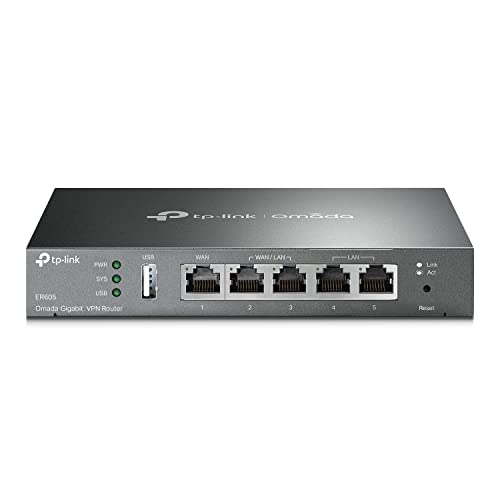
TP-Link ER605 V2 Wired Gigabit VPN Router, Up to 3 WAN Ports

The TP-Link ER605 V2 is a solid choice for small businesses needing a reliable and affordable VPN router. Its multiple WAN ports allow for load balancing and redundancy, ensuring consistent internet connectivity. It’s easy to set up and manage, even for those less technically inclined. While not the most feature-rich option, it provides excellent value for the price.
- Five Gigabit Ports (1 WAN + 4 LAN/WAN)
- USB WAN Port for 4G/3G Modem Backup
- Advanced Firewall Policies & DoS Defense
- Supports up to 20 IPsec, 16 OpenVPN, 16 L2TP, and 16 PPTP VPN connections
- SPI Firewall, VPN Passthrough, and various ALGs
Pros:
– Affordable
– Easy to set up
– Multiple WAN ports for redundancy
– Good VPN connection support
Cons:
– Fewer VPN connections than higher-end models
– Lacks some advanced features found in more expensive routers
User Impressions: Customers generally praise the ER605 V2 for its ease of use and reliable performance. Many appreciate the multiple WAN ports and the option for 4G/3G backup.
TP-Link ER7206 Multi-WAN Professional Wired Gigabit VPN Router

Stepping up from the ER605 V2, the TP-Link ER7206 offers significantly enhanced capabilities. Its integration with Omada SDN allows for centralized management of your entire network, making it ideal for growing businesses. The increased number of supported VPN connections and higher network capacity make it a powerhouse for larger operations.
- Flexible Port Configuration (1 SFP WAN + 1 WAN + 2 WAN/LAN + 1 LAN)
- High Network Capacity (up to 700 clients)
- Omada SDN Integration for Centralized Management
- Cloud Access for Remote Management
- Supports up to 100 IPsec, 50 OpenVPN, 50 L2TP, and 50 PPTP VPN connections
Pros:
– High VPN connection capacity
– Omada SDN integration for centralized management
– Cloud access for remote administration
– Excellent performance
Cons:
– More expensive than the ER605 V2
– Requires familiarity with Omada SDN
User Impressions: Users appreciate the powerful features and scalability of the ER7206, especially its Omada integration. However, some find the setup slightly more complex than simpler routers.
ASUS ExpertWiFi EBG15 Gigabit VPN Wired Router, up to 3 WAN Ports

The ASUS ExpertWiFi EBG15 stands out with its user-friendly interface and robust security features. The included ASUS AiProtection Pro offers commercial-grade protection against online threats. Its VLAN support adds an extra layer of security, segmenting your network for enhanced privacy.
- Easy Setup via Web Browser or Mobile App
- VLAN Support for Enhanced Security
- Up to 3 WAN Ports with Load Balancing
- Backup WAN via USB Port
- ASUS AiProtection Pro for Robust Security
Pros:
– Easy to use
– Strong security features
– VLAN support for network segmentation
– Backup WAN option
Cons:
– Fewer VPN connection options compared to TP-Link models
– Can be more expensive than some alternatives
User Impressions: Customers consistently praise the ease of use and excellent security features of the ASUS ExpertWiFi EBG15. The mobile app is also frequently highlighted as a positive aspect.
GL.iNet GL-BE3600 (Slate 7) Portable Travel Router

If portability and flexibility are key, the GL.iNet GL-BE3600 is a strong contender. Its small size and touchscreen interface make it ideal for travel or use in smaller offices. While not as powerful as some wired options, it offers excellent VPN capabilities and is highly customizable thanks to its OpenWrt firmware.
- Dual-Band Wi-Fi 7
- Touchscreen Interface
- OpenWrt 23.05 Firmware for Customization
- VPN Client & Server Support
- Compact and Portable
Pros:
– Portable and versatile
– Customizable OpenWrt firmware
– VPN client and server capabilities
– Easy-to-use touchscreen
Cons:
– Lower maximum VPN speed compared to wired options
– Limited ports
User Impressions: Users love the GL-BE3600’s portability and ease of use, making it a popular choice for those on the go or needing a small, flexible solution.
TRENDnet Gigabit Multi-WAN VPN Business Router, TWG-431BR

The TRENDnet TWG-431BR is a robust option prioritizing high availability and redundancy. Its multiple WAN ports allow for load balancing and failover, ensuring minimal downtime. It’s a great choice for businesses that require continuous internet connectivity.
- 5 Gigabit Ports (configurable as WAN/LAN)
- USB 3.0 Port
- Supports IPSec, PPTP, L2TP, and SSL VPN
- Content Filtering via Router Limits
- High Availability Network Capabilities
Pros:
– Multiple WAN ports for redundancy and load balancing
– High availability features
– Robust build quality
– Content filtering capabilities
Cons:
– Can be more expensive than other options
– Interface may not be as user-friendly as some competitors
User Impressions: Customers value the TWG-431BR’s reliability and high availability features, particularly the ability to create a redundant network. The robust build quality is also a frequently mentioned plus.
Frequently Asked Questions (FAQ)
Q: What is a VPN router, and why does my small business need one?
A: A VPN router encrypts your internet traffic, protecting sensitive data from unauthorized access. For small businesses, this is crucial for securing financial information, customer data, and internal communications, especially when using public Wi-Fi.
Q: How many VPN connections do I need?
A: This depends on your business size and number of employees needing simultaneous VPN access. Consider the number of devices that will connect to the VPN concurrently.
Q: What are the different VPN protocols, and which is best?
A: Common protocols include IPsec, OpenVPN, L2TP/IPsec, and PPTP. OpenVPN is generally considered the most secure, but the best choice depends on your specific needs and compatibility with your VPN service provider.
Q: Can I use my existing internet modem with a VPN router?
A: Yes, you typically connect your VPN router to your existing modem. The VPN router then becomes the central point for managing your network and VPN connections.
Q: How difficult is it to set up a VPN router?
A: Ease of setup varies by router model. Some routers offer user-friendly interfaces and mobile apps, while others may require more technical expertise.
Q: What’s the difference between a VPN router and a VPN service?
A: A VPN service is the software or subscription that provides the encrypted connection. A VPN router is the hardware device that manages and encrypts the internet traffic. You need both to have a secure VPN connection.
Q: How much should I expect to spend on a VPN router for my small business?
A: Prices vary widely depending on features and performance. You can find suitable options ranging from a few hundred to over a thousand dollars. Consider your budget and required features when making your selection.




Leave a Reply
You must be logged in to post a comment.