
Finding the best modem router combo for your Comcast Xfinity internet can feel like navigating a maze. But don’t worry, we’ve done the hard work for you! This guide reviews seven top contenders, helping you choose the perfect device for your needs and budget.
Choosing the Best Modem Router Combo For Comcast Xfinity Internet
Before diving into the reviews, let’s quickly consider what factors matter most when selecting a Comcast Xfinity compatible modem router combo:
- Internet Speed: Match the modem’s capabilities to your Xfinity plan’s speed. Higher speeds require DOCSIS 3.1 technology.
- Wi-Fi Standard: Wi-Fi 6 (AX) offers faster speeds and better performance for multiple devices. Wi-Fi 5 (AC) is still a solid option.
- Coverage Area: Consider the size of your home and the number of devices you need to connect. Larger homes might need a combo with a strong signal booster.
- Number of Ethernet Ports: More ports are beneficial for connecting wired devices like gaming consoles and smart TVs.
- Security Features: Look for built-in security features like firewalls and parental controls.
Top 7 Best Modem Router Combo For Comcast Xfinity Internet
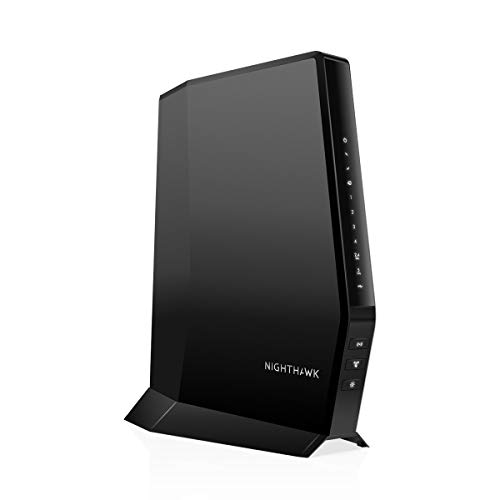
1. NETGEAR Nighthawk Modem Router Combo (CAX30) DOCSIS 3.1

The NETGEAR Nighthawk CAX30 is a powerhouse, boasting impressive speed and coverage. This DOCSIS 3.1 modem router combo is perfect for users with high-speed internet plans, delivering blazing-fast Wi-Fi 6 speeds. Its sleek design and user-friendly Nighthawk app make setup a breeze.
- Key Features:
- DOCSIS 3.1 compatible, up to 2Gbps
- Wi-Fi 6 (AX2700)
- Coverage up to 2,000 sq ft
- 4 Gigabit Ethernet ports
- 1 USB 3.0 port
- NETGEAR Armor security suite (30-day trial)
- Pros:
- Excellent speed and range
- Robust security features
- Easy setup and management
- Cons:
- Pricey compared to other options
- Not compatible with all ISPs
- User Impressions: Users consistently praise the CAX30’s speed and performance, along with the helpful Nighthawk app. Some find the price a bit steep.
2. NETGEAR Nighthawk AC1900 (24×8) DOCSIS 3.0 WiFi Cable Modem Router Combo (C7000)

The NETGEAR Nighthawk C7000 offers a strong balance of speed and affordability. While it uses the older DOCSIS 3.0 standard, it still provides excellent performance for many users. Its AC1900 Wi-Fi handles a large number of devices with relative ease.
- Key Features:
- DOCSIS 3.0 compatible, up to 800 Mbps
- AC1900 Wi-Fi
- Coverage up to 1,800 sq ft
- 4 Gigabit Ethernet ports
- 1 USB port
- Supports WPA/WPA2 security
- Pros:
- Good value for the price
- Reliable performance
- Easy to set up
- Cons:
- Not as fast as DOCSIS 3.1 models
- Limited security features compared to newer models
- User Impressions: Customers appreciate the C7000’s reliability and ease of use, particularly for its price point.
3. ARRIS (G34) – Cable Modem Router Combo – Fast DOCSIS 3.1

ARRIS is a well-known name in the industry, and the G34 doesn’t disappoint. This DOCSIS 3.1 modem boasts impressive speeds and a user-friendly app for management. The Wi-Fi 6 technology provides a reliable connection for multiple devices.
- Key Features:
- DOCSIS 3.1 compatible, up to 1 Gbps
- Wi-Fi 6 (AX3000)
- 4 Gigabit Ethernet ports
- SURFboard Central App
- Pros:
- Reliable performance
- Easy setup
- Good value
- Cons:
- Coverage might be limited in larger homes
- User Impressions: Generally positive reviews highlighting ease of setup and reliable performance. Some mention occasional connectivity issues.
4. ARRIS (SBG10) – Cable Modem Router Combo – DOCSIS 3.0

The ARRIS SBG10 is a budget-friendly option offering decent speeds and reliability. It’s a solid choice for users with moderate internet needs. While it’s a DOCSIS 3.0 model, it remains a capable device for many households.
- Key Features:
- DOCSIS 3.0 compatible
- SURFboard Central App for easy setup and management.
- Pros:
- Affordable
- Easy setup
- Cons:
- Slower speeds compared to DOCSIS 3.1 models
- Limited advanced features
- User Impressions: Users find it a good, basic option for its price, though those needing high speeds might want to look elsewhere.
5. Motorola MG7700 Modem WiFi Router Combo with Power Boost
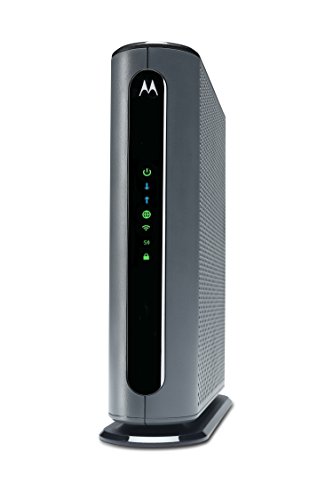
The Motorola MG7700 stands out with its “Power Boost” technology, designed to amplify Wi-Fi signals for better coverage. It’s a DOCSIS 3.0 model with a good balance of speed and range.
- Key Features:
- DOCSIS 3.0 compatible, up to 1000 Mbps (modem)
- AC1900 Wi-Fi with Power Boost
- 4 Gigabit Ethernet ports
- Pros:
- Good coverage thanks to Power Boost
- Reliable performance
- Cons:
- Not the fastest option available
- User Impressions: Users appreciate its strong signal and reliable performance even in larger homes.
6. ARRIS (G18) – Cable Modem Router Combo – Fast DOCSIS 3.1

The ARRIS G18 is another DOCSIS 3.1 offering from ARRIS. It provides fast speeds and reliable performance, utilizing Wi-Fi 6 for enhanced connectivity.
- Key Features:
- DOCSIS 3.1 compatible
- Wi-Fi 6 (802.11ax)
- SURFboard Central App
- Pros:
- Fast speeds
- Reliable performance
- Cons:
- Price might be higher than some DOCSIS 3.0 options
- User Impressions: Similar to other ARRIS models, users generally report good performance and ease of use.
7. NETGEAR Nighthawk Modem Router Combo C7000-Compatible with Comcast Xfinity

This NETGEAR Nighthawk C7000 offers a cost-effective solution for users who don’t need the absolute highest speeds. It’s a reliable choice with solid performance for everyday internet use.
- Key Features:
- DOCSIS 3.0 compatible, up to 800 Mbps
- AC1900 Wi-Fi
- 4 Gigabit Ethernet ports
- 1 USB 2.0 port
- NETGEAR Armor security suite (30-day trial)
- Pros:
- Affordable
- Easy setup and use
- Cons:
- Lower speeds compared to DOCSIS 3.1 models
- User Impressions: Generally positive reviews highlighting its value and ease of use.
Frequently Asked Questions (FAQs)
Q: What DOCSIS standard do I need for my Xfinity plan?
A: Check your Xfinity plan’s details. If you have a gigabit or multi-gigabit plan, you’ll need a DOCSIS 3.1 modem. Slower plans might work with DOCSIS 3.0.
Q: How do I know if a modem is compatible with Xfinity?
A: Xfinity’s website provides a list of approved modems. Check there before purchasing.
Q: What is the difference between Wi-Fi 5 (AC) and Wi-Fi 6 (AX)?
A: Wi-Fi 6 offers faster speeds, better performance with multiple devices, and improved range. Wi-Fi 5 is still good, but Wi-Fi 6 is the future.
Q: How many devices can a typical modem router combo handle?
A: This varies depending on the model, but most can handle 20-30 devices concurrently without significant performance issues.
Q: What is the importance of Gigabit Ethernet ports?
A: Gigabit Ethernet ports provide much faster wired connections compared to standard Ethernet ports, ideal for gaming consoles, PCs, and other high-bandwidth devices.
Q: Should I rent a modem from Xfinity or buy my own?
A: Buying your own modem often saves money in the long run, as rental fees can add up significantly over time.
Q: Can I use a modem router combo with a mesh network?
A: Yes, you can use a modem router combo as the primary gateway for a mesh network system. Many mesh systems are designed to connect seamlessly with existing routers. This will extend your network’s Wi-Fi coverage and improve signal strength in areas where the combo unit struggles.




Leave a Reply
You must be logged in to post a comment.