
Finding reliable Wi-Fi in a home with thick brick walls can feel like a mission impossible. But don’t despair! The right mesh Wi-Fi system can conquer even the toughest brick barriers, delivering strong signals to every corner of your house. This guide reviews seven of the best mesh WiFi systems for brick walls, helping you choose the perfect solution for your needs.
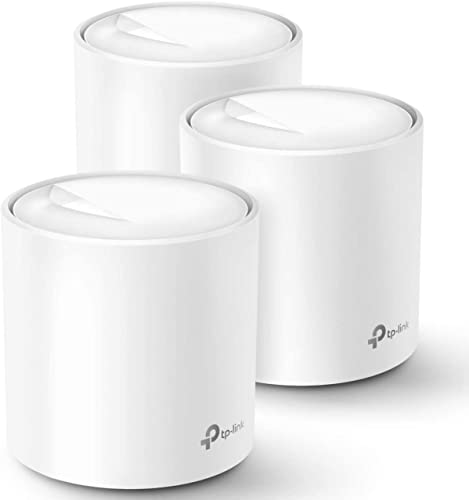
TP-Link Deco WiFi 6 Mesh System (Deco X20)

The TP-Link Deco X20 is a solid contender for homes needing reliable Wi-Fi penetration. Its Wi-Fi 6 capabilities provide faster speeds and greater capacity than older systems, making it ideal for households with multiple devices. While not specifically designed to only combat brick walls, its strong signal and mesh network effectively mitigate signal loss.
- Wi-Fi 6 (AX1800)
- Covers up to 5800 sq ft
- Supports up to 150 devices
- Easy setup with Deco app
- Parental controls and TP-Link HomeShield security
Pros:
– Affordable
– Easy to set up
– Good coverage for its price
Cons:
– Coverage might be limited in very large or heavily obstructed homes.
User Impressions: Many users praise the Deco X20’s ease of setup and reliable performance, even in homes with some structural challenges. A few users in homes with exceptionally thick walls reported minor signal issues in far corners.
TP-Link Deco X55 AX3000 WiFi 6 Mesh System

Stepping up from the X20, the Deco X55 boasts a faster AX3000 Wi-Fi 6 connection and even greater coverage. Its AI-driven mesh technology intelligently adapts to your home’s environment, optimizing signal strength and routing for optimal performance, even through those pesky brick walls. The additional Gigabit Ethernet ports are a bonus for wired connections.
- Wi-Fi 6 (AX3000)
- Covers up to 6500 sq ft
- Supports up to 150 devices
- AI-driven mesh technology
- Multiple Gigabit Ethernet ports
Pros:
– Excellent speed and coverage
– AI optimization for optimal performance
– Multiple Ethernet ports
Cons:
– More expensive than the Deco X20
User Impressions: Users consistently report exceptional speeds and broad coverage with the Deco X55, even in multi-story homes and those with dense construction. The AI features receive positive feedback.
TP-Link Deco S4 Mesh AC1900 WiFi System

If you’re not ready to jump to Wi-Fi 6, the Deco S4 is a powerful AC1900 system that offers excellent value. While not as future-proof as the Wi-Fi 6 options, it still provides strong performance and seamless roaming throughout your home, effectively penetrating brick walls better than a traditional router.
- AC1900 Wi-Fi
- Covers up to 5500 sq ft
- Supports up to 100 devices
- Robust parental controls
- Easy setup with Deco app
Pros:
– Great value for the price
– Good coverage for most homes
– Easy setup
Cons:
– Not Wi-Fi 6
User Impressions: Users appreciate the Deco S4’s balance of performance and affordability. While not as fast as Wi-Fi 6, it’s still a solid choice for many homes, even those with brick walls, providing a solid upgrade over standard routers.
ASUS ZenWiFi AX Hybrid Powerline Mesh WiFi 6 System (XP4)

The ASUS ZenWiFi AX XP4 stands out with its hybrid approach, combining Wi-Fi 6 mesh technology with Powerline networking. This means it uses your home’s electrical wiring to extend the signal, making it exceptionally effective at penetrating brick walls and other obstacles where Wi-Fi struggles.
- Wi-Fi 6 (AX1800)
- Covers up to 5500 sq ft
- Powerline backhaul for improved penetration
- Lifetime free network security (AiProtection Pro)
Pros:
– Excellent penetration through walls
– Strong security features
– Hybrid approach offers redundancy
Cons:
– Can be more complex to set up than pure Wi-Fi mesh systems
User Impressions: Users consistently highlight the ZenWiFi AX XP4’s ability to reach areas previously unreachable by Wi-Fi, particularly in homes with thick walls or challenging layouts. The setup process requires a bit more attention.
NETGEAR Orbi Whole Home Tri-Band WiFi 6 Mesh Network (RBK852)

The NETGEAR Orbi RBK852 is a high-performance tri-band system offering exceptional speed and coverage. Its dedicated backhaul band ensures uninterrupted performance, even with many devices connected, and helps to improve signal strength and penetration in brick-walled homes.
- Tri-band Wi-Fi 6 (AX5200)
- Covers up to 10,000 sq ft
- Supports up to 75 devices
- NETGEAR Armor security
Pros:
– Exceptional speed and coverage
– Tri-band for optimal performance
– Robust security
Cons:
– High price point
User Impressions: Users describe the Orbi system as exceptionally fast and reliable, delivering consistent performance even under heavy load and in challenging environments, making it a great solution for those needing the best best mesh wifi for brick walls.
WiFi 6 Mesh System GP-AX3000

The GP-AX3000 offers a compelling balance of speed and coverage at a more competitive price point than some premium options. While not as extensively reviewed as some other brands, its Wi-Fi 6 capabilities and mesh networking provide a strong solution for many homes needing improved signal penetration through dense materials like brick.
- Wi-Fi 6 (AX3000)
- Covers up to 1600 sq ft
- Supports up to 100 devices
- Dual-band for versatile connectivity
Pros:
– Good value for Wi-Fi 6 performance
– Easy setup and management
Cons:
– Coverage might be less than some other options on the list
User Impressions: Early user feedback points to strong performance and an easy setup experience. Long-term reliability and performance in heavily obstructed homes requires more data.
FAQ
Q: What is mesh Wi-Fi?
A: Mesh Wi-Fi uses multiple interconnected nodes (or units) to create a whole-home network. This eliminates dead zones and provides consistent, strong Wi-Fi coverage throughout your house.
Q: How does mesh Wi-Fi work through brick walls?
A: Mesh Wi-Fi systems utilize multiple access points and sophisticated signal management to overcome obstacles like brick walls. They intelligently route traffic to optimize signal strength and penetration. Some systems, like the ASUS ZenWiFi AX, even utilize powerline technology for added penetration.
Q: Do I need a lot of nodes for a large home?
A: The number of nodes needed depends on the size and layout of your home and the thickness of your walls. Larger homes or those with heavy construction might require more nodes for optimal coverage. Manufacturers provide estimated coverage areas for their systems.
Q: What are the benefits of Wi-Fi 6?
A: Wi-Fi 6 offers faster speeds, improved capacity (supporting more devices simultaneously), and lower latency compared to older Wi-Fi standards. This is particularly beneficial in busy households with many smart devices.
Q: Can I use a mesh Wi-Fi system with my existing modem?
A: Yes, mesh Wi-Fi systems typically replace your existing router, but they work with your existing modem. The modem connects to your internet service provider, and the mesh Wi-Fi system handles distributing the signal throughout your home.
Q: How difficult is it to set up a mesh Wi-Fi system?
A: Most modern mesh Wi-Fi systems have user-friendly mobile apps that guide you through the setup process. While some systems might require a bit more technical expertise, many are designed for easy installation.
Q: What features should I look for when choosing best mesh wifi for brick walls?
A: Look for systems with Wi-Fi 6, a strong signal strength rating, features such as Powerline backhaul for better wall penetration, multiple ethernet ports and a good reputation for reliable performance, especially in larger or heavily constructed homes.
{“@context”: “https://schema.org”, “@type”: “FAQPage”, “mainEntity”: [{“@type”: “Question”, “name”: “What is mesh Wi-Fi?”, “acceptedAnswer”: {“@type”: “Answer”, “text”: “Mesh Wi-Fi uses multiple interconnected nodes (or units) to create a whole-home network. This eliminates dead zones and provides consistent, strong Wi-Fi coverage throughout your house.”}}, {“@type”: “Question”, “name”: “How does mesh Wi-Fi work through brick walls?”, “acceptedAnswer”: {“@type”: “Answer”, “text”: “Mesh Wi-Fi systems utilize multiple access points and sophisticated signal management to overcome obstacles like brick walls. They intelligently route traffic to optimize signal strength and penetration. Some systems, like the ASUS ZenWiFi AX, even utilize powerline technology for added penetration.”}}, {“@type”: “Question”, “name”: “Do I need a lot of nodes for a large home?”, “acceptedAnswer”: {“@type”: “Answer”, “text”: “The number of nodes needed depends on the size and layout of your home and the thickness of your walls. Larger homes or those with heavy construction might require more nodes for optimal coverage. Manufacturers provide estimated coverage areas for their systems.”}}, {“@type”: “Question”, “name”: “What are the benefits of Wi-Fi 6?”, “acceptedAnswer”: {“@type”: “Answer”, “text”: “Wi-Fi 6 offers faster speeds, improved capacity (supporting more devices simultaneously), and lower latency compared to older Wi-Fi standards. This is particularly beneficial in busy households with many smart devices.”}}, {“@type”: “Question”, “name”: “Can I use a mesh Wi-Fi system with my existing modem?”, “acceptedAnswer”: {“@type”: “Answer”, “text”: “Yes, mesh Wi-Fi systems typically replace your existing router, but they work with your existing modem. The modem connects to your internet service provider, and the mesh Wi-Fi system handles distributing the signal throughout your home.”}}, {“@type”: “Question”, “name”: “How difficult is it to set up a mesh Wi-Fi system?”, “acceptedAnswer”: {“@type”: “Answer”, “text”: “Most modern mesh Wi-Fi systems have user-friendly mobile apps that guide you through the setup process. While some systems might require a bit more technical expertise, many are designed for easy installation.”}}, {“@type”: “Question”, “name”: “What features should I look for when choosing best mesh wifi for brick walls?”, “acceptedAnswer”: {“@type”: “Answer”, “text”: “Look for systems with Wi-Fi 6, a strong signal strength rating, features such as Powerline backhaul for better wall penetration, multiple ethernet ports and a good reputation for reliable performance, especially in larger or heavily constructed homes.”}}]}




Leave a Reply
You must be logged in to post a comment.