
Tired of paying those pesky monthly equipment rental fees to Xfinity? Or perhaps you’re just not getting the blazing-fast internet speeds you signed up for? It’s a common dilemma! Investing in your own cable modem and WiFi router combo can be a game-changer, not only saving you money in the long run but often providing better performance and more control over your home network.
With so many options out there, finding the best cable modem and WiFi router for Xfinity can feel like a daunting task. You need something that’s not only compatible with Xfinity’s service but also robust enough to handle your internet plan, whether you’re a casual browser or a hardcore gamer streaming 4K content. We’ve done the heavy lifting for you, breaking down the top 10 modem-router combos that are Xfinity-approved and ready to boost your broadband experience. Let’s dive in!
Our Top 10 Picks for Xfinity Users
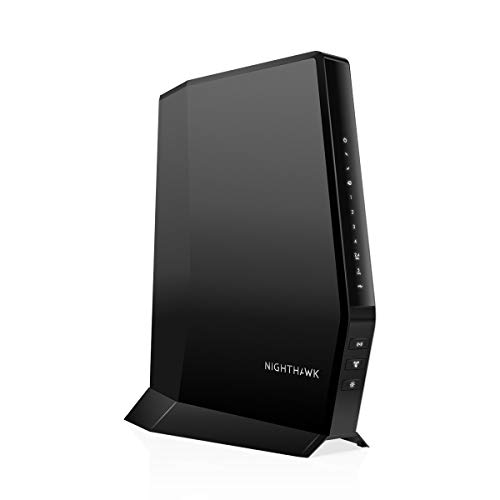
NETGEAR Nighthawk Modem Router Combo (CAX30) DOCSIS 3.1

The NETGEAR Nighthawk CAX30 stands out as a premium choice for those looking to future-proof their home network. This beast combines a high-speed DOCSIS 3.1 modem with a powerful WiFi 6 router, offering incredible speeds and coverage for large homes and numerous devices. If you’re on a high-speed Xfinity plan (up to 2Gbps), this combo ensures you’re getting every bit of performance you pay for, making it a strong contender for the best cable modem and WiFi router for Xfinity users who demand top-tier connectivity.
- Key Features:
- Compatible with Xfinity, Spectrum, Cox (up to 2Gbps plans)
- WiFi 6 (AX2700) for speeds up to 2.7Gbps
- Coverage up to 2,000 sq. ft. and 25 concurrent devices
- 4 Gigabit Ethernet ports (supports port aggregation) and 1 USB 3.0 port
- DOCSIS 3.1 and 32×8 channel bonding
- NETGEAR Armor security (30-day trial included)
- Easy setup and management with Nighthawk app
- Pros:
- Future-proof DOCSIS 3.1 and WiFi 6 technology
- Excellent for multi-gig Xfinity plans
- Strong Wi-Fi coverage and device capacity
- Enhanced security features
- Saves on rental fees
- Cons:
- Premium price point
- Not compatible with bundled voice services
- NETGEAR Armor is a subscription service after trial
- User Impressions: Users rave about the CAX30’s lightning-fast speeds and reliable performance, especially for demanding tasks like 4K streaming and online gaming. Many highlight the simple setup process and the significant improvement over rented equipment.
- See it on Amazon Here
ARRIS (SBG10) – Cable Modem Router Combo – DOCSIS 3.0

For those who want to ditch rental fees without breaking the bank, the ARRIS SURFboard SBG10 is a fantastic entry-level option. As a trusted name in home connectivity, ARRIS delivers a reliable DOCSIS 3.0 modem and Wi-Fi combo that’s perfect for standard Xfinity internet plans. It’s a simple, secure, and cost-effective way to get better performance and control over your home network.
- Key Features:
- Certified for use with Xfinity, Cox (not Spectrum)
- DOCSIS 3.0 modem technology
- Wi-Fi Router combo
- Simple and secure set-up via SURFboard Central App
- Real-time network monitoring and parental controls through the app
- Saves up to $168/year in rental fees
- Pros:
- Affordable price point
- Easy to set up and manage
- Reputable brand with a long history in modems
- App-based parental controls
- Significant savings on rental fees
- Cons:
- DOCSIS 3.0 limits top-tier speed compatibility
- Not compatible with Charter Spectrum
- May not be sufficient for very high-speed Xfinity plans (e.g., Gig speeds)
- User Impressions: Customers appreciate the SBG10 for its straightforward setup and solid performance for everyday internet use. It’s often praised as a reliable replacement for ISP-rented equipment for mid-range internet plans.
- See it on Amazon Here
NETGEAR Nighthawk AC1900 (C7000) DOCSIS 3.0 WiFi Cable Modem

The NETGEAR Nighthawk AC1900 (C7000) is a veteran in the modem-router combo space, offering a powerful blend of DOCSIS 3.0 modem and AC1900 WiFi for moderate to high-speed Xfinity plans. It’s an excellent choice if you’re looking for strong Wi-Fi coverage and reliable wired connections without needing the absolute bleeding edge of DOCSIS 3.1 or WiFi 6. This model provides substantial value for its performance.
- Key Features:
- Compatible with Xfinity, Cox, Spectrum
- Best for cable provider plans up to 800 Mbps
- AC1900 WiFi performance for up to 1800 sq ft and 30 devices
- 4 Gigabit Ethernet ports and 1 USB port
- DOCSIS 3.0 with 24×8 channel bonding
- WEP and WPA/WPA2 wireless security protocols
- Pros:
- Excellent value for performance
- Broad compatibility with major ISPs
- Strong Wi-Fi coverage for most homes
- Plenty of wired ports for devices
- Saves on monthly rental fees
- Cons:
- DOCSIS 3.0 is not suitable for multi-gigabit plans
- WiFi 5 (AC) rather than newer WiFi 6
- Not compatible with bundled voice services
- User Impressions: Users frequently commend the C7000 for its reliability, ease of installation, and significant improvement over standard ISP equipment. It’s often recommended for households with multiple devices and moderate to heavy internet usage.
- See it on Amazon Here
ARRIS (G34) – Cable Modem Router Combo – Fast DOCSIS 3.1

The ARRIS SURFboard G34 is a top-tier contender if you’re aiming for multi-gigabit speeds from Xfinity. This combo unit brings the power of DOCSIS 3.1 modem technology with high-speed Wi-Fi 6 (AX3000), ensuring a fast, low-latency, and secure connection. It’s designed to handle the most demanding internet activities, from 4K streaming across multiple devices to competitive online gaming, making it a strong candidate for the best cable modem and WiFi router for Xfinity power users.
- Key Features:
- DOCSIS 3.1 for speeds up to 1 Gbps
- Dual-concurrent AX3000 Wi-Fi 6 for speeds up to 3 Gbps
- Four 1-Gigabit Ethernet ports
- Compatible with Xfinity, Cox, Spectrum (approved for plans up to 1 Gbps)
- Simple setup via SURFboard Central App with parental controls
- 2-year warranty
- Pros:
- Future-proof DOCSIS 3.1 and WiFi 6
- Excellent for Xfinity Gig-speed plans
- Low latency for gaming
- Robust security and parental controls
- Reduces rental fees
- Cons:
- Higher price point
- MoCA technology not included
- Not compatible with bundled voice services
- User Impressions: Reviewers are impressed by the G34’s ability to deliver consistent gigabit speeds and expansive Wi-Fi coverage. The ease of setup through the app and the noticeable reduction in lag for gaming are frequently highlighted.
- See it on Amazon Here
ARRIS (G18) – Cable Modem Router Combo – Fast DOCSIS 3.1

The ARRIS SURFboard G18 offers a fantastic balance of advanced technology and user-friendly features. This combo pairs a high-performance DOCSIS 3.1 modem with strong Wi-Fi 6 coverage, making it ideal for Xfinity users who want fast, reliable internet for streaming, gaming, and browsing across their entire home. It’s a solid choice for those seeking a modern upgrade without going to the absolute top of the line in terms of raw speed.
- Key Features:
- DOCSIS 3.1 for faster speeds and better security
- Dual-band Wi-Fi 6 for faster, wider wireless performance
- Compatible with major ISPs like Xfinity, Spectrum, and Cox
- Trusted brand with high reliability
- Saves up to $168/year in rental fees
- Pros:
- Modern DOCSIS 3.1 and Wi-Fi 6 technologies
- Reliable high-speed connection for various activities
- Broad ISP compatibility
- Good value for advanced features
- Easy to set up
- Cons:
- Specific Wi-Fi 6 speed (AX rating) not explicitly listed, suggesting it might not be the highest tier of WiFi 6
- No specified USB port for storage
- Not compatible with bundled voice services
- User Impressions: Customers appreciate the G18 for its noticeable speed improvement and enhanced Wi-Fi coverage compared to older models. Many find it to be a stable and powerful solution for multi-device households.
- See it on Amazon Here
NETGEAR Nighthawk WiFi 6 Cable Modem Router CAX30-100NAR

If you’re looking for the absolute cutting edge for your Xfinity internet, the NETGEAR Nighthawk CAX30-100NAR is virtually identical to our first pick, emphasizing its high-performance capabilities. This combo unit is certified for Xfinity plans up to 800Mbps (and higher with other providers), bringing top-tier DOCSIS 3.1 and WiFi 6 (AX2700) to your home network. It’s built for speed, coverage, and the growing number of devices in modern households.
- Key Features:
- Compatible with Xfinity (up to 800Mbps), Spectrum and Cox (up to 1Gbps)
- Dual-band WiFi 6 (AX2700) for speeds up to 2.7Gbps
- Coverage up to 2,500 sq. ft. and 25 concurrent devices
- 4 Gigabit Ethernet ports (supports port aggregation) and 1 USB 3.0 port
- DOCSIS 3.1 and 32×8 channel bonding
- Easy setup and management with the Nighthawk app
- Supports WPA/WPA2/WPA3 wireless security protocols
- Pros:
- Leading-edge DOCSIS 3.1 and WiFi 6 technologies
- Excellent for high-speed Xfinity plans
- Expansive Wi-Fi coverage and device support
- Advanced security protocols
- Saves on rental fees
- Cons:
- Premium price point
- Xfinity certification for this specific model is listed up to 800Mbps, which might not leverage its full potential on higher Xfinity plans
- Not compatible with bundled voice services
- User Impressions: Users consistently report a significant boost in both Wi-Fi speed and range. The Nighthawk app is frequently praised for its intuitive interface and useful network management features.
- See it on Amazon Here
NETGEAR Nighthawk Modem Router Combo C7000-Compatible with Xfinity

The NETGEAR Nighthawk C7000 is a classic for a reason. This model remains a highly recommended choice for Xfinity users on plans up to 800Mbps. It delivers reliable AC1900 WiFi 5 speeds across a good range, coupled with a robust DOCSIS 3.0 modem. It’s a cost-effective way to get great performance for streaming, gaming, and general web browsing without having to rent equipment from your ISP.
- Key Features:
- Compatible with Xfinity, Spectrum, Cox (up to 800Mbps plans)
- WiFi 5 AC1900 speed (up to 1900Mbps)
- Coverage up to 1,800 sq. ft. and 30 devices
- 4 Gigabit Ethernet ports and 1 USB 2.0 port
- Supports WPA/WPA2 wireless security protocols
- NETGEAR Armor security (30-day trial included)
- Easy setup and management with the Nighthawk app
- Made for use in the US only
- Pros:
- Great performance for its price point
- Wide compatibility with major ISPs
- Solid Wi-Fi coverage and device capacity
- Useful NETGEAR Armor security features (trial)
- Saves on rental fees
- Cons:
- DOCSIS 3.0 and WiFi 5 are not the newest technologies
- USB 2.0 port is slower than USB 3.0
- Not compatible with bundled voice services
- User Impressions: Many users find the C7000 to be a significant upgrade from their ISP-provided modem. It’s praised for its stable connection, consistent speeds, and ease of installation, making it a great all-around performer.
- See it on Amazon Here
NETGEAR Nighthawk AC1900 (24×8) DOCSIS 3.0 WiFi Cable Modem

Another iteration of the popular NETGEAR Nighthawk AC1900 C7000, this model further solidifies its position as a reliable option for Xfinity customers. It’s specifically certified by Xfinity by Comcast, Cox, and Spectrum, ensuring hassle-free compatibility for plans up to 800Mbps. If you’re looking for a proven workhorse that offers strong Wi-Fi performance, multiple wired connections, and helps you save on rental fees, this is an excellent choice.
- Key Features:
- Certified by Xfinity, Cox, and Spectrum
- Best for cable provider plans up to 800Mbps speed
- AC1900 Wi-Fi for up to 1800 sq ft wireless coverage and 30 devices
- 4 Gigabit Ethernet ports and one USB port for storage devices
- DOCSIS 3.0 with 24×8 channel bonding
- WEP and WPA/WPA2 wireless security protocols
- Pros:
- Xfinity certified, guaranteeing compatibility
- Robust Wi-Fi coverage for most homes
- Excellent for mid to high-speed DOCSIS 3.0 plans
- Saves on monthly rental costs
- Reliable and stable performance
- Cons:
- DOCSIS 3.0 technology won’t support future multi-gigabit plans
- WiFi 5 (AC) is not the newest standard
- Not compatible with bundled voice services
- User Impressions: Customers consistently highlight the C7000’s reliability and the noticeable improvement in speed and coverage over rental units. The straightforward setup and stable connection are frequently praised, making it a favorite for many.
- See it on Amazon Here
Motorola MT7711 24X8 Cable Modem/Router with Two Phone Ports
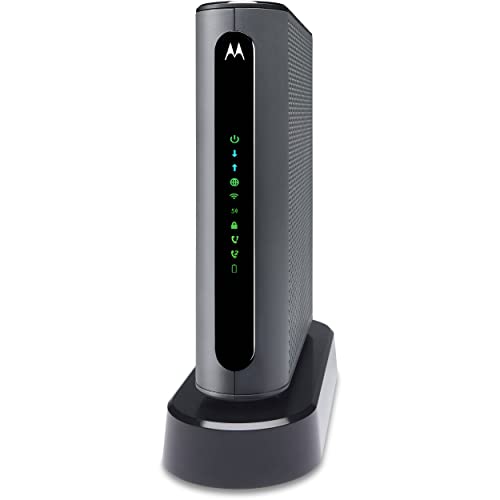
The Motorola MT7711 stands out for a very specific reason: it includes two phone ports, making it one of the few modem-router combos that support Xfinity Voice telephone service. If you have an Xfinity Voice bundle and want to own your equipment, this is likely your go-to device. Beyond voice, it offers high-speed AC1900 Wi-Fi 5, strong Wi-Fi features like AnyBeam beamforming, and ample Ethernet ports, providing a comprehensive solution for Xfinity users.
- Key Features:
- Two telephone ports for Xfinity Voice service (Comcast)
- High-speed AC1900 Wi-Fi 5 Gigabit Router
- 4 Gigabit Ethernet ports
- AnyBeam beamforming for improved Wi-Fi performance and range
- Guest network access
- Wireless Power Boost for enhanced signal strength
- Only compatible with Xfinity (Comcast) Internet Service
- Pros:
- Supports Xfinity Voice, a rare feature in owned combos
- Strong AC1900 Wi-Fi with beamforming for better range
- Ample wired connections
- Provides high-speed internet for many devices
- Dedicated customer support
- Cons:
- Exclusively compatible with Xfinity, no other ISPs
- DOCSIS 3.0 technology
- Wi-Fi 5 (AC) rather than Wi-Fi 6
- User Impressions: For Xfinity Voice customers, this modem is a lifesaver, allowing them to finally stop paying rental fees for phone service. Users report solid internet performance and appreciate the included phone functionality.
- See it on Amazon Here
ARRIS (SBG10-RB) – Modem Router Combo – DOCSIS 3.0 16×4
The ARRIS SURFboard SBG10-RB is a refurbished version of the popular SBG10, offering an even more budget-friendly path to owning your Xfinity internet equipment. This DOCSIS 3.0 modem-router combo is approved for Xfinity and Cox and is best suited for internet service plans up to 400 Mbps. It’s a straightforward and reliable choice for casual internet users who want to cut down on monthly bills without needing top-tier speeds.
- Key Features:
- Approved for Cox and Xfinity internet (not compatible with DSL/Fiber providers)
- 16 downstream and 4 upstream channels
- Best for cable internet service plans up to 400 Mbps
- Setup and manage your network with the SURFboard Manager app
- Does NOT support cable digital voice service
- Pros:
- Very affordable, especially as a refurbished unit
- Easy setup and app management
- Reliable performance for mid-tier internet plans
- Saves on rental fees
- From a trusted brand
- Cons:
- DOCSIS 3.0 limits top speed compatibility
- 16×4 channel bonding is less than higher-end models (e.g., 24×8 or 32×8)
- Not suitable for high-speed or multi-gigabit Xfinity plans
- No support for digital voice service
- User Impressions: Users often choose the SBG10-RB for its unbeatable price and its ability to effectively replace rental modems for basic to moderate internet usage. It’s seen as a smart, economical choice.
- See it on Amazon Here
Conclusion
Choosing the best cable modem and WiFi router for Xfinity ultimately comes down to your specific internet plan, home size, and budget. Whether you’re looking to support blazing-fast multi-gigabit speeds with cutting-edge DOCSIS 3.1 and WiFi 6, or simply need a reliable, cost-effective solution for everyday browsing and streaming, there’s an option here for you. The key is to match the modem’s DOCSIS version and speed capabilities with your Xfinity plan to ensure optimal performance.
By investing in your own modem-router combo, you’ll not only enjoy potentially better performance and more control over your network, but you’ll also save a significant amount of money over time by eliminating those monthly rental fees. Remember to always double-check compatibility with your specific Xfinity plan before making a purchase. Happy browsing!
FAQs
Q: Why should I buy my own cable modem and WiFi router for Xfinity?
A: Buying your own equipment saves you money on monthly rental fees (which can add up to $150-$168 per year!). You also gain more control over your network settings, potentially get better performance, and can choose features that best suit your needs.
Q: What is DOCSIS 3.0 and DOCSIS 3.1, and which one do I need for Xfinity?
A: DOCSIS (Data Over Cable Service Interface Specification) is the technology cable internet providers use. DOCSIS 3.0 supports speeds generally up to 1 Gbps, while DOCSIS 3.1 is the latest standard, supporting multi-gigabit speeds (up to 10 Gbps). For most standard Xfinity plans up to 800 Mbps, DOCSIS 3.0 is sufficient. For Xfinity Gigabit or higher plans, you’ll definitely need a DOCSIS 3.1 modem to get the advertised speeds.
Q: Will these modem-router combos work with Xfinity Voice service?
A: Most standard modem-router combos listed here do NOT support Xfinity Voice (digital phone service). If you have Xfinity Voice, you’ll need a specific telephony modem, such as the Motorola MT7711, which includes phone ports. Always check the product description carefully.
Q: How do I set up a new modem and router with Xfinity?
A: Generally, you connect the coax cable, power it on, then connect a computer to it via Ethernet or Wi-Fi. You’ll typically need to visit Xfinity’s activation website (often xfinity.com/activate) or call their customer service to register your new modem’s MAC address. Follow the instructions provided with your new device.
Q: What is Wi-Fi 5 (AC) vs. Wi-Fi 6 (AX)?
A: These refer to Wi-Fi standards. Wi-Fi 5 (802.11ac) is common and provides good speeds. Wi-Fi 6 (802.11ax) is newer, offering faster speeds, better efficiency, and improved performance in congested network environments (like homes with many smart devices). If you have many Wi-Fi 6 compatible devices or a very busy network, Wi-Fi 6 is a good upgrade.
Q: How do I know what speed plan I have with Xfinity?
A: You can check your Xfinity bill, log into your Xfinity account online, or contact Xfinity customer service directly to confirm your current internet speed plan. This information is crucial for selecting a compatible modem.
Q: What if a modem is listed as compatible but my Xfinity service isn’t working?
A: First, ensure proper setup and activation. Double-check all cable connections. If issues persist, contact Xfinity customer support. They can verify if your modem is properly registered on their network and troubleshoot any service-related problems. Sometimes, firmware updates on the modem may be required, which Xfinity typically pushes out.
Q: Do these modem-router combos also support mesh Wi-Fi systems?
A: These combo units primarily function as a single Wi-Fi access point. While they provide the internet connection, if you need expansive Wi-Fi coverage for very large homes or multi-story buildings, you might want to consider adding a separate mesh Wi-Fi system. Most mesh systems can be connected to any modem/router combo and operate in “access point” mode to extend your Wi-Fi network.
{“@context”: “https://schema.org”, “@type”: “FAQPage”, “mainEntity”: [{“@type”: “Question”, “name”: “Why should I buy my own cable modem and WiFi router for Xfinity?”, “acceptedAnswer”: {“@type”: “Answer”, “text”: “Buying your own equipment saves you money on monthly rental fees (which can add up to $150-$168 per year!). You also gain more control over your network settings, potentially get better performance, and can choose features that best suit your needs.”}}, {“@type”: “Question”, “name”: “What is DOCSIS 3.0 and DOCSIS 3.1, and which one do I need for Xfinity?”, “acceptedAnswer”: {“@type”: “Answer”, “text”: “DOCSIS (Data Over Cable Service Interface Specification) is the technology cable internet providers use. DOCSIS 3.0 supports speeds generally up to 1 Gbps, while DOCSIS 3.1 is the latest standard, supporting multi-gigabit speeds (up to 10 Gbps). For most standard Xfinity plans up to 800 Mbps, DOCSIS 3.0 is sufficient. For Xfinity Gigabit or higher plans, you’ll definitely need a DOCSIS 3.1 modem to get the advertised speeds.”}}, {“@type”: “Question”, “name”: “Will these modem-router combos work with Xfinity Voice service?”, “acceptedAnswer”: {“@type”: “Answer”, “text”: “Most standard modem-router combos listed here do NOT support Xfinity Voice (digital phone service). If you have Xfinity Voice, you’ll need a specific telephony modem, such as the Motorola MT7711, which includes phone ports. Always check the product description carefully.”}}, {“@type”: “Question”, “name”: “How do I set up a new modem and router with Xfinity?”, “acceptedAnswer”: {“@type”: “Answer”, “text”: “Generally, you connect the coax cable, power it on, then connect a computer to it via Ethernet or Wi-Fi. You’ll typically need to visit Xfinity’s activation website (often `xfinity.com/activate`) or call their customer service to register your new modem’s MAC address. Follow the instructions provided with your new device.”}}, {“@type”: “Question”, “name”: “What is Wi-Fi 5 (AC) vs. Wi-Fi 6 (AX)?”, “acceptedAnswer”: {“@type”: “Answer”, “text”: “These refer to Wi-Fi standards. Wi-Fi 5 (802.11ac) is common and provides good speeds. Wi-Fi 6 (802.11ax) is newer, offering faster speeds, better efficiency, and improved performance in congested network environments (like homes with many smart devices). If you have many Wi-Fi 6 compatible devices or a very busy network, Wi-Fi 6 is a good upgrade.”}}, {“@type”: “Question”, “name”: “How do I know what speed plan I have with Xfinity?”, “acceptedAnswer”: {“@type”: “Answer”, “text”: “You can check your Xfinity bill, log into your Xfinity account online, or contact Xfinity customer service directly to confirm your current internet speed plan. This information is crucial for selecting a compatible modem.”}}, {“@type”: “Question”, “name”: “What if a modem is listed as compatible but my Xfinity service isn’t working?”, “acceptedAnswer”: {“@type”: “Answer”, “text”: “First, ensure proper setup and activation. Double-check all cable connections. If issues persist, contact Xfinity customer support. They can verify if your modem is properly registered on their network and troubleshoot any service-related problems. Sometimes, firmware updates on the modem may be required, which Xfinity typically pushes out.”}}, {“@type”: “Question”, “name”: “Do these modem-router combos also support mesh Wi-Fi systems?”, “acceptedAnswer”: {“@type”: “Answer”, “text”: “These combo units primarily function as a single Wi-Fi access point. While they provide the internet connection, if you need expansive Wi-Fi coverage for very large homes or multi-story buildings, you might want to consider adding a separate mesh Wi-Fi system. Most mesh systems can be connected to any modem/router combo and operate in \”access point\” mode to extend your Wi-Fi network.”}}]}




Leave a Reply
You must be logged in to post a comment.