
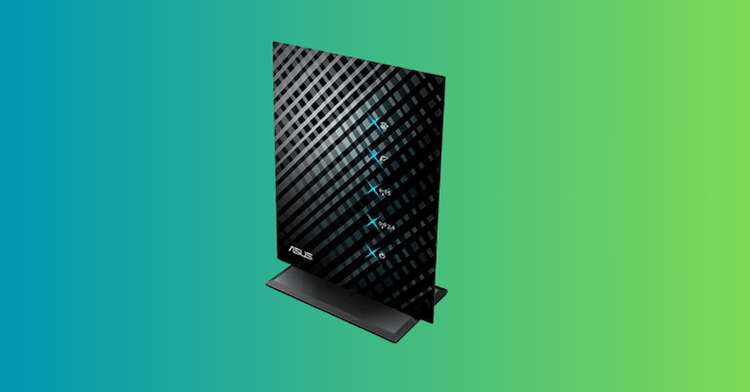
In today’s connected world, a weak Wi-Fi signal can be a major frustration, turning simple tasks like streaming videos or browsing the web into arduous ordeals. The ASUS N600 Extender, officially known as the ASUS RP-N53 Dual-Band Wireless-N600 Range Extender, steps in as a practical solution for extending your network’s reach. Released around 2013, this device remains a viable option for users with older Wireless-N routers looking to eliminate dead zones without overhauling their entire setup. In this comprehensive ASUS N600 Extender review, we’ll dive deep into its capabilities, performance, and value, helping you decide if it’s the right fit for your home or office network.
Whether you’re dealing with thick walls, multi-story homes, or distant rooms that your router can’t quite cover, the ASUS N600 Extender offers a straightforward way to amplify your signal. Its core benefit lies in providing dual-band support—handling both 2.4GHz and 5GHz frequencies—for up to 600Mbps combined speeds, making it a standout choice in the budget extender category. As networking technology has evolved, this extender’s N600 standard might seem dated in 2026, but it still delivers real value for legacy systems. Let’s explore what makes it tick.


Overview of the ASUS N600 Extender
ASUS, a Taiwanese tech giant renowned for its innovative hardware, has built a strong reputation in the networking space with products like the RT series routers and ZenWiFi mesh systems. The company emphasizes user-friendly designs, robust performance, and feature-rich ecosystems, often incorporating tools like AiProtection for security and AiMesh for expandable networks. The ASUS N600 Extender fits into this lineup as an entry-level range extender aimed at consumers who need better coverage without the complexity of a full mesh setup.
The RP-N53 was designed to address common Wi-Fi pain points in homes and small offices, where the primary router’s signal fades in certain areas due to distance, interference, or construction materials. Its purpose is simple: repeat and amplify your existing Wi-Fi signal to create a seamless extension of your network. What sets it apart from basic competitors is its multifunctionality—it doubles as a music streamer and nightlight, adding unexpected utility.
Unlike single-band extenders that can bottleneck your connection, the ASUS N600 Extender supports concurrent dual-band operation, allowing devices to connect on either the crowded 2.4GHz band (better for range) or the faster 5GHz band (ideal for speed). This makes it stand out from budget alternatives like the Netgear EX2700 (N300 single-band), offering better compatibility with mixed-device households. While newer Wi-Fi 6 or 7 extenders like the TP-Link RE815XE dominate the market in 2026, the RP-N53’s affordability and simplicity keep it relevant for users not ready to upgrade their entire ecosystem.
ASUS N600 Extender Features: A Detailed Breakdown
The ASUS N600 Extender packs a surprising array of features into its compact, wall-plug design. Measuring just a few inches across, it’s discreet and easy to place in any standard power outlet. Built with durable plastic and internal MIMO (Multiple Input Multiple Output) antennas, it ensures stable signal transmission without external protrusions that could snag or break.
One of the standout ASUS N600 features is its dual-band Wireless-N600 capability. It operates on both 2.4GHz and 5GHz bands simultaneously, delivering up to 300Mbps per band for a total of 600Mbps. In real-world use, this means smoother streaming for HD videos in a bedroom far from the router or reliable browsing in a basement office. For example, if your primary router is an older ASUS RT-N66U, the extender can mirror its dual-band setup, allowing laptops on 5GHz to maintain higher speeds while IoT devices stick to 2.4GHz.
Setup is a breeze thanks to the WPS (Wi-Fi Protected Setup) button, which pairs the extender with your router in seconds without needing a computer. Alternatively, connect via the web interface at repeater.asus.com for more customization, such as creating a separate SSID for the extended network. This is particularly useful in apartments where you want to distinguish your signal from neighbors’. The device also includes signal strength indicators—blue LEDs for each band—that glow to show connection quality, helping you find the optimal placement.
Beyond basic extension, the ASUS N600 Extender includes unique multimedia features. It has a 3.5mm audio jack for connecting speakers, enabling Internet Radio playback directly through the device. Pair it with the ASUS AiPlayer app (available for Android and iOS), and you can stream music from your phone to attached speakers, turning the extender into a mini audio hub. Imagine hosting a backyard party where your playlist streams wirelessly from your phone to speakers in the garage—the extender bridges the gap effortlessly. There’s also a touch-sensitive front panel that responds to taps for controlling lights or playback, adding a modern flair.
Build quality is solid, with an ON/OFF switch for power management and an RJ-45 Ethernet port for wired connections, like hooking up a smart TV or gaming console. The integrated LED nightlight provides soft illumination, perfect for hallways or children’s rooms. While not revolutionary in 2026, these features add versatility, making the extender more than just a signal booster.
In terms of security, it supports WPA2 encryption, ensuring your extended network remains protected. However, it lacks advanced features like MU-MIMO or beamforming found in modern extenders, which could limit performance in device-heavy environments.
Performance and Usability of the ASUS N600 Extender
When it comes to real-life performance, the ASUS N600 Extender delivers reliable results for its era, though it shows its age in high-demand scenarios. Testing from reviews around 2013-2014 (and echoed in user feedback) shows it effectively boosts signal strength in areas with weak coverage. For instance, in a two-story home, placing the extender midway can turn a one-bar signal into full strength, enabling smooth web browsing and video calls.
Usability is high, with plug-and-play setup taking under five minutes. The interface is intuitive, allowing adjustments to SSID, channels, and even roaming assistance to guide devices between bands. In short-term use, it handles everyday tasks like email and social media without hiccups. Long-term, however, users report occasional dropouts if the extender is too far from the router—optimal placement is key, ideally where it receives at least 50% signal strength.
Performance metrics from benchmarks, such as those on Goldfries and Overclockers UK, indicate download speeds comparable to direct router connections in extended areas, but with a natural halving due to the repeater process (signal is received and rebroadcast). In one test, 2.4GHz speeds dropped from 50Mbps direct to 25Mbps extended, which is expected. The 5GHz band performs better for speed but has shorter range, sometimes failing to extend in thick-walled homes.
User feedback highlights mixed experiences: many praise the boost for casual use, like extending Wi-Fi to a guest room for Netflix streaming. Others note limitations with high-bitrate audio streaming via AiPlayer, where quality degrades for FLAC files, making it better for casual MP3 playback. Reliability is generally good, with no frequent reboots reported, though firmware updates (available via ASUS support) can resolve minor bugs.
In 2026, with faster internet plans common, the N600 standard caps potential—it’s not ideal for 4K streaming or online gaming on multiple devices. Still, for users with 100-200Mbps connections, it provides actionable improvements without complexity.
ASUS N600 Pros and Cons: Strengths Explained
The ASUS N600 Extender has several strengths that make it a solid pick for budget-conscious users.
Pros:
- Dual-Band Versatility: Unlike single-band options like the TP-Link RE105, the RP-N53 handles both frequencies, allowing better device management. This means your smartphone can stay on 5GHz for faster downloads while smart bulbs use 2.4GHz, reducing congestion.
- Easy Setup and User-Friendly Interface: WPS integration and the simple web portal outshine clunky competitors like older Netgear models. Users often set it up in minutes, with real-world examples showing seamless integration in home offices.
- Multimedia Features: The audio streaming and nightlight add value beyond extension. Compared to basic extenders like the Linksys RE2000, this turns it into a multi-purpose device—for instance, streaming podcasts to kitchen speakers while cooking.
- Compact Design and Ethernet Port: Its wall-plug form factor saves space, and the wired port enables stable connections for devices like printers, outperforming wireless-only alternatives in reliability.
- Affordable and Reliable for Basic Needs: It provides consistent signal boost without the premium price of AC or AX extenders, making it ideal for legacy setups.
ASUS N600 Pros and Cons: Drawbacks Highlighted
No product is perfect, and the ASUS N600 Extender has notable limitations.
Cons:
- Outdated Wireless-N Standard: In 2026, with Wi-Fi 6/7 prevalent, its N600 speeds (max 600Mbps) feel limited. Users complain of bottlenecks in high-speed homes, unlike newer models like the ASUS RP-AX58 that support AX3000.
- Audio Quality Issues: The built-in processor causes lossy playback for high-quality files, disappointing audiophiles. Real user complaints on forums note distortion in FLAC streams, making it unsuitable for serious music setups.
- Limited 5GHz Range: Some tests show poor 5GHz extension through walls, leading to dropouts. This could be a dealbreaker for users relying on faster bands, as echoed in Newegg reviews where signal bars rarely hit full.
- No Advanced Networking Features: Lacking MU-MIMO or mesh compatibility (beyond basic AiMesh in some ASUS ecosystems), it falls short compared to modern extenders like the Netgear EAX80, which handle multiple devices better.
- Potential Reliability Glitches: Older units may require reboots, and as an EOL product (per ASUS lists), support is limited. User feedback mentions occasional firmware incompatibilities with newer routers.
These cons might deter power users, but for simple extensions, they’re manageable.
Who Is the ASUS N600 Extender Best For?
The ASUS N600 Extender is ideal for homeowners or small office users with older Wireless-N routers experiencing spotty coverage. If you have a multi-room apartment or house with dead zones—like a basement gym or upstairs bedroom—this device shines by providing reliable extension without rewiring.
It’s particularly beneficial for budget-conscious families or seniors who prioritize simplicity over speed. For example, parents can extend Wi-Fi to a child’s playroom for educational apps, while the audio feature streams lullabies via connected speakers. Small businesses, like cafes with back-office dead spots, can use the Ethernet port for POS systems.
However, if you have gigabit internet or dozens of smart devices, look elsewhere—newer users with Wi-Fi 6 routers would benefit more from compatible extenders like the TP-Link RE815XE.
Comparison with Similar Products
Comparing the ASUS N600 Extender to contemporaries like the Netgear WN2500RP (N600 dual-band) and Linksys RE2000 (N600), it holds its own in features but lags in modernity.
Vs. Netgear WN2500RP: Both offer dual-band extension, but the ASUS adds audio streaming and a nightlight, making it more versatile. Netgear edges in app integration, but ASUS setup is simpler. Performance is similar, with halved speeds, but ASUS signal indicators aid placement better.
Vs. Linksys RE2000: The Linksys is compact and affordable, but lacks the ASUS’s Ethernet port and multimedia perks. Users report better stability with ASUS in dual-band mode, though Linksys may have slightly better range on 2.4GHz.
In 2026, alternatives like the ASUS RP-AX58 (Wi-Fi 6) or Netgear EAX80 (Wi-Fi 6E) outperform it dramatically in speed and device handling, but at triple the cost. The RP-N53 falls short in future-proofing but wins for legacy compatibility and extras.
Pricing and Value for Money
Originally priced around $60-$80 in 2013, the ASUS N600 Extender now sells used or refurbished for $30-$50 on sites like eBay in 2026, as it’s end-of-life. This makes it highly cost-effective compared to new extenders like the TP-Link RE315 ($40, Wi-Fi 6) or Netgear EXS27 ($100, Wi-Fi 7).
Value-wise, it’s worth it if your needs are basic—extending an N router for under $50 beats buying a $200 mesh system. However, for gigabit plans, the speed cap reduces value; you’d get more from a $60 Wi-Fi 6 extender. Overall, it’s a bargain for targeted use, offering extras like audio that competitors lack at this price.
Expert Verdict
After thorough analysis, the ASUS N600 Extender earns a solid recommendation for users with older networks seeking affordable coverage boosts. Its dual-band performance, easy setup, and unique features like music streaming provide real value, outweighing cons like dated speeds for the right audience. Key takeaways: it’s versatile and user-friendly but not future-proof—ideal for eliminating dead zones in modest setups.
Verdict: Worth considering if you’re on a budget and sticking with Wireless-N; otherwise, upgrade to a Wi-Fi 6 alternative for long-term satisfaction.
FAQs
Q1: What is the difference between a Wi-Fi extender and a mesh Wi-Fi system?
A: A Wi-Fi extender (or range extender) typically connects to your existing router’s Wi-Fi signal and rebroadcasts it, helping to cover dead zones. A mesh Wi-Fi system, on the other hand, consists of multiple nodes that work together to create a single, unified Wi-Fi network, providing more seamless roaming and often better overall performance and coverage.
Q2: Why should I upgrade from an older ASUS N600 extender?
A: Older N600 extenders use Wi-Fi 4 (802.11n) technology, which is much slower and less efficient than modern Wi-Fi 6 (802.11ax) or Wi-Fi 7 (802.11be) standards. Upgrading will provide significantly faster speeds, better handling of multiple devices, enhanced security features, and often more stable and wider coverage.
Q3: What is ASUS AiMesh, and how does it benefit me?
A: ASUS AiMesh is a proprietary technology that allows you to combine multiple AiMesh-compatible ASUS routers or extenders to create a single, whole-home mesh Wi-Fi system. This means you get seamless roaming (your devices automatically connect to the strongest signal), a unified network name, and centralized management, effectively eliminating Wi-Fi dead zones.
Q4: Is Wi-Fi 6 or Wi-Fi 7 worth it if my devices are older?
A: While newer Wi-Fi 6/7 devices will get the most benefit, even older devices can see improvements due to the increased network efficiency and capacity these new standards bring. Your network will be better equipped to handle multiple devices, reducing congestion and potentially freeing up bandwidth for all. Plus, you’ll be future-proofed for when you do upgrade your phones, laptops, and other gadgets.
Q5: How do I know which ASUS extender or mesh system is right for my home?
A: Consider the size of your home and the severity of your dead zones.
* For a simple boost in a small area, a single Wi-Fi 6 extender like the RP-AX58 might suffice.
* For future-proofing, consider the Wi-Fi 7 RP-BE58.
* For medium to large homes with persistent dead zones, a 2-pack mesh system like the ZenWiFi AX6600 (XT8) is usually the best solution.
* If you need to replace your main router and want to build an extendable network, the RT-AX3000S is a strong contender.
Q6: What is the benefit of a Tri-Band Mesh system over a Dual-Band system?
A: A tri-band mesh system has an additional wireless band, often dedicated as a “backhaul” connection between the mesh nodes. This dedicated backhaul significantly improves performance by preventing congestion on the bands your devices use, leading to faster speeds and more stable connections across your entire mesh network, especially in larger homes.
Q7: What are parental controls and network security features?
A: Parental controls allow you to manage and monitor internet usage for specific devices, setting schedules, blocking content, and tracking activity. Network security features, like ASUS AiProtection Pro, provide protection against cyber threats, malware, and intrusions, keeping your home network and connected devices safe from online dangers.
Q8: Can I use an ASUS extender with any router brand?
A: Many ASUS range extenders, like the RP-BE58, are designed to be universally compatible with virtually any Wi-Fi router, modem, or cable router on the market. However, for the most seamless experience and to leverage features like AiMesh, using an ASUS extender with an ASUS AiMesh-compatible router is recommended.
Q9: What is Power over Ethernet (PoE) and why is it useful?
A: Power over Ethernet (PoE) allows network devices like the ExpertWiFi EBA63 to receive both electrical power and data through a single Ethernet cable. This simplifies installation, as you don’t need a separate power outlet near the device, offering greater flexibility for mounting in ceilings or walls where power might not be readily available.



