
Are you tired of Wi-Fi dead zones, frustrating lag, and signals that just can’t reach every corner of your home or property? You’re not alone! In today’s connected world, a weak Wi-Fi signal can be a real headache, especially if you live in a larger house, have thick walls, or want reliable internet access in your backyard or garage. Finding the best router for long distance Wi-Fi is crucial for ensuring smooth streaming, gaming, and browsing throughout your entire space.
A router designed for extended range doesn’t just push out a signal further; it often comes packed with technologies like Wi-Fi 6 or even Wi-Fi 7, multiple high-gain antennas, and advanced signal processing to cut through interference and deliver a strong, stable connection. This article dives deep into some of the top contenders that promise to boost your wireless coverage, eliminate those pesky dead spots, and provide a truly extensive Wi-Fi experience. We’ve rounded up 10 fantastic options, including some specialized solutions, to help you make an informed decision and finally get the whole-home Wi-Fi coverage you deserve.
Why Your WiFi Needs a Boost: Understanding Long-Distance Connectivity
Before we dive into the products, let’s briefly touch on what makes a router great for long distance Wi-Fi. It’s not just about raw power; it’s a combination of factors:
- Antenna Design: More antennas, and especially high-gain antennas, can better transmit and receive signals.
- Beamforming Technology: This clever feature directs Wi-Fi signals directly to your devices, rather than broadcasting them randomly.
- Wi-Fi Standards (Wi-Fi 6, Wi-Fi 7): Newer standards offer improved efficiency and capacity, often leading to better performance over range.
- Dual-Band or Tri-Band: Offering both 2.4GHz (better range, lower speed) and 5GHz (faster speed, shorter range) bands, or even a third band, allows devices to connect optimally.
- Processor Power: A stronger processor can handle more devices and data streams without bogging down.
- Mesh Compatibility/Extenders: For truly massive spaces, a single router might not be enough. Mesh systems or dedicated extenders can work wonders in conjunction with a capable router.
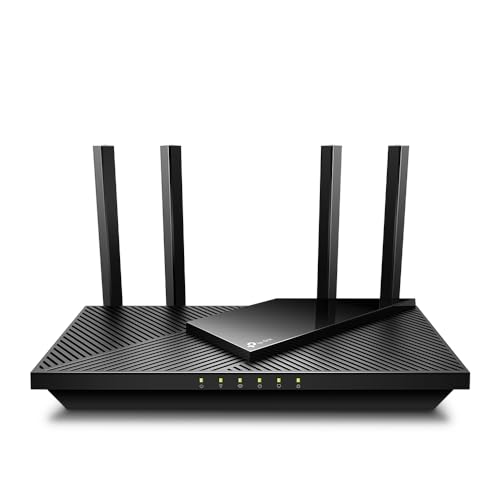
TP-Link AX1800 WiFi 6 Router V4 (Archer AX21)

If you’re looking for a solid entry into the Wi-Fi 6 world without breaking the bank, the TP-Link Archer AX21 V4 is a fantastic choice. This router stands out by offering the speed and efficiency benefits of Wi-Fi 6, alongside a built-in VPN server, making it a powerful yet affordable option for users who need both performance and enhanced security. It’s designed to deliver extensive coverage and reduce network congestion, ensuring your devices far and wide get a stable connection.
- Key Features:
- VPN SERVER: Supports both OpenVPN and PPTP VPN Server.
- DUAL-BAND WIFI 6 ROUTER: Wi-Fi 6 (802.11ax) technology for faster speeds and greater capacity.
- AX1800: Up to 1.8 Gbps total bandwidth (1200 Mbps on 5 GHz, 574 Mbps on 2.4 GHz).
- CONNECT MORE DEVICES: OFDMA technology allows more data to more devices simultaneously.
- EXTENSIVE COVERAGE: Beamforming, 4 high-gain antennas, and advanced FEM chipset for strong, reliable Wi-Fi.
- Cybersecurity Commitment: Designed with advanced security.
- Works with all internet service providers.
- Pros:
- Excellent value for a Wi-Fi 6 router.
- Includes VPN server functionality.
- Good coverage for medium to large homes.
- Supports modern Wi-Fi 6 features like OFDMA and Beamforming.
- Cons:
- Not the fastest Wi-Fi 6 option available.
- No USB port for network storage.
- User Impressions: Many users praise the Archer AX21 for its easy setup and noticeable improvement in Wi-Fi speed and coverage compared to older routers. It’s frequently recommended as a reliable, budget-friendly upgrade that handles multiple devices well.
TP-Link AX5400 WiFi 6 Router (Archer AX73)

For those who demand serious speed and expansive coverage, the TP-Link Archer AX73 steps up to the plate. This router is a powerhouse, boasting AX5400 speeds perfect for 8K streaming and intense gaming sessions. What really sets it apart for long distance is its robust coverage features, including six high-power antennas and Beamforming, all working together to adapt Wi-Fi to your home’s layout and concentrate signal strength where it’s needed most. Plus, with a USB 3.0 port and TP-Link HomeShield, it offers a well-rounded package for any modern smart home.
- Key Features:
- Gigabit WiFi for 8K Streaming: Up to 5400 Mbps total bandwidth.
- Full Featured WiFi 6 Router: 4T4R and HE160 technologies on 5 GHz for max 4.8 Gbps.
- Connect More Devices: MU-MIMO and OFDMA for congestion reduction and 4X throughput.
- Extensive Coverage: High-Power FEM, 6× Antennas, Beamforming, and 4T4R structures.
- More Vents, Less Heat: Improved design for sustained performance.
- USB Sharing: 1× USB 3.0 port for media sharing and private cloud.
- TP-Link HomeShield: Premium security services (free and paid options).
- Works with all internet service providers.
- Pros:
- Exceptional speed for demanding applications.
- Superior coverage due to multiple high-gain antennas and Beamforming.
- USB 3.0 port adds versatility for network storage.
- Advanced security features with HomeShield.
- Cons:
- Higher price point than entry-level Wi-Fi 6 routers.
- HomeShield Pro requires a subscription for full features.
- User Impressions: Users frequently highlight the AX73’s impressive range and stability, often noting significant improvements in areas where their previous routers struggled. Gamers and streamers particularly appreciate the consistent, high-speed connection it provides.
TP-Link AC1900 Smart WiFi Router (Archer A8)

The TP-Link Archer A8 is a smart choice for those looking for a high-performance AC router that offers great value and strong coverage. While not the latest Wi-Fi 6 standard, its AC1900 speeds (1300 Mbps on 5GHz and 600 Mbps on 2.4GHz) are more than adequate for most homes, and its Wave 2 MU-MIMO technology ensures efficient communication with multiple devices. Its standout feature for long-distance connectivity is the boosted Wi-Fi coverage thanks to Beamforming and its OneMesh compatibility, allowing you to easily expand your network with extenders for seamless whole-home Wi-Fi.
- Key Features:
- OneMesh Compatible Router: Form a seamless WiFi network with TP-Link OneMesh extenders.
- Wave 2 Wireless Internet Router: AC1900 speeds (600 Mbps on 2.4GHz, 1300 Mbps on 5GHz).
- MU-MIMO Gigabit Router: 3 simultaneous data streams for optimal device performance.
- Boosted WiFi Coverage: Beamforming technology for efficient, long-range Wi-Fi.
- Full Gigabit Ports: 4 x Gigabit LAN and 1 x Gigabit WAN for fast wired connections.
- Parental Controls: Block content and set time limits.
- Works with all internet service providers.
- Pros:
- Excellent performance for an AC router.
- OneMesh compatibility for future expandability.
- Strong Wi-Fi coverage with Beamforming.
- Full Gigabit Ethernet ports.
- Cons:
- No USB port.
- Not Wi-Fi 6, so lacks some of the latest efficiency improvements.
- User Impressions: Customers often commend the Archer A8 for its reliable performance, ease of setup, and strong signal penetration, especially for its price point. The OneMesh feature is frequently cited as a major plus for expanding coverage to larger areas.
TP-Link AC1200 Gigabit WiFi Router (Archer A6)

The TP-Link Archer A6 provides an affordable yet capable solution for upgrading your home network, especially if you’re stepping up from an older, slower router. This dual-band AC1200 router offers a good balance of speed and coverage, making it an excellent best router for long distance Wi-Fi option for smaller to medium-sized homes on a budget. With four external antennas and Beamforming, it focuses signal strength, while MU-MIMO technology keeps multiple devices connected efficiently. Its OneMesh compatibility means you can easily extend its reach down the line, and WPA3 security adds a modern layer of protection.
- Key Features:
- Dual band router: Up to 1200 Mbps (300Mbps for 2.4GHz, 900Mbps for 5GHz).
- Full Gigabit Ports: 4 Gigabit LAN ports for wired devices.
- Boosted Coverage: Four external antennas with Beamforming technology.
- MU-MIMO technology: Allows high speeds for multiple devices simultaneously (5GHz band).
- Access Point Mode: Transforms wired connections into wireless networks.
- Advanced Security with WPA3: Latest Wi-Fi security protocol.
- TP-Link OneMesh: Simple way to form a seamless whole-home WiFi network.
- Works with all internet service providers.
- Pros:
- Very affordable entry-level Gigabit Wi-Fi.
- Good coverage for its price point with Beamforming and external antennas.
- WPA3 security provides modern protection.
- OneMesh compatible for future expansion.
- Cons:
- AC1200 speeds are modest compared to newer standards.
- No USB port.
- User Impressions: Reviewers appreciate the Archer A6’s straightforward setup, reliable performance, and solid coverage for its price. It’s often recommended for those seeking an economical upgrade that delivers a stable connection throughout their home.
GL.iNet GL-MT6000 (Flint 2) WiFi 6 High Speed Gaming Router

For gamers, power users, and privacy-conscious individuals, the GL.iNet GL-MT6000 (Flint 2) is a true gem. This Wi-Fi 6 router is not just about blazing speeds (up to 6 Gbps); it’s a feature-rich device designed for ultimate control over your network. Its standout capabilities for long-distance Wi-Fi include its robust 8-stream Wi-Fi 6 technology for stable connections, even under heavy load, but it truly shines with its rapid OpenVPN and Wireguard speeds, making it an ideal choice for securing your connection across large distances, whether at home or when traveling. The added AdGuard Home support ensures a clutter-free browsing experience.
- Key Features:
- WiFi 6 Standard: Up to 6 Gbps for smoother 4K streaming, gaming, video calls.
- High Speed Gaming Router: 8-stream Wi-Fi 6 technology for stable, high-speed connections.
- Rapid OpenVPN & Wireguard speed: Up to 900Mbps (Wireguard) and 190Mbps (OpenVPN).
- AdGuard Home Supported: DNS server for blocking tracking and ads.
- Mass device connectivity: Caters to over a hundred devices with higher storage.
- Easy Setup: Web Admin Panel access via Ethernet.
- Pros:
- Exceptional VPN performance (Wireguard and OpenVPN).
- Robust Wi-Fi 6 speeds and efficiency for gaming.
- AdGuard Home integration for ad and tracker blocking.
- High capacity for numerous connected devices.
- Cons:
- Requires firmware update upon initial setup for optimal performance.
- More technical features might be overkill for casual users.
- User Impressions: Users rave about the Flint 2’s powerful VPN capabilities and the level of control it offers over network settings. Gamers particularly highlight its low latency and stable performance, while privacy advocates appreciate the AdGuard Home integration.
NETGEAR Nighthawk 6-Stream Dual-Band WiFi 6 Router (RAX54S)

The NETGEAR Nighthawk RAX54S brings the legendary Nighthawk performance to the Wi-Fi 6 era. This router is engineered for extensive coverage, claiming up to 2,500 sq. ft. for up to 25 devices, making it a strong contender for the best router for long distance Wi-Fi in larger homes. Its AX5400 Gigabit speeds ensure uninterrupted streaming and gaming, while NETGEAR Armor provides an automatic, comprehensive shield of security for all your connected devices. It’s a premium option that combines raw power with robust security and reliable performance.
- Key Features:
- Coverage up to 2,500 sq. ft. for up to 25 devices.
- Fast AX5400 Gigabit speed with WiFi 6 technology.
- NETGEAR Armor: Automatic security shield (1-year subscription included).
- Compatible with any internet service provider up to 1Gbps.
- 4 x 1 Gig Ethernet ports and 1 USB 3.0 port for wired devices and storage.
- Easy setup and management with the Nighthawk app.
- Pros:
- Excellent coverage and speed for large homes.
- Robust cybersecurity features with NETGEAR Armor.
- USB 3.0 port for network storage and sharing.
- Reliable performance for demanding applications like HD gaming and video conferencing.
- Cons:
- NETGEAR Armor subscription required after the first year.
- Premium price point.
- User Impressions: Customers consistently praise the Nighthawk RAX54S for its powerful signal, wide coverage, and easy setup via the Nighthawk app. The included security features are also a big hit, providing peace of mind for connected smart home devices.
Wi-Fi Extender Internet Booster, 10000 Sq.ft Long Range

Sometimes, even the best router needs a little help reaching every nook and cranny. This 2026 WiFi Extender is designed to do just that, offering an impressive 10,000 sq. ft. of coverage to eliminate dead zones and ensure a consistent, stable Wi-Fi signal throughout your home. While not a router itself, it’s a powerful tool to achieve truly long distance Wi-Fi by boosting your existing router’s signal. With its 4 external antennas and powerful CPU, it’s built to handle numerous devices and demanding tasks without buffering.
- Key Features:
- 360° Full Signal Coverage: Extends wireless internet network coverage up to 10000 sq. ft.
- Incredibly Fast and Stable: Powerful CPU and 2.4Ghz ultra-core processor for strong signals.
- 99% Compatibility – Support 65+ Devices: Seamless online experiences for numerous devices.
- 1-Tap Setup: Easy WPS button setup, multiple modes (Repeater/Client/AP/Bridge/Router).
- Upgraded Security Features: WPA/WPA2 protocols for internet security.
- Ethernet Port: For faster wired connections.
- Pros:
- Massive claimed coverage area.
- High device compatibility (65+ devices).
- Extremely easy one-tap WPS setup.
- Multiple operating modes offer versatility.
- Cons:
- It’s an extender, not a primary router (requires an existing router).
- Claims of 10,000 sq. ft. might be optimistic under real-world conditions.
- User Impressions: Users are impressed by the simplicity of setting up this extender and the noticeable improvement in signal strength in previously dead zones. Its ability to support many devices simultaneously is also a commonly praised feature.
Wi-Fi 6 Extender Internet Booster for Home

Taking signal boosting to the next level, this 2026 WiFi 6 Extender Internet Booster offers an astounding 18,000 sq. ft. of claimed coverage and leverages Wi-Fi 6 technology for superior performance. If you have an exceptionally large home, a property with outdoor areas you want covered, or even a garage that needs a strong signal, this AX3000 dual-band extender is a compelling solution. It’s specifically designed to conquer long-distance challenges, providing fiber-grade speeds and robust connectivity for up to 99+ devices, ensuring your long distance Wi-Fi is both extensive and fast.
- Key Features:
- Long Range up to 18k sq. ft. Coverage: New generation WiFi 6, quad-core chip, 2 high-gain antennas.
- AX3000 Gigabit WiFi 6 Booster: Dual-band with speeds up to 3000Mbps, 35% faster than WiFi 5.
- Wide Compatibility: 5G high bandwidth, MU-MIMO, supports 99+ devices.
- 1-Tap Setup: WPS button pairing in 5 seconds.
- Commercial Grade Security: Latest WPA3/WPA2-WPA security protocols.
- Pros:
- Unrivaled claimed coverage area (18,000 sq. ft.).
- Wi-Fi 6 technology for faster, more efficient boosting.
- Supports a very high number of devices.
- Strong security with WPA3/WPA2-WPA.
- Cons:
- As an extender, it still relies on your main router’s signal quality.
- Real-world coverage might vary significantly from advertised.
- User Impressions: Customers highlight this extender’s incredible range and the speed improvements gained by its Wi-Fi 6 capabilities. The ease of setup is a recurring positive comment, as is its ability to reach previously inaccessible areas like garages and backyards.
Point-to-Point Wireless Bridge System CPE688KIT

When your need for long distance Wi-Fi goes beyond a large home and extends to outbuildings, barns, or remote offices, a traditional router or extender simply won’t cut it. This Point-to-Point Wireless Bridge System is the ultimate solution. It includes two weather-resistant wireless bridges capable of 5KM transmission, effectively extending your network over vast distances, and thoughtfully bundles an AX3000 Wi-Fi 6 router to broadcast the internet signal locally at the remote end. This comprehensive kit provides a reliable, robust, and secure network extension for even the most challenging scenarios.
- Key Features:
- Comprehensive Wireless Bridge Kit: Two 5.8G wireless bridges, brackets, and a WiFi 6 AX3000 dual-band router.
- 5KM Point-to-Point Transmission: Stable data transfer over long distances.
- Dual Gigabit Ethernet Ports: On both bridges for fast wired connections.
- 48V PoE Power Supply: Simplifies installation with single-cable power and data.
- Adjustable Mounting Brackets: For optimal alignment on poles or walls.
- Seamless WiFi 6 AX3000 Router: Provides ultra-fast Wi-Fi at the remote location.
- Weather-Resistant Design: IP66 weatherproofing for outdoor environments.
- Plug & Play Setup: Pre-configured for easy installation.
- Pros:
- Ideal solution for extreme long-distance outdoor network extension.
- Includes a high-performance Wi-Fi 6 router for the remote site.
- Robust, weather-resistant design for outdoor reliability.
- PoE simplifies power and data cabling.
- Cons:
- Requires line-of-sight between bridges for optimal performance.
- More complex setup than a standard router or extender.
- User Impressions: Users describe this kit as a “game-changer” for extending network access to remote buildings. They highlight its reliability, ease of setup (despite initial appearances), and the strong, stable connection it provides over impressive distances, even in challenging weather.
TP-Link Archer BE6500 Dual-Band Wi-Fi 7 Router

Step into the future of wireless connectivity with the TP-Link Archer BE6500, a cutting-edge Wi-Fi 7 router designed for unparalleled performance and future-proofing your home network. This router features the latest Multi-Link Operation (MLO) and 4K-QAM technologies, delivering incredible 6.5 Gbps total bandwidth. For long distance Wi-Fi, its wide coverage of up to 2,400 sq. ft. for up to 90 devices, supported by 6 high-performance antennas and Beamforming, ensures that every corner of your large home gets an optimized, lightning-fast signal. With ultra-fast 2.5 Gbps wired ports and EasyMesh compatibility, it’s ready for the most demanding applications and seamless whole-home coverage.
- Key Features:
- Future-Ready Wi-Fi 7: Multi-Link Operation (MLO), Multi-RUs, 4K-QAM.
- 6-Stream, Dual-Band Wi-Fi: 6.5 Gbps total bandwidth (5764 Mbps on 5GHz, 688 Mbps on 2.4GHz).
- Wide Coverage: Up to 2,400 sq. ft. max for up to 90 devices, 6x high performance antennas, Beamforming.
- Ultra-Fast 2.5 Gbps Wired Performance: 1x 2.5 Gbps WAN/LAN, 1x 2.5 Gbps LAN, 3x 1 Gbps LAN ports.
- Cybersecurity Commitment: Advanced security as a core requirement.
- Multi-Link Operation (MLO) Technology: Enhanced throughput, lower latency, improved reliability.
- Expand Your WiFi Coverage with EasyMesh: Create seamless Mesh network.
- Easy Setup and Use: Tether app or web interface.
- TP-Link HomeShield: Comprehensive network protection.
- VPN Clients and Server Supported: Enhanced security and flexibility.
- Pros:
- Bleeding-edge Wi-Fi 7 technology for future compatibility and speed.
- Exceptional total bandwidth and efficient data transfer.
- Extensive coverage and high device capacity.
- Multiple 2.5 Gbps wired ports for ultra-fast connections.
- Supports both VPN client and server functionalities.
- EasyMesh compatible for building a whole-home mesh network.
- Cons:
- Premium price point, as expected for Wi-Fi 7.
- Requires Wi-Fi 7 compatible devices to fully utilize its new features.
- User Impressions: Early adopters are thrilled with the Archer BE6500’s raw speed and the palpable difference Wi-Fi 7 makes, even with current devices benefiting from its efficiency. Users note its incredible range and the stability it brings to large, device-heavy networks, making it a powerful investment for years to come.
Conclusion
Choosing the best router for long distance Wi-Fi can dramatically transform your home network experience. Whether you’re battling dead zones in a large house, need robust connectivity for outdoor areas, or simply want to future-proof your setup, there’s a solution tailored to your needs. From budget-friendly Wi-Fi 6 options like the TP-Link Archer AX21 to the cutting-edge Wi-Fi 7 power of the TP-Link Archer BE6500, or specialized solutions like the Point-to-Point Wireless Bridge for extreme distances, the market offers a fantastic range of devices to ensure every corner of your space is bathed in a strong, reliable signal.
When making your final decision, consider your home’s size and layout, the number of devices you need to connect, your budget, and whether you might need to expand your network with mesh capabilities or extenders in the future. Prioritizing features like Beamforming, multiple high-gain antennas, and the latest Wi-Fi standards will help ensure you get the extensive coverage you’re looking for. Don’t let weak Wi-Fi hold you back any longer—invest in a router that truly delivers a powerful, long-distance connection!
FAQ
Q1: What makes a router good for long distance Wi-Fi?
A: Routers designed for long distance Wi-Fi typically feature high-gain external antennas, Beamforming technology (which directs signals to devices), and often support newer Wi-Fi standards like Wi-Fi 6 or Wi-Fi 7 for improved efficiency and signal penetration. A powerful processor also helps manage more devices and data streams over larger areas.
Q2: Is Wi-Fi 6 better for range than Wi-Fi 5?
A: While Wi-Fi 6 (802.11ax) doesn’t inherently boost raw signal power over Wi-Fi 5 (802.11ac), its efficiency improvements like OFDMA and MU-MIMO can lead to better performance and more stable connections over range, especially in environments with many connected devices or interference. It allows more efficient data transfer, which feels like better range because the connection remains strong and consistent.
Q3: What’s the difference between a router, an extender, and a mesh system?
A:
* Router: The primary device that connects to your modem and creates your Wi-Fi network.
* Extender (or Repeater): A device that captures your existing Wi-Fi signal and rebroadcasts it, extending its reach to dead zones. It often creates a separate network name.
* Mesh System: A network of multiple devices (a main router and several satellites) that work together to create a single, seamless Wi-Fi network that blankets a large area with consistent signal.
Q4: How important are antennas for long-range Wi-Fi?
A: Very important! Antennas are crucial for transmitting and receiving Wi-Fi signals. Routers with multiple high-gain external antennas can project signals further and with greater strength, improving overall coverage and penetrating obstacles more effectively than routers with internal or fewer antennas.
Q5: Can I use an old router as an extender?
A: Yes, many older routers can be configured to act as Wi-Fi extenders or access points. This can be a cost-effective way to boost your Wi-Fi coverage, though it might lack some advanced features and performance of dedicated extenders or newer Wi-Fi standards. Check your router’s firmware for “AP mode” or “repeater mode” options.
Q6: What is Beamforming technology?
A: Beamforming is a smart technology that allows your router to detect where your Wi-Fi devices are located and then focus its Wi-Fi signal directly towards them. Instead of broadcasting the signal uniformly in all directions, Beamforming directs a stronger, more targeted signal to your specific devices, resulting in better speed, range, and reliability.
Q7: Should I choose a dual-band or tri-band router for long distance?
A: For many homes, a good dual-band router (2.4GHz and 5GHz) with strong antennas and Beamforming will provide excellent long-distance coverage. Tri-band routers add a second 5GHz band, which is particularly beneficial in very dense networks with many high-bandwidth devices (like multiple 4K streamers or gaming consoles) to reduce congestion, but don’t necessarily offer a huge increase in raw range over a well-designed dual-band router.
Q8: What are the main factors that can negatively affect Wi-Fi range?
A: Many things can degrade your Wi-Fi signal. Common culprits include physical obstructions (thick walls, metal objects, concrete), interference from other electronic devices (microwaves, cordless phones, neighbor’s Wi-Fi), distance from the router, outdated router technology, and the layout of your home.
Q9: How can I improve my existing router’s range without buying a new one?
A:
1. Relocate your router: Place it centrally, high up, and away from obstructions.
2. Update firmware: Ensure your router has the latest software for optimal performance.
3. Adjust antennas: If adjustable, orient them for best signal.
4. Change Wi-Fi channels: Switch to less congested channels to reduce interference.
5. Add an extender or access point: For significant dead zones.
6. Reduce interference: Move other electronics away from your router.




Leave a Reply
You must be logged in to post a comment.