
Are you tired of sluggish internet speeds, dead zones, or constantly buffering streams with your Comcast Xfinity service? It might be time to ditch that old, rented modem/router combo and invest in one of the best routers for Comcast WiFi. Upgrading your equipment can significantly improve your home network’s performance, expand your wireless coverage, and even save you money on monthly rental fees!
Choosing the right router for your Comcast internet can feel a bit overwhelming, with all the technical jargon and endless options. But don’t sweat it! We’ve done the heavy lifting for you, breaking down the top contenders that are fully compatible with Comcast Xfinity. We’ll explore powerful modem-router combos that streamline your setup and dedicated Wi-Fi 6 routers that elevate your wireless experience, ensuring you get the most out of your internet plan.
Let’s dive in and find the perfect device to supercharge your Comcast WiFi!
What to Look For in a Router for Comcast Xfinity
Before we jump into our top picks, here’s a quick rundown of what makes a great router for Comcast:
- Compatibility: Ensure the device is certified by Comcast Xfinity. Our picks below are confirmed compatible.
- DOCSIS Standard: For modem/router combos, DOCSIS 3.0 is good for speeds up to 400-800 Mbps, while DOCSIS 3.1 is future-proof and supports gigabit speeds and beyond.
- Wi-Fi Standard: Wi-Fi 5 (802.11ac) is still strong, but Wi-Fi 6 (802.11ax) offers faster speeds, better efficiency for multiple devices, and improved performance in busy networks.
- Speed & Coverage: Match the router’s rated speed and coverage area to your internet plan and home size.
- Features: Look for features like multiple Ethernet ports, parental controls, a dedicated app for easy management, and security protocols.
- Modem-Router Combo vs. Separate Units: Combos save space and simplify setup but offer less flexibility for upgrades. Separate units give you more freedom to mix and match.
Our Top Picks for the Best Router for Comcast WiFi
Let’s get to the good stuff! Here are our reviews of the top 7 options:
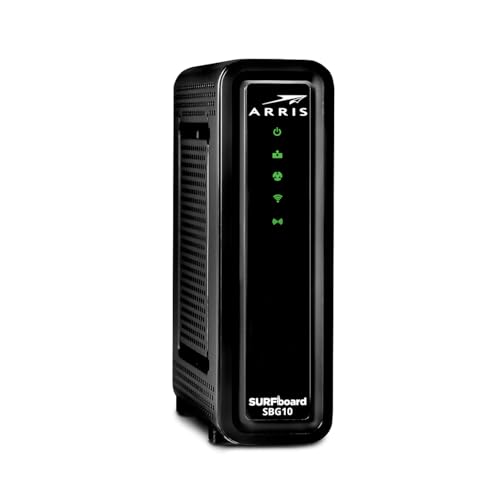
ARRIS (SBG10) – Cable Modem Router Combo – DOCSIS 3.0

The ARRIS SURFboard SBG10 is an excellent entry-level modem router combo for anyone looking to ditch their rental fees and get reliable, fast internet for moderate speed plans. Arris is a trusted name in home connectivity, and this two-in-one device delivers solid Wi-Fi coverage and speeds, making it a smart choice for most households. It’s a straightforward solution that combines your modem and router into one sleek unit, saving space and hassle.
- Key Features:
- DOCSIS 3.0 modem technology.
- Certified for use with Comcast Xfinity (and Cox).
- Save up to $168 per year in rental fees.
- Easy setup and management via the SURFboard Central App.
- Enhanced parental controls and real-time network monitoring through the app.
- From a trusted brand with extensive modem sales.
- Pros:
- Cost-effective, helps eliminate monthly rental fees.
- Simple, intuitive setup process with app support.
- Reliable performance for everyday browsing, streaming, and downloading.
- Integrated parental controls are a bonus for families.
- Compact 2-in-1 design saves space.
- Cons:
- DOCSIS 3.0 is an older standard, not ideal for gigabit-plus internet plans.
- Not compatible with Charter Spectrum (but good for Comcast Xfinity).
- Max speeds are limited compared to DOCSIS 3.1 models.
- User Impressions: Users frequently praise the SBG10 for its ease of installation and the immediate savings on rental fees. Many find it perfectly sufficient for their moderate internet needs, offering stable connectivity for multiple devices without a hitch. While some wish for higher speeds for demanding tasks, it generally meets expectations for a budget-friendly combo unit.
See it on Amazon Here
ARRIS (G34) – Cable Modem Router Combo – Fast DOCSIS 3.1

If you’re looking for a serious upgrade to handle today’s—and tomorrow’s—internet speeds, the ARRIS SURFboard G34 is a fantastic choice. This modem router combo truly stands out with its cutting-edge DOCSIS 3.1 technology and Wi-Fi 6 capabilities, making it ideal for Comcast Xfinity’s faster internet plans, including gigabit speeds. It’s built for low latency, ultra-fast streaming, and seamless online gaming across your entire home.
- Key Features:
- DOCSIS 3.1 modem technology (10x faster than DOCSIS 3.0).
- Dual-concurrent AX3000 Wi-Fi 6 speeds up to 3 Gbps.
- Four 1-Gigabit Ethernet ports for fast wired connections.
- Certified for Comcast Xfinity (Gigabit/Gigabit x2), Cox (Gigablast), and Spectrum (Internet Gig).
- Save up to $168 per year on rental fees.
- Easy setup and advanced management via the SURFboard Central App, including parental controls.
- 2-year warranty and dedicated customer support.
- Pros:
- Future-proof with DOCSIS 3.1 and Wi-Fi 6, supporting multi-gig speeds.
- Excellent performance for heavy streaming, online gaming, and multiple connected devices.
- Robust wired connectivity with four Gigabit Ethernet ports.
- Intuitive mobile app for setup and network control.
- Strong warranty and customer support.
- Cons:
- Higher price point than DOCSIS 3.0 models.
- Might be overkill for users on very low-speed internet plans.
- User Impressions: Customers rave about the G34’s speed and reliability, especially those with gigabit Xfinity plans. The Wi-Fi 6 performance is a game-changer for homes with many devices, and the app makes managing the network a breeze. Gamers and streamers particularly appreciate the low latency and consistent performance.
See it on Amazon Here
NETGEAR Nighthawk AC1900 (24×8) DOCSIS 3.0 WiFi Cable Modem

The NETGEAR Nighthawk AC1900 C7000 is a powerful and reliable modem router combo that has been a long-standing favorite for Comcast Xfinity users. It’s engineered for fast speeds, offering DOCSIS 3.0 with 24×8 channel bonding and AC1900 Wi-Fi performance. This unit is perfect for households that need robust wireless coverage and reliable wired connections for gaming consoles, PCs, and other smart home devices.
- Key Features:
- DOCSIS 3.0 modem with 24×8 channel bonding.
- AC1900 Wi-Fi (Wi-Fi 5) for speeds up to 1900 Mbps.
- Compatible with Xfinity by Comcast, Cox, and Spectrum.
- Save up to $150/year in rental fees.
- Built for cable provider plans up to 800 Mbps speed.
- Up to 1800 sq ft wireless coverage and 30 device connections.
- Four Gigabit Ethernet ports and one USB port for storage.
- Supports WEP and WPA/WPA2 wireless security protocols.
- Pros:
- Excellent Wi-Fi coverage and capacity for medium to large homes.
- High-performance DOCSIS 3.0 for plans up to 800 Mbps.
- Multiple Gigabit Ethernet ports and a USB port add versatility.
- Reputable Nighthawk brand for reliability and performance.
- Saves significantly on monthly rental fees.
- Cons:
- Uses DOCSIS 3.0 and Wi-Fi 5, not the absolute latest standards.
- May not be sufficient for future multi-gig internet plans.
- User Impressions: The Nighthawk C7000 consistently receives high marks for its strong Wi-Fi signal, ease of setup, and overall reliability. Users appreciate its ability to handle multiple devices simultaneously, making it great for busy households with lots of streaming and online activity. Many highlight the noticeable improvement over their rented Comcast equipment.
See it on Amazon Here
TP-Link AX1800 WiFi 6 Router V4 (Archer AX21) – Dual

The TP-Link Archer AX21 is a fantastic choice if you already have a separate, compatible cable modem or prefer to keep your modem and router separate for maximum flexibility. This is a router-only unit, but it’s one of the best routers for Comcast WiFi if you’re specifically looking to upgrade your Wi-Fi network with the latest Wi-Fi 6 technology. It delivers impressive speeds, extensive coverage, and features like a built-in VPN server, making it a powerful hub for your home network.
- Key Features:
- Dual-Band Wi-Fi 6 (802.11ax) technology for faster speeds and greater capacity.
- AX1800 total bandwidth (up to 1200 Mbps on 5 GHz, 574 Mbps on 2.4 GHz).
- OFDMA technology for connecting more devices simultaneously.
- Extensive coverage with Beamforming, 4 high-gain antennas, and an advanced FEM chipset.
- Built-in OpenVPN Server and PPTP VPN Server.
- Works with all internet service providers (Comcast, Charter, AT&T, etc.) as it’s a router only.
- CISA Secure-by-Design pledge signatory for cybersecurity.
- Pros:
- Top-tier Wi-Fi 6 performance significantly boosts wireless speeds and efficiency.
- Excellent Wi-Fi coverage, reducing dead zones.
- Advanced features like VPN server for enhanced privacy and security.
- OFDMA improves performance in device-dense environments.
- Future-proofs your wireless network, regardless of your modem.
- Cons:
- Requires a separate cable modem (not a combo unit).
- May be a higher initial investment if you need to buy a modem too.
- Dual-band only, doesn’t support the 6 GHz band of Wi-Fi 6E.
- User Impressions: Users frequently commend the Archer AX21 for its strong Wi-Fi 6 performance and expanded range. Many report a significant improvement in their wireless experience, especially with multiple devices. The built-in VPN server is a popular feature for those seeking added privacy. The only caveat for some is the need for a separate modem, but for those who understand this, it’s a highly recommended upgrade.
See it on Amazon Here
ARRIS (SBG10-RB) – Modem Router Combo – DOCSIS 3.0 16
This ARRIS SURFboard SBG10-RB is essentially a variant of the ARRIS SBG10 we reviewed earlier, often indicating a refurbished model or a specific retail package. It offers the same core benefits of a reliable DOCSIS 3.0 modem router combo, making it a practical and cost-effective solution for those with Comcast Xfinity plans up to 400 Mbps. It’s perfect for families looking to save on rental fees while maintaining solid internet performance for everyday tasks.
- Key Features:
- DOCSIS 3.0 modem with 16 downstream and 4 upstream channels.
- Approved for Comcast Xfinity (and Cox).
- Best for cable internet service plans up to 400 Mbps.
- Setup and manage your network with the SURFboard Manager app.
- Integrated modem and Wi-Fi router.
- Pros:
- Great value, especially if it’s a refurbished option offering a lower price point.
- Simple setup and management through the companion app.
- Reliable performance for mid-tier internet speeds.
- Saves monthly rental fees from your ISP.
- Compact 2-in-1 design.
- Cons:
- DOCSIS 3.0 and 16×4 channels limit maximum speed and future-proofing.
- Not suitable for gigabit-speed plans.
- May not have the latest Wi-Fi standards or advanced features of newer models.
- User Impressions: Customers find this model to be a dependable workhorse for their 300-400 Mbps Comcast plans. The main draw is the cost savings and the straightforward plug-and-play experience. While it won’t break any speed records, it consistently delivers a stable connection for streaming, browsing, and general home use.
See it on Amazon Here
NETGEAR Nighthawk Modem Router Combo C7000-Compatible with

The NETGEAR Nighthawk C7000, as seen previously, is a fantastic option, and this listing reaffirms its popularity and capability. This particular variant often highlights the robust security features bundled with the Nighthawk line. It’s a powerful 2-in-1 device that combines a high-speed DOCSIS 3.0 cable modem with an AC1900 Wi-Fi 5 router, delivering excellent coverage and speed for Comcast Xfinity plans up to 800 Mbps. With NETGEAR Armor, it adds an extra layer of protection to your entire home network.
- Key Features:
- Compatible with Xfinity, Spectrum, Cox, and other major cable providers.
- Best for cable provider plans up to 800Mbps.
- Coverage up to 1,800 sq ft and 30 devices with WiFi 5 AC1900 speed.
- Replaces your cable modem and WiFi router, saving up to $168/yr.
- Four 1 Gig Ethernet ports and one USB 2.0 port.
- NETGEAR Armor software for automatic, real-time security against hackers (30-day trial included).
- Easy setup and management with the Nighthawk app.
- Automatic firmware updates and industry-leading safety features.
- Pros:
- Reliable, high-performance combo unit from a trusted brand.
- Extensive Wi-Fi coverage for large homes and many devices.
- Integrated cybersecurity with NETGEAR Armor offers peace of mind.
- Saves on monthly rental fees.
- Simple management via the Nighthawk app.
- Cons:
- DOCSIS 3.0 and Wi-Fi 5 are not the newest standards.
- May not fully leverage the fastest gigabit-plus internet plans.
- User Impressions: This version of the C7000 often draws praise for its added security features, which users find valuable in protecting their connected devices. Beyond that, it delivers the consistent performance and reliable Wi-Fi that Nighthawk is known for, making it a go-to choice for those wanting both speed and network protection for their Comcast service.
See it on Amazon Here
NETGEAR Nighthawk AC1900 (24×8) DOCSIS 3.0 WiFi Cable Modem

Once again, the NETGEAR Nighthawk C7000 makes an appearance, emphasizing its broad compatibility and proven performance. This confirms its status as a consistently recommended best router for Comcast WiFi users. It offers the same robust features, reliable AC1900 Wi-Fi, and DOCSIS 3.0 modem capabilities that make it a smart investment for replacing your rented Comcast equipment and improving your home network’s efficiency and speed.
- Key Features:
- Certified by Xfinity by Comcast, COX, and Spectrum.
- DOCSIS 3.0 modem with 24×8 channel bonding.
- AC1900 Wi-Fi (up to 1900 Mbps) for up to 1800 sq ft coverage and 30 devices.
- Best for cable provider plans up to 800 Mbps speed.
- Save up to $150/yr in equipment rental fees.
- Four Gigabit Ethernet ports and one USB port.
- Supports WEP and WPA/WPA2 wireless security protocols.
- Pros:
- Widely compatible and certified by major cable internet providers, including Comcast.
- Strong Wi-Fi performance and extensive coverage for most homes.
- Reliable DOCSIS 3.0 technology for high-speed internet.
- Versatile connectivity options with multiple Ethernet and USB ports.
- Eliminates monthly equipment rental costs.
- Cons:
- As with other C7000 listings, it uses DOCSIS 3.0 and Wi-Fi 5, not the absolute cutting edge.
- Not suitable for multi-gig fiber connections or the very fastest cable plans (above 800Mbps).
- User Impressions: This consistent listing of the C7000 underscores its long-standing popularity and positive user experiences. Customers consistently praise its straightforward setup, strong and stable Wi-Fi signal, and its ability to handle demanding tasks like streaming and online gaming. It’s seen as a reliable and cost-effective upgrade from ISP-provided hardware.
See it on Amazon Here
Conclusion
Choosing the best router for Comcast WiFi is a fantastic way to take control of your internet experience, eliminate those pesky monthly rental fees, and significantly improve your home network’s performance. Whether you opt for a powerful, future-proof DOCSIS 3.1 Wi-Fi 6 combo like the ARRIS G34, a reliable DOCSIS 3.0 workhorse like the NETGEAR Nighthawk C7000, or a dedicated Wi-Fi 6 router like the TP-Link Archer AX21, you’re investing in a faster, more stable, and more secure connection.
Remember to consider your current Comcast internet plan speed and your household’s needs when making your choice. If you have a gigabit plan, a DOCSIS 3.1 modem is a must. If you’re on a mid-tier plan and want a simple, budget-friendly solution, a DOCSIS 3.0 combo could be perfect. And don’t forget the added benefits of a companion app for easy management and enhanced security features.
Ultimately, the right router will not only save you money but also transform your online activities from frustrating to fantastic. Happy browsing, streaming, and gaming!
FAQ
Q1: Why should I buy my own router for Comcast Xfinity instead of renting?
A: Buying your own router (or modem/router combo) can save you money on monthly equipment rental fees, which typically range from $10-$15. Over a year, this can add up to $120-$180 in savings. Additionally, you get better control over your network, access to more advanced features, and often superior performance and coverage compared to ISP-provided equipment.
Q2: Do I need a modem, a router, or a modem/router combo for Comcast WiFi?
A: To access Comcast internet, you always need a cable modem to translate the signal from the cable line. You also need a Wi-Fi router to create a wireless network for your devices. A modem/router combo unit combines both functions into one device, offering simplicity and saving space. If you prefer more flexibility or want the absolute latest Wi-Fi tech, separate modem and router units are an option.
Q3: What is DOCSIS and why does it matter for Comcast?
A: DOCSIS (Data Over Cable Service Interface Specification) is the international telecommunications standard that permits high-speed data transfer over existing cable TV (CATV) systems. For Comcast, the DOCSIS standard of your modem (e.g., DOCSIS 3.0 or DOCSIS 3.1) determines the maximum internet speeds it can support. DOCSIS 3.1 is the latest standard, offering significantly faster speeds and better performance, especially for gigabit internet plans.
Q4: Will a new router improve my internet speed from Comcast?
A: A new router itself won’t increase the maximum speed of your Comcast internet plan. However, a high-quality router can ensure you get the full speed you’re paying for by improving Wi-Fi signal strength, reducing interference, efficiently managing traffic for multiple devices, and supporting newer, faster Wi-Fi standards (like Wi-Fi 6). It can eliminate bottlenecks caused by outdated or underperforming equipment.
Q5: What is Wi-Fi 6 (802.11ax) and do I need it for Comcast?
A: Wi-Fi 6 is the latest generation of Wi-Fi technology. It offers faster speeds, lower latency, and improved efficiency, especially in environments with many connected devices (like smart homes). While not strictly necessary for all Comcast plans, it’s highly recommended if you have a fast internet plan (300 Mbps or higher), a lot of Wi-Fi devices, or engage in demanding activities like 4K streaming or online gaming. It’s more future-proof.
Q6: How do I know if a router is compatible with Comcast Xfinity?
A: Always check the product description for compatibility with “Comcast Xfinity” or “Xfinity by Comcast.” Many manufacturers also provide a list of compatible ISPs, or you can check Comcast’s official list of approved modems on their website. All the products listed in this article are compatible with Comcast Xfinity.
Q7: Can I use my new router for Comcast Voice or Xfinity Home Security?
A: Most standard third-party cable modems and routers are not compatible with Comcast’s bundled voice services (digital voice) or Xfinity Home Security. These services often require specific Comcast-provided gateway devices. If you use these services, you might need to keep your Comcast gateway (and perhaps put it in bridge mode) or use a separate modem/router for data only. Always verify with Comcast directly.
Q8: What’s the difference between AC1900 and AX1800 Wi-Fi speeds?
A: AC1900 refers to Wi-Fi 5 (802.11ac) with a theoretical maximum combined speed of 1900 Mbps (typically 1300 Mbps on 5GHz and 600 Mbps on 2.4GHz). AX1800 refers to Wi-Fi 6 (802.11ax) with a theoretical maximum combined speed of 1800 Mbps (typically 1200 Mbps on 5GHz and 574 Mbps on 2.4GHz). While the numbers look similar, Wi-Fi 6 (AX) generally offers better efficiency, lower latency, and better performance in congested environments, even if the peak “number” isn’t dramatically higher in some models.




Leave a Reply
You must be logged in to post a comment.