
Ever find yourself stuck in a “WiFi dead zone” in your own home? Maybe your streaming cuts out during a crucial moment, or your video call keeps freezing. It’s frustrating, right? A powerful WiFi signal is the backbone of any modern smart home, and for that, you need a router with excellent range. Whether you’re working from home, binge-watching your favorite shows, or gaming online, having the best range for wifi router can make all the difference.
In this guide, we’ve rounded up five top-notch wireless routers that excel at blanketing your home with fast, reliable internet. Say goodbye to buffering and hello to seamless connectivity, no matter where you are in the house.
Why Your Router’s Range Matters
Your WiFi router isn’t just about speed; its ability to cover your entire home with a strong signal is equally important. A router with superior range ensures that every device, from your laptop in the study to your smart TV in the living room and your security camera in the backyard, gets a consistent and robust connection. This means no more dropped calls, no more pixelated videos, and no more frustrating lag during your online gaming sessions. It’s about enjoying your digital life without interruptions.
Our Top 5 Picks for Extended WiFi Coverage
Let’s dive into our hand-picked selection of routers that deliver exceptional range and performance.
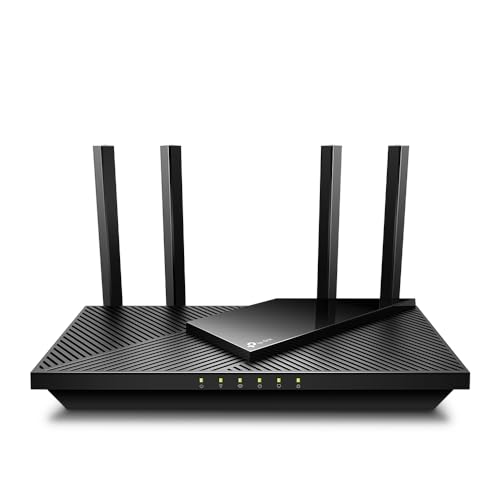
1. TP-Link AX1800 WiFi 6 Router V4 (Archer AX21)

If you’re looking for a router that blends modern WiFi 6 technology with solid range and handy features without breaking the bank, the TP-Link Archer AX21 V4 is a fantastic choice. This router stands out for its impressive ability to deliver strong, reliable WiFi throughout your home, thanks to its advanced antenna design and Beamforming technology. Plus, with a built-in VPN server, it offers an extra layer of privacy and flexibility that many users appreciate.
- Key Features:
- VPN SERVER: Supports both OpenVPN and PPTP VPN Server.
- DUAL-BAND WIFI 6 ROUTER: Wi-Fi 6 (802.11ax) technology for faster speeds and greater capacity.
- AX1800: Up to 1.8 Gbps total bandwidth (1200 Mbps on 5 GHz, 574 Mbps on 2.4 GHz).
- CONNECT MORE DEVICES: OFDMA technology allows simultaneous data communication to multiple devices.
- EXTENSIVE COVERAGE: Beamforming, 4 high-gain antennas, and an advanced FEM chipset for strong, reliable WiFi.
- WORKS WITH ALL INTERNET SERVICE PROVIDERS.
- CISA Secure-by-Design pledge signatory for cybersecurity.
- Pros:
- Excellent value for a WiFi 6 router.
- Good coverage for medium to large homes.
- Includes VPN server functionality.
- Supports OFDMA for better multi-device performance.
- Easy setup and management via the Tether app.
- Cons:
- AX1800 speed might not be sufficient for very high-bandwidth needs (e.g., multiple 8K streams).
- Lacks a USB port for network storage.
- User Impressions: Customers frequently praise the Archer AX21 for its straightforward setup, consistent performance, and the noticeable improvement in WiFi coverage compared to older routers. Many highlight the strong signal even through walls and the reliable connection for multiple smart home devices.
2. TP-Link AX5400 WiFi 6 Router (Archer AX73)

The TP-Link Archer AX73 is a powerhouse designed for homes that demand serious bandwidth and expansive coverage. If you’re into 8K streaming, intense online gaming, or have a house full of smart gadgets, this router is built to handle it all without a sweat. Its advanced features, including 6 powerful antennas and HE160 technology, are specifically engineered to provide an extensive and robust wireless signal, making it one of the best range for wifi router options available.
- Key Features:
- Gigabit WiFi for 8K Streaming – Up to 5400 Mbps WiFi for faster browsing, streaming, gaming.
- Full Featured WiFi 6 Router – 4T4R and HE160 technologies on the 5 GHz band for max 4.8 Gbps ultra-fast connections.
- Connect More Devices – MU-MIMO and OFDMA support reduce congestion and boost throughput.
- Extensive Coverage – High-Power FEM, 6× Antennas, Beamforming, and 4T4R structures for wide WiFi coverage.
- More Vents, Less Heat – Improved design for optimal performance.
- USB Sharing – 1× USB 3.0 port for easy media sharing and private cloud storage.
- TP-Link HomeShield – Premium security services with free and paid features (Network Security Scan, Parental Controls, QoS).
- Pros:
- Blazing-fast AX5400 speeds ideal for demanding activities.
- Exceptional coverage thanks to 6 antennas and Beamforming.
- USB 3.0 port for network storage.
- Robust security features with TP-Link HomeShield.
- Efficient heat dissipation for stable performance.
- Cons:
- Higher price point compared to entry-level WiFi 6 routers.
- HomeShield Pro features require a subscription after the trial.
- User Impressions: Users are consistently impressed by the Archer AX73’s ability to eliminate dead zones and deliver incredibly fast speeds throughout larger homes. Many highlight its stability, the strong signal strength, and the added utility of the USB port for network-attached storage.
3. NETGEAR Nighthawk 6-Stream Dual-Band WiFi 6 Router (RAX54S)

The NETGEAR Nighthawk RAX54S brings the legendary Nighthawk performance and sleek design to a powerful WiFi 6 package. This router is engineered for extensive coverage, boasting the capability to cover up to 2,500 sq. ft. and connect up to 25 devices without a hitch. Its focus on security, with NETGEAR Armor included, makes it a top contender for families looking for a high-performance and secure home network. If you need a reliable best range for wifi router with enterprise-grade security, look no further.
- Key Features:
- Coverage up to 2,500 sq. ft. for up to 25 devices.
- Fast AX5400 Gigabit speed with WiFi 6 technology for uninterrupted streaming, HD video gaming, and web conferencing.
- NETGEAR Armor provides an automatic shield of security for your WiFi and connected devices (1-year subscription included).
- Compatible with any internet service provider up to 1Gbps.
- 4 x 1 Gig Ethernet ports and 1 USB 3.0 port for wired devices and storage.
- Easily set up and manage your WiFi with the Nighthawk app.
- Automatic firmware updates and industry-leading safety features.
- Pros:
- Excellent coverage for large homes.
- Robust cybersecurity with a year of NETGEAR Armor included.
- High AX5400 speeds for demanding applications.
- Multiple Gigabit Ethernet ports and a USB 3.0 port.
- Intuitive Nighthawk app for easy management.
- Cons:
- NETGEAR Armor subscription required after the first year.
- Design might be too aggressive for some aesthetics.
- User Impressions: Reviewers frequently praise the RAX54S for its impressive range, noting that it effectively eliminates dead spots even in multi-story homes. The included NETGEAR Armor is a huge plus for those concerned about cybersecurity, and the Nighthawk app makes setup and ongoing management a breeze.
4. TP-Link AXE5400 Tri-Band WiFi 6E Router (Archer AXE75)

The TP-Link Archer AXE75 is truly a next-generation router, embracing the groundbreaking WiFi 6E standard to deliver unparalleled speeds and an expansive wireless experience. Its revolutionary 6 GHz band provides a dedicated, interference-free superhighway for your newest devices, making it an absolute game-changer for latency-sensitive activities like VR gaming and 8K streaming. For those seeking the absolute best range for wifi router performance with future-proof technology, this tri-band beast is hard to beat.
- Key Features:
- Tri-Band WiFi 6E Router – Up to 5400 Mbps WiFi across three bands (6 GHz: 2402 Mbps; 5 GHz: 2402 Mbps; 2.4 GHz: 574 Mbps).
- WiFi 6E Unleashed – The brand new 6 GHz band offers more bandwidth, faster speeds, and near-zero latency.
- Connect More Devices—True Tri-Band and OFDMA technology increase capacity by 4 times.
- More RAM, Better Processing – Armed with a 1.7 GHz Quad-Core CPU and 512 MB High-Speed Memory.
- OneMesh Supported – Create a seamless whole-home mesh network with a OneMesh Extender.
- VPN Server and Client: Supports OpenVPN/PPTP/L2TP.
- TP-Link HomeShield – Premium security service for network and IoT protection.
- Pros:
- Future-proof WiFi 6E technology with the exclusive 6 GHz band.
- Exceptional tri-band speeds and capacity.
- Powerful Quad-Core CPU for smooth performance.
- OneMesh support for expandable whole-home coverage.
- VPN server and client functionality.
- Cons:
- To fully utilize 6E, you need WiFi 6E compatible devices.
- Premium price point.
- User Impressions: Early adopters of the Archer AXE75 rave about the incredible speed and low latency provided by the 6 GHz band, calling it a noticeable upgrade. They also appreciate the robust performance for multiple devices and the extended range, particularly in modern homes with compatible hardware.
5. TP-Link AC1200 Gigabit WiFi Router (Archer A6)

For those who need a reliable upgrade to their home network without breaking the bank, the TP-Link Archer A6 is an excellent choice. This AC1200 dual-band router provides a significant boost in speed and range over older N-standard routers, making it ideal for standard streaming and browsing in small to medium-sized homes. Its four external antennas with Beamforming technology ensure that your WiFi signal reaches further and more consistently, making it a budget-friendly contender for the best range for wifi router in its class.
- Key Features:
- Dual band router upgrades to 1200 Mbps high speed internet (300mbps for 2.4GHz plus 900Mbps for 5GHz).
- Full Gigabit Ports – 4 Gigabit LAN ports for wired devices.
- Boosted Coverage – Four external antennas with Beamforming technology extend and concentrate Wi-Fi signals.
- MU-MIMO technology – (5GHz band) allows high speeds for multiple devices simultaneously.
- Access Point Mode – Transforms your wired connection into a wireless network.
- Advanced Security with WPA3 – The latest Wi-Fi security protocol.
- TP-Link OneMesh – Form a seamless whole-home WiFi network by adding a OneMesh WiFi Extender.
- Pros:
- Very affordable price point.
- Good range and coverage for small to medium-sized homes.
- Full Gigabit Ethernet ports for fast wired connections.
- WPA3 security for enhanced protection.
- Supports MU-MIMO and Beamforming for better performance.
- Cons:
- Not WiFi 6, so it lacks the latest efficiency and speed benefits.
- Lower overall speed compared to AX-series routers.
- User Impressions: Users frequently commend the Archer A6 for its outstanding value. They report noticeable improvements in WiFi coverage and speed over their old routers, especially for basic streaming and browsing. The easy setup and the stable connection for everyday tasks are commonly highlighted.
Conclusion
Choosing the best range for wifi router really comes down to understanding your specific needs. Are you living in a small apartment or a multi-story mansion? Do you have just a few devices or a whole smart home ecosystem? No matter your situation, investing in a router with excellent wireless coverage is crucial for a smooth, frustration-free online experience.
From the budget-friendly yet capable TP-Link Archer A6 to the cutting-edge, future-proof TP-Link Archer AXE75 with its exclusive 6 GHz band, there’s a router here designed to banish those dreaded dead zones and supercharge your home network. Consider features like WiFi 6/6E, Beamforming, MU-MIMO, and the number of antennas when making your decision, as these all contribute significantly to boosting your signal strength and range.
Ultimately, a good router isn’t just a piece of tech; it’s the gateway to seamless entertainment, productive work, and effortless communication. Pick the one that best fits your home and lifestyle, and get ready to enjoy uninterrupted connectivity wherever you roam within your walls.
FAQ
Q1: What factors affect a WiFi router’s range?
A1: Several factors influence a router’s range, including the router’s power, antenna design, WiFi standard (e.g., WiFi 6, WiFi 6E), obstacles like walls (especially concrete or brick), other wireless interference, the layout of your home, and even the placement of the router itself.
Q2: Is WiFi 6 better for range than older standards?
A2: Yes, generally. While older standards like WiFi 5 (802.11ac) focused more on speed, WiFi 6 (802.11ax) introduces technologies like OFDMA and improved Beamforming which enhance efficiency and signal delivery, leading to better overall coverage and performance, especially in congested environments. WiFi 6E further adds a dedicated 6 GHz band which offers faster speeds and lower latency, though its range can be slightly shorter due to higher frequency, it provides a “cleaner” signal.
Q3: Where is the best place to put my WiFi router for maximum range?
A3: Place your router in a central location in your home, away from thick walls, large metal objects, and other electronics that might cause interference (like microwaves or cordless phones). Elevating it on a shelf or desk can also improve signal dispersion.
Q4: Can I extend my router’s range if it’s not enough?
A4: Absolutely! You can use WiFi extenders, mesh WiFi systems, or powerline adapters to boost your signal and eliminate dead zones. Mesh systems are often recommended for seamless whole-home coverage.
Q5: What is Beamforming technology and how does it help with range?
A5: Beamforming is a technology that allows a router to detect where your devices are located and direct a stronger, more focused WiFi signal directly towards them, rather than broadcasting it indiscriminately. This focused transmission improves signal strength and range for individual devices, especially at greater distances.
Q6: Do more antennas mean better range?
A6: Not always, but typically, routers with multiple well-designed external antennas can offer better signal strength and coverage. These antennas often work together using technologies like MU-MIMO and Beamforming to optimize signal transmission and reception, improving the best range for wifi router.
Q7: What’s the difference between dual-band and tri-band routers for range?
A7: Dual-band routers operate on two frequencies (2.4 GHz and 5 GHz). The 2.4 GHz band offers a wider range and better penetration through obstacles, while the 5 GHz band provides faster speeds over shorter distances. Tri-band routers add a second 5 GHz band or, with WiFi 6E, a 6 GHz band. This extra band can offload traffic, reduce congestion, and potentially offer more consistent performance across a wider area, especially if you have many devices, although the extra bands don’t inherently extend the maximum physical reach of the signal.
Q8: Should I prioritize range or speed when buying a router?
A8: Ideally, you want a balance of both. A super-fast router with poor range will only deliver high speeds in a small area. Conversely, a router with great range but slow speeds will give you connectivity everywhere, but it might not be enough for high-bandwidth tasks. For most users, a router that provides adequate speed and covers your entire living space is the best range for wifi router choice.
Q9: Does my internet service provider (ISP) affect my router’s range?
A9: No, your ISP primarily dictates the speed of the internet coming into your home (your bandwidth). Once the internet reaches your modem, your router is responsible for distributing that signal wirelessly throughout your house. A great router can’t make your ISP’s connection faster, but a poor router can certainly slow down the speeds you experience wirelessly, regardless of your ISP’s plan.




Leave a Reply
You must be logged in to post a comment.