
Ever been in the middle of an important video call, a thrilling online game, or just browsing your favorite site when suddenly, the lights flicker, and poof – your internet goes out? It’s frustrating, right? Even if the power comes back on quickly, waiting for your router and modem to boot up can feel like an eternity. That’s where a good battery backup for WiFi router comes in handy!
A reliable Uninterruptible Power Supply (UPS) isn’t just for keeping your computer on during a blackout; it’s a fantastic solution for maintaining your internet connection. These clever devices provide a continuous power supply to your network equipment, ensuring you stay connected even when the main power grid falters. Whether you’re working from home, streaming movies, or simply hate losing connection, investing in the best battery backup for WiFi router can be a game-changer.
We’ve scoured the market to bring you our top 5 picks for keeping your home network running smoothly. Let’s dive in!
Our Top 5 Battery Backup Solutions for Your WiFi Router
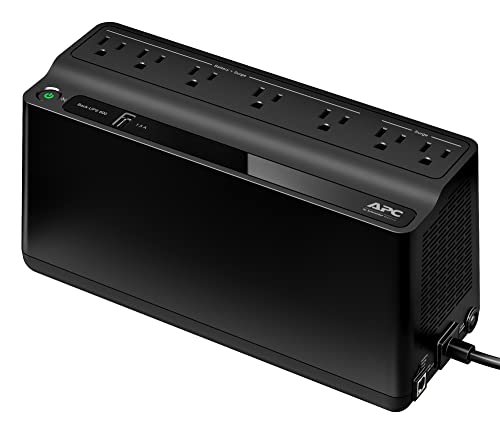
1. APC UPS Battery Backup and Surge Protector, 600VA/330 Watts

This APC UPS is a solid all-rounder, offering reliable battery backup and surge protection in a compact design. It’s an excellent choice for anyone looking for a no-fuss solution to keep their essential devices, like a WiFi router and modem, powered during short outages. Its thoughtful design, including a wall-mountable option and a USB charging port, makes it versatile for various home setups, ensuring your critical electronics remain operational.
- Key Features:
- 600VA / 330W battery backup power
- 7 Outlets: 5 Battery Backup & Surge Protector; 2 Surge Protection Only
- 1 USB Charger Port (1.5A)
- 5′ Power Cord with right-angle plug
- Wall-mountable design
- Powerchute UPS management via data port (Windows/Mac compatible)
- Replaceable Battery (model APCRBC154, sold separately)
- Pros:
- Good balance of power and features for common home needs
- USB port for charging small devices
- Wall-mountable, saving desk space
- User-replaceable battery extends product lifespan
- Reliable APC brand reputation
- Cons:
- 330W might be insufficient for multiple high-power devices
- Powerchute software mainly for PC/Mac, less relevant for just a router
- User Impressions: Customers frequently praise this unit for its reliability and ease of setup. Many appreciate the wall-mount feature for tidiness and the peace of mind it offers during brief power interruptions, especially for maintaining their internet connection. It’s often cited as a great value for the features provided.
2. CyberPower CP1500PFCLCD PFC Sinewave UPS Battery Backup and Surge Protector

When it comes to serious power protection for sensitive electronics, the CyberPower CP1500PFCLCD stands out. This beast offers a substantial 1500VA/1000W output with pure sine wave technology, making it ideal for devices with Active PFC power supplies, like high-end computers and networking gear. Its detailed color LCD panel, extensive outlet configuration, and USB charging ports make it a comprehensive solution for even the most demanding home office or entertainment system.
- Key Features:
- 1500VA/1000W PFC Sinewave Battery Backup
- 12 NEMA 5-15R OUTLETS: Six battery backup & surge protected; six surge protected
- Input: NEMA 5-15P right angle plug with five foot cord
- 2 USB charge ports (1 Type-A, 1 Type-C)
- Multifunction, color LCD panel (tilts up to 22 degrees)
- Automatic Voltage Regulation (AVR)
- 3-Year Warranty (including battery); $500,000 Connected Equipment Guarantee
- FREE PowerPanel Management Software (Download)
- Pros:
- High capacity suitable for multiple devices and longer runtimes
- Pure sine wave output is safer for sensitive electronics
- Excellent surge protection and AVR features
- Comprehensive color LCD panel provides real-time information
- USB-C charging port is a modern convenience
- Generous warranty and connected equipment guarantee
- Cons:
- Larger footprint due to higher capacity
- Higher price point compared to smaller units
- May be overkill if only backing up a router and modem
- User Impressions: Reviewers consistently highlight the robust build quality and the peace of mind provided by the pure sine wave output. The informative LCD screen is a big hit, offering easy monitoring of power conditions. Users with gaming PCs or extensive home network setups find this unit invaluable for preventing data loss and maintaining an uninterrupted workflow.
3. APC UPS 1500VA UPS Battery Backup and Surge Protector

For those with a more extensive home network or multiple critical devices to protect, this 1500VA APC UPS is a fantastic choice. It provides a generous 900W of battery backup, capable of supporting a full PC setup alongside your router and modem. With 10 outlets, including 5 with battery backup, you get ample connectivity, while features like Automatic Voltage Regulation (AVR) and Active PFC compatibility ensure clean, stable power delivery, making it a strong contender for the best battery backup for wifi router and beyond.
- Key Features:
- 1500VA / 900W Uninterruptible Power Supply
- 10 Outlets (NEMA 5-15R): 5 Battery Backup & Surge Protection; 5 Surge Protection Only
- 1 GB network dataline protection
- 6′ Power Cord with right-angle plug
- Powerchute UPS management via data port (Windows/Mac compatible)
- Automatic Voltage Regulation (AVR) and Active PFC compatible
- Replaceable Battery (model APCRBC124, sold separately)
- Energy-Star Certified
- Pros:
- High capacity and wattage for longer runtime and more devices
- AVR protects against voltage fluctuations without draining the battery
- Active PFC compatible for modern power supplies
- Network dataline protection is a thoughtful addition
- Energy-Star certified, promoting efficiency
- Replaceable battery for extended product life
- Cons:
- No USB charging ports
- Larger and heavier than smaller units
- Might be more capacity than needed for just a router and modem
- User Impressions: Users love the substantial backup power and the peace of mind it offers for their entire home office setup. Many have noted that it keeps their internet and computer running through significant power blips. The AVR feature is frequently praised for its ability to maintain power quality without constantly engaging the battery.
4. APC UPS Battery Backup Surge Protector, 425VA Backup

If your primary goal is simply to keep your WiFi router and perhaps a modem running during those annoying short power outages, the APC 425VA unit is a highly practical and budget-friendly option. This compact device delivers 425VA/225W of battery backup, specifically designed to power small, critical electronics. It’s perfect for tucking away in a corner, ensuring your essential internet connection stays live without breaking the bank.
- Key Features:
- 425VA / 225W battery backup power supply
- 6 Outlets (NEMA 5-15R): 4 UPS Battery Backup & Surge Protection; 2 Surge Protection Only
- 5′ Power Cord with right-angle plug
- Wall mountable
- Provides battery backup power for WiFi routers and other small electronics
- 3-year warranty; $75,000 connected-equipment policy
- Pros:
- Compact and wall-mountable design
- Specifically designed for small, critical electronics like a router
- Affordable entry point for UPS protection
- 3-year warranty for peace of mind
- Easy to set up and use
- Cons:
- Battery is not user-replaceable (service-replaceable only)
- Lower capacity means shorter runtime for multiple devices
- No advanced features like AVR or USB ports
- User Impressions: Customers appreciate its small footprint and effective performance for keeping their internet up during brief outages. It’s often recommended for those who need a basic, reliable backup for just their modem and router. The affordability and trusted APC brand are recurring positives in user feedback.
5. Amazon Basics UPS Battery Backup & Surge Protector

For an incredibly affordable and straightforward solution, the Amazon Basics UPS offers a no-frills yet effective way to protect your home network devices. With 400VA/255W of standby battery backup, it’s ideal for ensuring your WiFi router, modem, and other IoT devices stay powered during brief interruptions. It’s compact, easy to integrate into any space, and offers essential surge protection to safeguard your valuable electronics. This is a solid contender if you’re looking for the most economical battery backup for WiFi router.
- Key Features:
- Standby uninterruptible power supply (UPS) with 400VA / 255W battery backup
- 6 outlets total (NEMA 5-15R): 3 surge-protected; 3 surge-protected/battery-backup
- Protects electronic devices during a power surge
- Small compact size
- 5-foot cord with NEMA 5-15P right angle and 45-degree offset plug
- Power management software available for download
- Pros:
- Very budget-friendly option
- Compact design fits easily into small spaces
- Provides essential surge protection
- Good for basic home networks and IoT devices
- Simple and easy to use
- Cons:
- Shorter runtime compared to higher-capacity units (e.g., 1.5 min at full load)
- Standby UPS technology is less advanced than line-interactive or online
- No advanced features like AVR or USB charging
- Battery not user-replaceable
- User Impressions: Reviewers highlight its excellent value for money and its effectiveness for basic router and modem backup. It’s frequently recommended for users who experience only very short power flickers or need just enough time to safely shut down devices. The compact size is a common positive, making it unobtrusive in home environments.
Conclusion
Losing your internet connection, even for a moment, can be incredibly disruptive in our always-on world. Investing in the best battery backup for WiFi router is a smart move that provides peace of mind and keeps your digital life flowing smoothly, no feature can provide the peace of mind of having continuous internet. Whether you’re working from home, streaming your favorite show, or simply relying on smart home devices, a reliable UPS ensures those minor power blips don’t derail your day.
From the compact and affordable Amazon Basics UPS and APC 425VA, perfect for just your router and modem, to the more robust APC 600VA, and the powerhouse CyberPower and APC 1500VA units designed for comprehensive home office setups, there’s a battery backup solution for every need and budget. Each offers varying levels of capacity, protection features, and additional conveniences like USB charging or informative LCD screens.
When making your final decision, consider your specific needs: How many devices do you need to back up? How long do you need them to stay powered? What’s your budget? By answering these questions, you’ll be able to choose the perfect UPS to keep you connected, no matter what the power grid throws your way.
FAQ Section
Q1: What is a UPS (Uninterruptible Power Supply)?
A: A UPS (Uninterruptible Power Supply) is an electrical apparatus that provides emergency power to a load when the input power source or main power fails. It’s essentially a large battery pack with intelligent electronics that switches to battery power the instant it detects a power outage, without any interruption to your connected devices.
Q2: Why do I need a battery backup specifically for my WiFi router?
A: Your WiFi router and modem are essential for your internet connection. During power outages or even brief flickers, these devices lose power and have to reboot, which can take several minutes. A battery backup keeps them powered, ensuring your internet stays up and running continuously, which is crucial for remote work, online learning, or simply staying connected.
Q3: How long will a battery backup power my router and modem?
A: The runtime depends on the UPS’s capacity (measured in VA/Watts) and the power consumption of your connected devices. A typical WiFi router and modem consume very little power (e.g., 10-20 Watts combined). Even a smaller UPS (400-600VA) can power these devices for several hours, while larger units (1000-1500VA) could last much longer. Always check the manufacturer’s estimated runtimes at your expected load.
Q4: Can I plug other devices into the battery backup besides my router?
A: Yes, absolutely! Most UPS units come with multiple outlets. Some are battery-backed and surge-protected, while others are surge-protected only. You can typically plug in your computer, monitor, external hard drives, or other critical electronics. Just be mindful of the total wattage and VA rating to avoid overloading the unit and to ensure sufficient runtime for your most critical devices.
Q5: What’s the difference between VA and Watts?
A: VA (Volt-Amperes) is the “apparent power” and Watts is the “real power” that a device consumes. UPS units are rated in both. Watts is the power actually used by your devices, while VA relates to the total electrical load the UPS can handle. Generally, for a UPS, the Wattage rating is about 60% of the VA rating. Always ensure both the VA and Wattage ratings of the UPS are sufficient for the total of all connected devices.
Q6: How do I choose the right size UPS for my router and home setup?
A: First, identify all the devices you want to keep powered during an outage and note their wattage (usually found on the power adapter or in the manual). Add these wattages together. Then, choose a UPS with a Wattage rating that is at least 20-25% higher than your total load to allow for headroom. For router and modem only, a 400-600VA unit is often sufficient. For a full PC setup plus network gear, look at 1000VA-1500VA units.
Q7: Do these battery backups also provide surge protection?
A: Yes, nearly all modern UPS units include surge protection as a standard feature. This protects your connected electronics from damaging power surges, spikes, and lightning strikes, similar to a dedicated surge protector. Many units have specific outlets for surge protection only, and others that combine both battery backup and surge protection.
Q8: How often should I replace the battery in my UPS?
A: UPS batteries typically last 3-5 years under normal use, though this can vary based on environmental factors (like heat) and how frequently the battery is discharged. Many UPS units have indicators or software that alert you when the battery needs replacement. If your UPS frequently switches to battery power or provides significantly less runtime, it might be time for a new battery. Some units feature user-replaceable batteries, while others may require professional service.




Leave a Reply
You must be logged in to post a comment.