
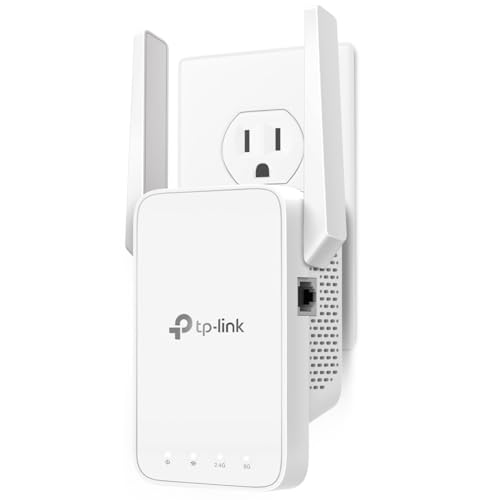
Ever find yourself stuck in a “Wi-Fi dead zone” at home, wrestling with slow internet speeds or endless buffering, especially when trying to use your faster 5GHz band devices? It’s a common modern-day dilemma, and it often means your router just isn’t reaching every corner of your house with a strong signal. That’s where a 5G wireless range extender comes into play.
While the “5G” in a Wi-Fi context refers to the 5 GHz frequency band (different from cellular 5G), it’s crucial for high-speed activities like 4K streaming, online gaming, and video calls. A good 5G Wi-Fi extender can dramatically improve your network coverage, ensuring those fast 5GHz signals reach every device, everywhere. No more pixelated movies or dropped video calls!
We’ve scoured the market to bring you a hand-picked list of the top 5 5G wireless range extender options designed to eliminate those frustrating dead spots and give your home network the boost it deserves. Let’s dive in!
What is a 5G Wireless Range Extender (and Why Do You Need One)?
Before we get to the reviews, let’s clarify what we mean by a “5G wireless range extender.” In the world of Wi-Fi, “5G” refers to the 5 GHz frequency band, which offers faster speeds and less interference than the older 2.4 GHz band. However, the 5 GHz signal typically has a shorter range and is more easily blocked by walls and other obstacles.
A Wi-Fi range extender, also known as a booster or repeater, picks up your existing Wi-Fi signal from your router and rebroadcasts it, essentially extending its reach. When it’s a “5G” extender, it specifically focuses on amplifying both your 2.4 GHz and your faster 5 GHz signals, ensuring you get robust connectivity even in previously hard-to-reach areas of your home. If you’re experiencing lag, buffering, or dropped connections, especially on devices that rely on the faster 5 GHz band, an extender is often the perfect, cost-effective solution.
Factors to Consider When Choosing Your 5G Wireless Range Extender
Finding the perfect Wi-Fi booster means considering a few key things:
- Coverage Area: How large is your home, and how much area do you need to cover? Look for square footage estimates.
- Speed (AC vs. AX): “AC” refers to Wi-Fi 5 (802.11ac) and “AX” refers to Wi-Fi 6 (802.11ax). Wi-Fi 6 offers faster speeds and better performance, especially in device-dense environments.
- Dual-Band Support: All our picks are dual-band, meaning they support both 2.4 GHz (better range, slower speed) and 5 GHz (shorter range, faster speed).
- Ethernet Ports: A Gigabit Ethernet port is a big plus for connecting wired devices like gaming consoles, smart TVs, or PCs for maximum speed and stability.
- Mesh Compatibility: Some extenders can integrate into a mesh network, providing more seamless whole-home Wi-Fi.
- Ease of Setup: Look for simple app-based or browser-based setup processes.
- Universal Compatibility: Ensure it works with your existing router. (Most modern extenders do!)
Product Reviews
TP-Link AC1200 WiFi Extender, 2026 Wirecutter Best WiFi…

This TP-Link AC1200 extender is a popular and highly-rated choice, even being recognized by Wirecutter, for good reason. It offers a fantastic balance of performance and affordability, making it an excellent option for most homes looking to banish dead zones and boost their existing Wi-Fi signal. Its dual-band capabilities ensure that both your slower 2.4 GHz devices and faster 5 GHz gadgets get a reliable connection across up to 1600 sq. ft.
- Key Features:
- Dual-Band WiFi Extender with 1.2 Gbps Total Bandwidth (867 Mbps on 5 GHz, 300 Mbps on 2.4 GHz)
- Maximized Coverage up to 1600 Sq. Ft for up to 32 devices
- TP-Link’s Cybersecurity Commitment (Secure-by-Design pledge)
- Fast Ethernet Port for wired connections
- EasyMesh-Compatible for seamless whole-home mesh connectivity
- Smart Adaptive Roaming for uninterrupted coverage
- Access Point (AP) Mode capability
- Easy Setup in minutes using the TP-Link Tether app
- Universal Compatibility with almost all WiFi-enabled devices and routers
- Pros:
- Affordable and high-value performance
- Excellent coverage for medium-sized homes
- EasyMesh compatibility allows for future network expansion
- Simple setup via the intuitive Tether app
- Includes a Fast Ethernet port for wired connections
- TP-Link’s commitment to cybersecurity is a strong plus
- Cons:
- Fast Ethernet port isn’t Gigabit, which might bottleneck very high-speed wired connections
- Like all extenders, it doesn’t increase your internet speed, only extends coverage
- User Impressions: Users frequently praise this extender for its straightforward installation and significant improvement in Wi-Fi coverage, especially in areas previously suffering from weak signals. Many appreciate the reliable dual-band performance and the helpful signal indicator for optimal placement.
TP-Link AC1900 WiFi Range Extender RE550 | Dual-Band…

If you need a bit more power and coverage than the AC1200, the TP-Link AC1900 RE550 steps up to the plate. This robust dual-band extender provides a total bandwidth of 1.9 Gbps, making it ideal for larger homes or those with more demanding network needs. Its three adjustable external antennas are designed to push Wi-Fi signals further, reaching up to 2100 sq. ft., and the addition of a Gigabit Ethernet port is a welcome upgrade for faster wired connections.
- Key Features:
- Dual-Band WiFi Extender with 1.9 Gbps Total Bandwidth (1300 Mbps on 5 GHz, 600 Mbps on 2.4 GHz)
- Maximized Coverage up to 2100 Sq. Ft for up to 32 devices
- TP-Link’s Cybersecurity Commitment (Secure-by-Design pledge)
- EasyMesh-Compatible for seamless whole-home mesh connectivity
- Gigabit Ethernet Port for high-speed wired devices
- Smart Adaptive Roaming for uninterrupted coverage
- Access Point (AP) Mode capability
- Easy Setup in minutes using the TP-Link Tether app
- Universal Compatibility with almost all WiFi-enabled devices and routers
- Pros:
- Enhanced coverage for larger homes or more devices
- Faster total bandwidth and higher 5 GHz speeds than AC1200
- Gigabit Ethernet port for uncompromised wired performance
- EasyMesh compatibility for a unified mesh network experience
- Simple and quick setup via the Tether app
- Cons:
- Slightly higher price point than entry-level extenders
- Still subject to the inherent limitations of extenders (doesn’t increase raw internet speed)
- User Impressions: Customers often highlight the RE550’s impressive range extension and the reliable high-speed connections it provides. The Gigabit Ethernet port is a frequently praised feature for its utility with gaming consoles and PCs, and the simple app-based setup is consistently a favorite.
WiFi Extender, WiFi Extenders Signal Booster for Home Up…

This Greab WiFi extender aims to be a comprehensive solution for eradicating Wi-Fi dead zones, boasting an impressive coverage claim of up to 8000 sq. ft. While such numbers can vary greatly depending on environment, it signifies a strong focus on range. It provides stable dual-band signals, making it suitable for homes with many connected devices needing both 2.4GHz for range and 5GHz for speed, all while offering versatile operating modes.
- Key Features:
- Claims coverage up to 8000 sq. ft. with advanced CPU and chips
- Dual-band technology: 300Mbps for 2.4GHz, 867Mbps for 5GHz
- Connects up to 30 Devices for HD video and online gaming
- Compatible with 99% of routers and gateways
- Fast Ethernet Port for stable wired connections
- Supports Repeater Mode (extend) and AP Mode (create hotspot)
- Easy plug & play installation with browser-based configuration
- Supports WEP, WPA/WPA2 wireless security protocols
- Vent Hole Design for better heat dissipation
- Pros:
- Very broad claimed coverage area, potentially good for very large spaces
- High compatibility with most existing routers
- Supports multiple modes (Repeater/AP) for versatility
- Straightforward plug-and-play installation
- Enhanced security protocols for a safe network
- Cons:
- The 8000 sq. ft. claim might be overly optimistic for real-world scenarios due to environmental factors
- Ethernet port speed is not specified but usually implies Fast Ethernet unless stated otherwise (potentially a bottleneck for gigabit connections)
- Brand is less recognized than TP-Link, which might impact long-term support perceptions.
- User Impressions: Users appreciate this extender’s ease of setup and the noticeable improvement in signal strength in areas where Wi-Fi was previously weak. Its ability to work with a wide variety of routers is a definite plus for many.
WiFi Extender Signal Booster for Home: Internet Repeater…

This compact Wi-Fi extender focuses on delivering high-speed signal boosting for hard-to-reach areas, promising to expand your network significantly, indoors and out. With speeds up to 300Mbps (likely referring to the 2.4GHz band, as 5Ghz isn’t explicitly detailed in the speed claim but implied by the “5G” in the title context), it’s designed to bring stable internet for activities like online gaming and 4K HD videos to up to 45+ devices across a vast area, including through walls and floors.
- Key Features:
- Expands existing network with speeds up to 300Mbps (for 2.4GHz)
- Claims coverage up to 8000+ square feet, both indoors and outside
- Delivers ultra-stable bandwidth for gaming, video conferences, and 4K HD streaming
- Connects 45+ devices simultaneously
- Easy setup via PC/smartphone/laptop
- Supports Repeater Mode and AP Mode via Ethernet Port
- Maximizes network security with WPA/WPA2 support
- Compact design (7 x 4 x 2 inches)
- Pros:
- Very large claimed coverage, suitable for extensive properties
- High device capacity (45+ devices)
- Simple and clear setup process
- Offers both Repeater and AP modes for flexibility
- Good security features (WPA/WPA2)
- Compact size is convenient
- Cons:
- Speed specification for 5GHz band is not clearly outlined, which could be misleading. The “300mbps” likely refers only to 2.4GHz.
- Similar to other non-major brands, the 8000+ sq. ft. claim should be taken with a grain of salt.
- Ethernet port speed is not specified (likely Fast Ethernet).
- User Impressions: Users appreciate the straightforward setup instructions and the noticeable extension of their Wi-Fi signal, especially for covering multiple floors or outdoor areas. The compact design is also a bonus for discreet placement.
TP-Link AX3000 WiFi 6 Range Extender | PCMag Editor’s…

For those looking for the absolute cutting edge in Wi-Fi extension, the TP-Link AX3000 WiFi 6 Range Extender (RE715X) is a powerhouse. Awarded PCMag Editor’s Choice, this extender brings the benefits of Wi-Fi 6 to your entire home, offering lightning-fast speeds up to 3 Gbps total bandwidth. It’s designed to handle a multitude of devices and demanding activities like 4K streaming and high-performance gaming, extending coverage up to 2400 sq. ft. and supporting up to 64 devices with advanced Beamforming technology. This 5G wireless range extender is a serious upgrade.
- Key Features:
- Dual-Band WiFi 6 Extender with 3 Gbps Total Bandwidth (2404 Mbps on 5 GHz, 574 Mbps on 2.4 GHz)
- Maximized Coverage up to 2400 Sq. Ft. for up to 64 devices with Beamforming technology
- TP-Link’s Cybersecurity Commitment (Secure-by-Design pledge)
- EasyMesh-Compatible for seamless whole-home mesh connectivity (not compatible with Deco mesh systems)
- Does Not Increase Speeds (actual speeds will be 50% or less from current speeds, but reliability improves)
- Gigabit Ethernet Port for wired connections
- Smart Adaptive Roaming for uninterrupted coverage
- Access Point (AP) Mode capability
- Easy Setup in minutes using the TP-Link Tether app
- Universal Compatibility, including new AX phones and laptops
- Pros:
- Next-gen Wi-Fi 6 technology for faster speeds and better efficiency
- Superior coverage and device capacity compared to Wi-Fi 5 extenders
- Gigabit Ethernet port for ultimate wired performance
- EasyMesh compatibility for a future-proof network
- Advanced Beamforming technology enhances signal strength
- Easy setup and management via the Tether app
- Cons:
- Higher price point, reflecting its advanced technology
- Not compatible with TP-Link’s Deco mesh systems (important distinction for existing Deco users)
- Requires a Wi-Fi 6 compatible router to fully leverage its capabilities
- User Impressions: Reviewers consistently praise the RE715X for its impressive speed and stable connections, especially when paired with a Wi-Fi 6 router. Users report a significant reduction in latency and buffering, making it a top choice for gamers and those with many smart home devices. The Gigabit Ethernet port is also a much-loved feature.
Conclusion
Choosing the right 5G wireless range extender can dramatically transform your home internet experience, turning those dreaded dead zones into areas of seamless, high-speed connectivity. Whether you’re dealing with a sprawling home, numerous connected devices, or simply want to ensure your fast 5 GHz Wi-Fi signal reaches every corner, there’s an extender on this list for you.
From the budget-friendly yet highly effective TP-Link AC1200 to the cutting-edge Wi-Fi 6 power of the TP-Link AX3000, each product offers unique benefits. Remember to consider your specific needs: how much area you need to cover, your existing router’s capabilities, and your budget. Pay close attention to features like dual-band support, Ethernet port speeds, and mesh compatibility to ensure you make the best choice.
Ultimately, the goal is a smooth, uninterrupted online experience for everyone in your household. By picking one of these top 5G Wi-Fi extenders, you’re well on your way to enjoying a truly connected home without the frustration of weak signals. Happy browsing!
FAQ
Q1: What does “5G” mean in “5G Wireless Range Extender”?
A: In this context, “5G” refers to the 5 GHz frequency band that modern Wi-Fi networks use. It’s different from the cellular “5G” mobile network technology. The 5 GHz Wi-Fi band offers faster speeds and less interference than the older 2.4 GHz band, but typically has a shorter range.
Q2: Will a 5G wireless range extender increase my internet speed?
A: No, a Wi-Fi range extender does not increase your internet service provider’s download or upload speed. Its primary purpose is to extend the coverage of your existing Wi-Fi signal, ensuring that more areas of your home receive a strong, reliable signal from your router, including the faster 5 GHz band. This can feel like an increase in speed because you’re getting a more consistent connection.
Q3: How do I set up a Wi-Fi range extender?
A: Most modern Wi-Fi extenders are very easy to set up. Many use a dedicated mobile app (like TP-Link’s Tether app) or a simple browser-based interface. Typically, you plug in the extender, connect to its temporary Wi-Fi network, and then follow on-screen instructions to select your home network and enter your password. Some even have a WPS (Wi-Fi Protected Setup) button for a quick, push-button connection with compatible routers.
Q4: Where should I place my 5G Wi-Fi extender for the best results?
A: The ideal placement is usually about halfway between your main router and the Wi-Fi dead zone you’re trying to eliminate. It needs to be close enough to your router to pick up a strong signal, but far enough to extend that signal effectively into the problematic area. Most extenders have smart signal indicators to help you find the optimal spot.
Q5: Can I use multiple extenders in my home?
A: While technically possible, using multiple traditional extenders can sometimes create more problems than it solves, such as network congestion and interference. For very large homes or complex layouts, a mesh Wi-Fi system or an extender with EasyMesh compatibility (like the TP-Link models reviewed) offers a more seamless and efficient solution for whole-home coverage.
Q6: What’s the difference between a Wi-Fi extender, repeater, and booster?
A: These terms are often used interchangeably to describe devices that extend the range of your Wi-Fi network. While there can be minor technical differences in how they operate, for most consumers, they all serve the same basic function: to expand Wi-Fi coverage.
Q7: Should I choose a Wi-Fi 5 (AC) or Wi-Fi 6 (AX) extender?
A: If your main router is Wi-Fi 6 compatible and you have Wi-Fi 6 devices (like newer smartphones or laptops), a Wi-Fi 6 (AX) extender like the TP-Link AX3000 will offer the best performance, speeds, and efficiency. If your router is older (Wi-Fi 5 or earlier) or most of your devices are Wi-Fi 5, an AC extender will still provide significant improvements at a lower cost.
Q8: What is EasyMesh compatibility?
A: EasyMesh is a standard that allows different Wi-Fi devices (like routers and extenders from compatible brands) to work together to create a unified mesh Wi-Fi network. This means you get a single Wi-Fi name throughout your home and devices automatically switch to the strongest signal without interruptions, similar to a dedicated mesh system. This is a great feature for seamless roaming.




Leave a Reply
You must be logged in to post a comment.